
Here is a question we get from clients pretty often: “What is the difference between page size and aspect ratio? Do either matter?”
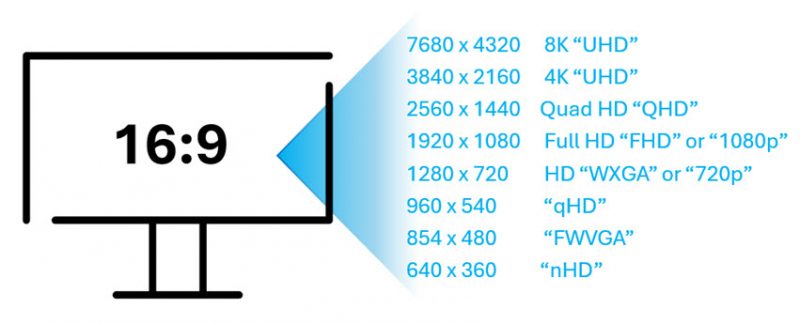
The answer is yes! They do matter, and each becomes even more important if multiple presentations are being combined into a single presentation.
- Aspect Ratio is the shape of the slides, and the aspect ratio needs to match the AV technology if the presentation is going to fill the AV screen properly. Nowadays, the standard aspect ratio is 16:9 – basically a rectangle.
- Page Size is the actual measurements used to create that aspect ratio in your presentation software. So yes, 13.333” x 7.5” is the same aspect ratio as 26” x 14.625”. However, and this is important, when the 26” wide slides are pasted into the 13.333” wide presentation, fonts and graphics may not scale down properly, nor maintain the same slide layout.
Obviously, the ideal scenario is for presentations to be created at the correct aspect ratio for where they are being presented (meaning the slides will fill the screen exactly) AND for all presentations to be created with the same page size. If both are done properly then presentations can be combined into a single file, and/or slides can seamlessly be added between presentations as needed.
With that in mind, below is a handy list of common presentation applications, such as PowerPoint and Adobe, and their default page sizes. In the case where an application doesn’t support inches, we simply exported the file to PowerPoint to pull the page size in inches. The great news is that all these apps use the standard 16:9 aspect ratio.
Default Page Size of Presentation Apps:
Microsoft PowerPoint Windows/Mac/Web: 1280 x 720px (~96ppi), 13.333 x 7.5in
*TIP: while the technical resolution of PowerPoint is 720p, the resolution is really based on the output (eg. what the computer projects). TLC Creative Services designs all presentations with images and content based on full HD, 1920×1080 if no end use resolution is specified.

Apple Keynote: 1920 x 1080px (~96ppi), 26.67 x 15in

Figma: 1920 x 1080px (~96ppi), 20 x 11.25in

Canva: 1920 x 1080px (~96ppi), 20 x 11.25in

Google Slides: 960 x 540px (~96ppi), 10 x 5.625in

Beautiful AI: 1920 x 1080px (~96ppi), 20 x 11.25in

Gemini (AI created presentation): 960 x 540px (~96ppi), 10 x 5.625in

Adobe Express: 1920 x 1080px (~96ppi), 20 x 11.25in
Now you know. 😊
-The TLC Creative Services presentation design team