Monthly Archives: April 2006

How many people are suppose to be at this meeting…

Okay, for most this will not apply. But I am in meetings at convention centers and resorts every week. It is always a bad day when someone miscalculated and to many people are squished into to small of meeting room. Here is an interesting online calculator that estimates how big a room should be reserved based on the seating type, and type of table used, and number of people attending. Check it out here.

-Troy @ TLC

By |2016-09-16T11:40:50-07:00April 10th, 2006|Personal, Resource/Misc|

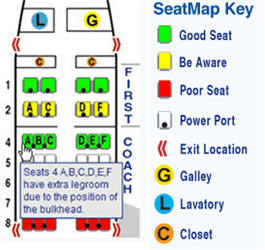
Is it a Good Seat? Find Out on SeatGuru.com

I travel to a different show virtually every week, so I am constantly on airplanes (this week L.A., next week New York for the NY Auto Show). Of course with a cross country flight I want to make sure I have a good seat, preferably with a power port.
Seat Guru .com
You may have noticed that some seats seem better than others – I have. After booking my flight, my first stop is SeatGuru.com. With your airline and flight info, look up the seating chart for that airplane, make sure you do not have a ‘yellow’ seat, check if it has a powerport and make sure you have the best seat in your category!

– Troy @ TLC

By |2016-09-16T11:40:02-07:00April 8th, 2006|Personal, Resource/Misc|

What is an .M4A?

.MP3 and .Wav are audio file formats that PowerPoint recognizes. Another very common format is .M4A (audi-only version of an .MP4), and you have heard of even if you do not think so.

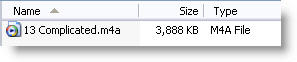
.M4A is the format of Apple iTunes music files. It is for the most part a higher quality file than an .mp3 and a smaller files size. Here is what an “M4A” looks like:
.M4A is an audio-only version of an .MP4

Unfortunately PowerPoint does not support the .M4A format, so if you download a song from iTunes it will need to be converted to another format (.mp3 or .wav).

-Troy @ TLC

By |2016-09-16T11:39:30-07:00April 6th, 2006|Tutorial|

What’s an “Ogg”?

.MP3 and .Wav are audio file formats. Another is .ogg, which is much common but with many .mp3 players supporting it you are likely to encounter one when developing a presentation at some point.

Vorbis is the group behind the .ogg format and it is for the most part a higher quality file than an .mp3. The Ogg Vorbis is a fully open, non-proprietary, patent-and-royalty-free, general-purpose compressed audio format for mid to high quality audio and music. Here is what an “ogg” looks like:

Unfortunately PowerPoint does not support the .ogg format, so if someone sends one to you for a presentation you will need to convert it to another format (.mp3 or .wav) in an audio editing application.

-Troy @ TLC

By |2016-09-16T11:38:38-07:00April 4th, 2006|Tutorial|

Making a Small .Wav

So, for maximum useability it great to embed multimedia into the presentation. PowerPoint allows the .wav audio format to embedded – great! But the .wav format makes the largest file size – bummer! The good news is, with a basic audio editing application you can dramatically reduce the size of your .wav files.

Here is my sample audio file; a huge 22MB!

Original .wav is 22MB!

I opened the file in Sound Forge Studio, went to Save As, choose .wav as the format and then clicked on the ‘Customize’ button to further modify the settings. As you can see I:
– Reduced the SAMPLE RATE to 22,050 (from 44,100)
– Reduced the BIT DEPTH to 8 (from 16)
– Changed the CHANNELS to mono (from stereo)
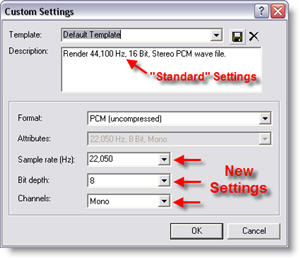
Custom Settings for Presentation .Wav files

Needless to say, this is a lower quality audio track than the original. But most presentations are viewed with computer speakers, have no stereo recording attributes and act as an enhancement to the presentation – no one will notice 🙂

Here is the same audio file saved with the above settings – a mere 2MB!

Using optimized settings it is now 2MB

For comparison, here is what the same file looks like saved as a lower quality .MP3 (64k, 16 bit, stereo), but higher quality than our optimized .wav the .MP3 is only 1MB:

As a lower quality .MP3 it is only 1MB

You will need to find the balance between the benefits of larger – embedded audio and smaller linked audio to know which is better for your presentation. Best of luck!

-Troy @ TLC

By |2016-09-16T11:37:08-07:00April 2nd, 2006|Tutorial|
Go to Top