
Software/Add-Ins

Making Movies SMALL and making them WORK

So the best way to assure (as much as possible) that linked movies play is to create them using a standard Windows Codec and use the most native Windows format (.wmv). The easiest way to accomplish this, reduce the file size and maintain quality is to have the PFCMedia add-in handle inserting and converting the movie.

One of the surprises is how well it optimizes the video files. Take a look at these before and after file sizes. The .mpeg1 files were supplied by client and the **PFC.wmv files created with PFCMedia, almost a 50% file size reduction and no noticeable quality loss during playback!
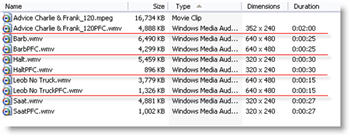
PFCMedia shrunk my movies by 50%!

Troy @ TLC

By |2016-09-16T11:42:56-07:00April 14th, 2006|Software/Add-Ins|

NXPowerlite 2.2 Released

Today, NXPowerlite has released version 2.2 of their excellent PowerPoint presentation compression software. Some of the new offerings include:
– Speed and interface enhancements
– If attaching a presentation to an email message with Outlook it can be compressed without opening anything additional
– Now supported in 6 languages (Spanish and Japanese added)

Read all the info here.

– Troy @ TLC

By |2016-09-16T11:32:57-07:00March 20th, 2006|Software/Add-Ins|

What the Font?

Matching a font from an image is just no fun. But it needs to be done for many projects and here is an online tool that might be of help.

Go to What the Font? and follow the online directions. I used SnagIt to quickly create a few .jpgs of written text in various fonts, which I uploaded to What the Font? and ran them through the system.

While many, such as the one above, did not come up with a match – many did. While not the perfect solution to a troublesome chore, it is worth a shot!

Troy @ TLC

By |2016-09-16T11:31:36-07:00March 15th, 2006|Software/Add-Ins|

New Crystal Xcelsius Tutorial (by Glenna Shaw)

Glenn Shaw, a Microsoft PowerPoint MVP, has been up to her magic again. This time she has created a whimsical tutorial that explains and shows how Crystal Xcelius can be used to create truly dynamic charts/graphs for PowerPoint. Check out the “Visually Analyze Resource Impact” tutorial here.

Xcelius is a very powerful tool and can also be integrated into websites. For a really fun and whimsical example, check out Glenna’s Cinderella Project (as in Disney Princess).

Troy @ TLC

By |2016-09-16T11:30:34-07:00March 11th, 2006|Software/Add-Ins, Tutorial|

Add Captions/Subtitles To Movies – Easily!

With Today’s realease of Camtasia 3.1 a number of great tools and output options have been added. One of the very cool features is an intuitive and powerful captioning feature. PowerPoint MVP Glenna Shaw has created a set of examples that show the results. The movie file is from one of my clients (SWOT Expert). I supplied the movie and text file of the narration. Glenna created English Captions and with the help of PowerPoint MVPs Ute Simon and Enric Manas translation, she created German and Spanish subtitles.

The process is so streamlined in Camtasia that Glenna told me all three versions were created in less than 1.5 hours!

Check out the samples here:
English Captions
Spanish Subtitles
German Subtitles

Troy @ TLC

By |2016-09-16T11:17:21-07:00January 18th, 2006|Software/Add-Ins|

NXPowerlite 2.1

NXPowerLite has released version 2.1 of their PowerPoint optimizing program. I have spoken with the guys at NXPowerLite for the past few years and earlier this year I tested version 2.0. On that version I noted that almost my entire wishlist had been incorporated! Most notable is support for .png with transparency images. Now v2.1 overcomes CMYK problems and a few other fixes.

I highly recomend it as a solution for oversized presentation files. Get it here.

Troy @ TLC

By |2016-09-16T11:15:18-07:00January 8th, 2006|Software/Add-Ins|

From Good to WOW with OfficeFX

I just finished adding a new project overview to the TLC Creative website. It includes a movie of a walk-in looping presentation I developed for an event, which highlighted the event sponsors. Online is a write-up and movie that shows how it was transformed from good to WOW!

Basically, after developing a custom PowerPoint presentation, I used OfficeFX‘s ability to render realtime 3D moving backgrounds and transitions to add that extra something special! To see the write-up and movie click here.

Troy @ TLC

By |2016-09-16T11:15:01-07:00January 7th, 2006|Portfolio, Software/Add-Ins|

Camtasia 3.1

Just received word that Camtasia Studio 3.1 will be released on January 18! I have been beta testing this new version for the past month and it has some fantastic options and results (many can be seen on the movie samples found throughout the TLC Creative website).

Here are a few of the options that I think make this a standout upgrade:
1. Ability to output Flash 8/.flv movie format
2. Ability to create left column containing video of speaker with interactive table of contents and PowerPoint presentation unhindered on right side
3. Incredible captioning tools

Click here to see a side-by-side presentation (speaker is Dave Ulrich, used with permission)

Troy @ TLC

— And TechSmith sent out wonderful Christmas cards with a fantastic poster of “2006 Reasons To Be Thankful.” Amazingly I made the list (lower right brown section)! Get it here.

By |2016-09-16T11:14:20-07:00January 5th, 2006|Software/Add-Ins|
Go to Top