Monthly Archives: February 2006

Rename Master Slides

Things can get confusing working with a presentation that has multiple masters. Especially if the Master Slides are very similiar (eg. One with a primary bullet, one without). The solution is to name the Master Slides to something meaningful. I have added a tutorial on renaming PowerPoint Master Slides here.

Troy @ TLC

By |2016-09-16T11:26:55-07:00February 25th, 2006|Tutorial|

PPT + .png transparent images = ugly print

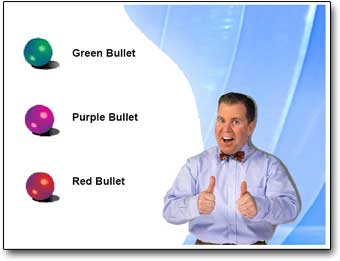
If you have ever printed a presentation that contained a .png image with transparency the results were certainly less than desirable. Here is the printed slide with a number of transparent .png images – not so good…
Tech Table
Note the jagged edges around the 3D spheres, Missing portion of background, solid/jagged dropshadow around the person.

○ The solution is a few easy steps and provides ‘picture’ perfect printouts.
○ Go to SAVE AS and export all slides to .JPG images. It is a good idea to save all of these to a new folder (Note: For higher quality images I use the PPTXtreme Import/Export add-in for this process. I export slides at 1600×1200 pixels for better quality).
○ Create a new presentation
○ Import all of the .jpg images/slides using the Photo Album feature, PPTXtreme’s Import/Export add-in, or Shyam’s Image Importer add-in.
○ Print

Here is a slide that was exported as a .jpg, then placed on a slide and printed

Tech Table

Side Note: If you delete all slides from real presentation, do a SAVE AS, then insert all of the .jpg slide images the master slide, header/footer and properties information will be preserved.

Troy @ TLC

By |2016-09-16T11:26:34-07:00February 23rd, 2006|Tutorial|

It’s official – “Office 2007”

What has been referred to as “Office 12,” the next version of Office has been officially named. And the new name is: “Office 2007“.

ZDNet has a good article providing the details on what bundles will be, some of the new options and of course the official name. Check it all out here.

Troy @ TLC

By |2016-09-16T11:25:28-07:00February 18th, 2006|PowerPoint|

Online Olympic event schedule

If you want to know when an Olympic event is happening, check here.

Click on a day to see the details of that day. Then click on the event for a complete detail of it, or click on the ‘scheduled’ link to see who’s competing. A good use of the internet.

PS: Happy Valentines Day!

Troy @ TLC

By |2016-09-16T11:24:01-07:00February 14th, 2006|Personal|
Go to Top