Monthly Archives: July 2006

3D Spheres from AutoShapes

I create a lot of graphic elements for presentations and since the inception of PPT XP I have been able to do many directly in PowerPoint with some creative use of AutoShapes and transparency settings. PPT MVP Shawn Toh has posted a sample presentation with some really great 3D spheres at Indezine.

Here is one of the spheres created entirely with autoshapes:
One of the 3D Spheres in the Presentation
Here are the autshapes used to create the above 3D spere:
Autoshapes used to create the 3D Sphere

Here is the description and download link on Indezine, click here.

Troy @ TLC

By |2016-11-17T14:05:00-08:00July 8th, 2006|Resource/Misc, Tutorial|

PPT Keyboard Shortcuts

There are lots of great ways to work faster in PowerPoint (and all Office applications for that matter). Most everyone knows the basic keyboard shortcuts; copy, paste, duplicate slide, etc. But how about moving through action panes (F6) or move one word (Ctrl + Right Arrow).

Here is a reference this page on Microsoft for the complete listing of keyboard shortcuts, click here.

Troy @ TLC

By |2016-11-17T14:04:41-08:00July 6th, 2006|Resource/Misc, Tutorial|

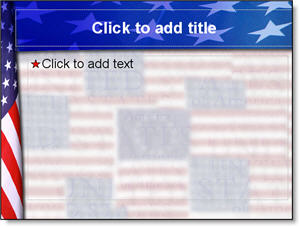
4th of July template

Happy 4th of July!! The states are awash with patriotism and we are off for our annual trip to the state fair where we end the day listening to the Navy Band and watching a huge fireworks show.

There are lots of great template sites out there, and it is not something I have focused on (providing a library of downloadable templates). But I designed this Americana themed template to share with all. Download here (580k).

Troy @ TLC

By |2016-11-17T14:04:24-08:00July 4th, 2006|Templates/Assets|

Where’s the job application…

My work environment when I interact with people face-to-face is generally in ballrooms and convention centers across the country. I hear and get the “I’d like to do what you do” question fairly common. I recently responded to someone, who was very serious about a change of direction in their design work, which I will share with all:

“Dear XXXX,

Over the past few years I have seen a surprising need for qualified people to work showsite presentations. But for straight design work I believe there is a very competitive market. For me the two have become inseparable. I do lots of creative design work for live events, both in pre-production from my office and while on showsite.

For showsite presentations the graphics person needs to be very knowledgeable about design principles – PowerPoint – computer/hardware issues – A/V equipment (projectors, scalers, switchers, etc.) and of course people skills. I would recommend:

○ Spending lots of time on the PowerPoint newsgroup just reading the questions and answers. Knowing the solutions to the various common problems is mandatory. https://support.microsoft.com/newsgroups/default.aspx?NewsGroup=microsoft.public.powerpoint&SLCID=US&ICP=GSS3&sd=GN&id=fh;en-us;newsgroups
○ Get familiar with the PPT FAQ that Steve Rindsberg maintains(you will see plenty of newsgroup replies are just links to pages on this site) https://www.rdpslides.com/pptfaq
○ Beyond skills and knowledge it is a matter of getting your name in with production companies. The industry is relatively small, so working with one means referrals to others.

Lest you think it all exciting, the hours are anywhere between midnight-and-midnight. Airplanes – hotels – banquet food – and lots of travel are a daily part of things too…”

Troy @ TLC

By |2016-11-17T14:03:47-08:00July 2nd, 2006|Personal|
Go to Top