Monthly Archives: October 2007

Download or View PDF?

This is a browser add-in that I recently was told about and I like it. The frustration is when you click on a link to a PDF it is up to your browser settings whether it opens the PDF or downloads it (and Adobe’s default setting is to open it).

If I know I want to download the PDF there are three choices:
1. Right-click the link and choose ‘save file as’
2. Click the link, have it open, then click the save icon
3. Install the “PDF Download” add-in

With ‘PDF Download’ installed, every time a PDF link is clicked a dialog asks if it should be opened or saved – brilliant!

– Troy @ TLC
By |2016-11-17T16:30:04-08:00October 8th, 2007|Software/Add-Ins|

Rotate Pictures in Windows Explorer

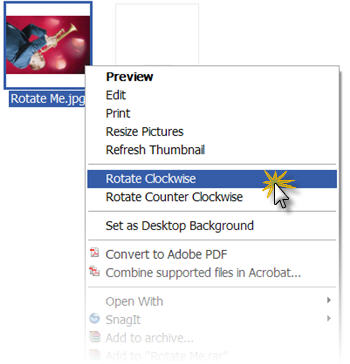
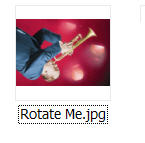
If you have bunch of images to insert into a presentation, but some are rotated (ie. taken in vertical layout with a digital camera) they can easily be rotated BEFORE inserting into the presentation.

1. Open Windows Explorer
2. Set View to thumbnail or filmstrip
3. Select image(s) to rotate
4. Right-click and choose the rotation (clockwise or counter clockwise) needed

– Troy @ TLC

By |2016-11-17T16:29:23-08:00October 5th, 2007|Tutorial|

Image Resizer

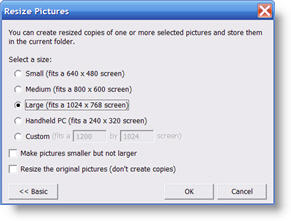
This free application from Microsoft has some great uses. Basically it does exactly what the name implies, it adds the ability to resize images. But this one is accessible from a right-click on any image.

It is a limited use application, in that it offers only four preset image sizes. If you click the ‘Advanced’ button it also offers the ability to set a custom size. Another nice feature is you can select multiple image files and convert all to a new size as a batch process.

You can get more info and download from here.

– Troy @ TLC

By |2016-11-17T16:28:35-08:00October 3rd, 2007|Software/Add-Ins|

Favorite Shortcuts and Apps

I have mentioned before, but one of the wonderful aspects of my projects is always working with different people and interacting with a diversity of talented people. Recently a group of us started talking about favorite applications, add-ins and shortcuts. Everyone seemed to have something that none of the others (all highly experienced graphic designers) had not heard of before.

Taking my cue from that group discussion I have put together a series on some of my favorite Windows short-cuts and applications. Some may be useful, others not so much. And if you have one that goes with one of posts – send me an email – so this series may grow and help us all.

– Troy @ TLC

By |2016-11-17T16:28:05-08:00October 1st, 2007|Personal, Resource/Misc|
Go to Top