Monthly Archives: December 2007

PPT 2007 and Imported Photos

Well I just finished a series on lots of the great things that can be done with text in PowerPoint 2007. Next up is a series of posts on what can be accomplished with imported photos!

And as a sneak peak, here is the image everything is going to happen to:

– Troy @ TLC

By |2016-11-17T14:49:48-08:00December 10th, 2007|Tutorial|

3D Perspective to Text

The Z-Axis is a common item in 3D applications. It is one of the axes in a three dimensional system that gives things a 3D perspective. Now PowerPoint has some z-axis features, which Microsoft refers to as ‘3D Rotation.’ All three of these text boxes were created from the same one. The top one shows the visual effect applied to the text (bevel and reflection). The bottom two apply 3D Rotation for some GREAT Visual effects!

And all of these remain editable text.

– Troy @ TLC

By |2016-11-17T14:50:07-08:00December 5th, 2007|Tutorial|

Kerning!!

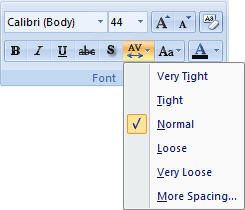
If you have used desktop publishing software you are familiar with the concept of kerning. With (variable width) fonts, different pairs of characters are spaced differently. Kerning is the adjustment of spacing between letters to obtain a more pleasing appearance. The great news is that PowerPoint now has some basic kerning capabilities. Microsoft calls it ‘Character Spacing’ and here is the quick menu.
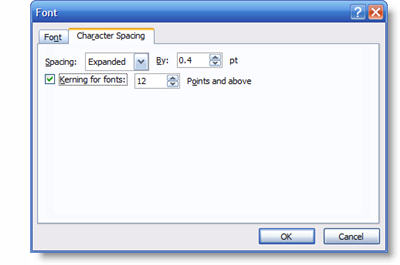
We can also get more fine control over the Character Spacing by opening the Character Spacing dialog window.
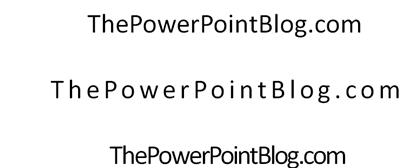
Here are a few examples of kerning in use. The top text is the standard, or normal, kerning. The second one is expanded and the third is condensed. All is still editable text and can be applied to select text within a single text box.
– Troy @ TLC


By |2016-11-17T14:50:27-08:00December 3rd, 2007|Tutorial|
Go to Top