Monthly Archives: December 2008

Making a Visual (Scoreboard)

Working on a recent project I thought this was a good example of the progression of a slide. The original speaker notes called for a slide that basically said they are ahead of the competition. Here is the slide they came up with:

During a slide review we moved to making this in to a visual that the speaker could use for an analogy. A football scoreboard was the solution. Here is what they came up with (‘they’ being the clients internal staff).

When I received the presentation to go through and clean up all slides here is the visual developed:
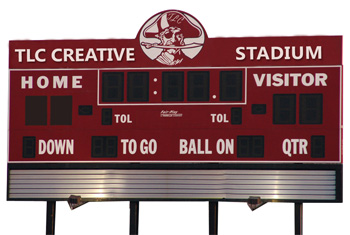
– All of numbers on the scoreboard were PPT WordArt (using PPT 2003) overlaid, so client can easily change to match analogy.
– Top of scoreboard was branded with client name (here I branded with TLC Creative)
– Hard to see here, but even the mascott is branded with the company initials on his hat (with TLC here)

The final slide ended up being animated with the numbers on the scoreboard (quater, score, time remaining until new product launch, etc.) changing as a quick history/timeline was presented!

– Troy @ TLC
By |2016-11-17T12:16:06-08:00December 11th, 2008|Portfolio|

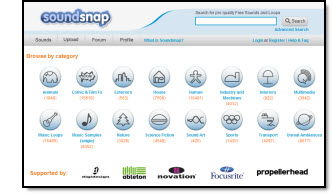
Snapsound.com for FREE sound fx

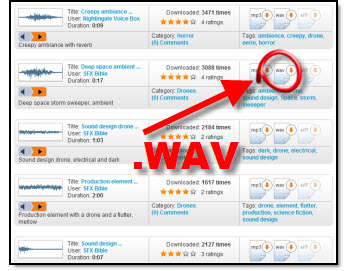
If you need some sound effect (fx) for a presentation, a great, FREE, online resource is soundsnap.com. You do need to register and then 5 downloads per month are free.

There are a lot of sound fx here and the collection seems to be continuously growing. All are free to download and royalty free for use. One of the best features is you can download almost any audio file in either .mp3 or .wav format (I prefer .wav as it can be embedded into PowerPoint).

Visit the site by clicking here.

– Troy @ TLC

By |2016-11-17T12:16:23-08:00December 9th, 2008|Software/Add-Ins|

Macro Settings In PPT ’07 vs PPT ’03

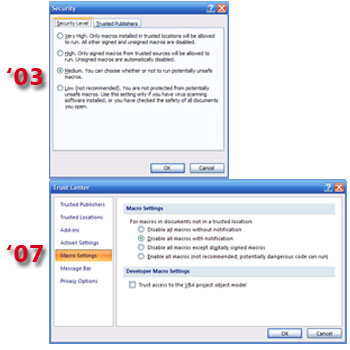
The previous post showed how to find the security level settings in PPT 2007. Not to make things difficult, but all of the descriptions and names have changed.

In addition to the name changes, some are virtually the same and some don’t quite match up.

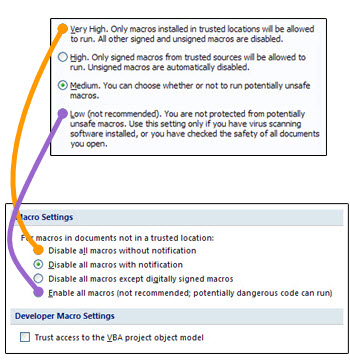
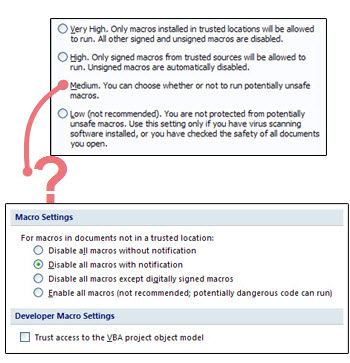
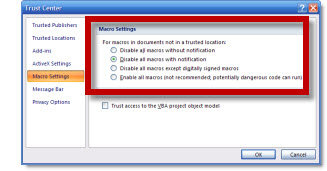
The HIGH and LOW settings from PPT 2003 have PPT 2007 settings that match up and accomplish the same thing:

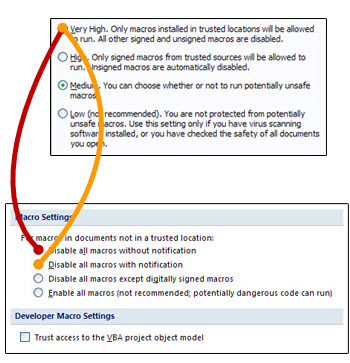
The VERY HIGH PPT 2003 setting has been split into 2 settings in PPT 2007:

Finally the MEDIUM setting from PPT 2003 really has no equivalent in PPT 2007… And because here on ThePowerPointBlog and in PPT training programs I recommend changing the Macro Security to Medium, what do I recomend now?

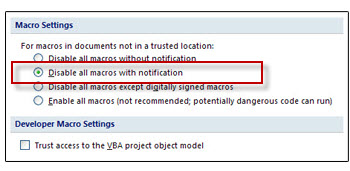
I have setup all of the TLC computers and recommend (though it is not based on the same knowledge, understanding and confidence of Medium in PPT 2003) to use the 2nd setting – Disable All Macros With Notification.

– Troy @ TLC

By |2016-11-17T12:16:42-08:00December 7th, 2008|Tutorial|

Where are ‘Macro Security Settings’ in PPT 2007?

When installing add-ins in PowerPoint, the macro security settings need to be lowered from the default setting of HIGH to MEDIUM or LOW. But how do you do this in PowerPoint 2007?

First the names have changed and second the where you find them is a bit difficult if you are not familiar with the new Ribbon layout.

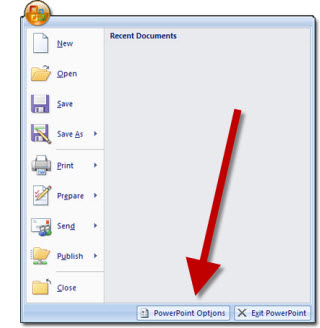
1. Click the circle Office button in the upper left corner.
2. Click on POWERPOINT OPTIONS.

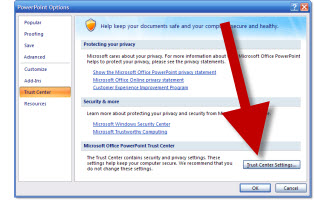
3. Go to TRUST CENTER in the left column.
4. Click on TRUST CENTER SETTINGS.

5. Adjust to needed setting, click OK and exit PowerPoint to save setting.

– Troy @ TLC

By |2016-11-17T12:17:07-08:00December 5th, 2008|Tutorial|

Oakley’s Podium

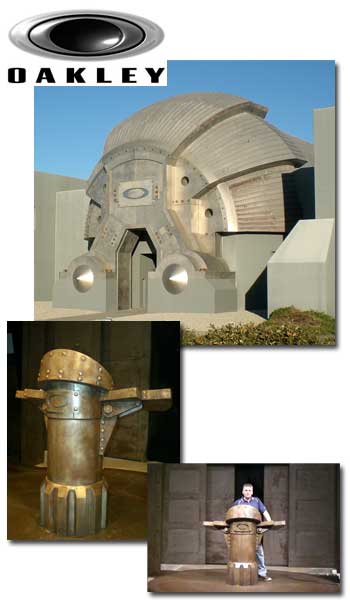
Oakley sunglasses is a great company to work with! They have a style unique to them and it has to be experienced to be understood – but it works! I recently spent a few days at their ‘interplanetary headquaters’ which is an impressive building (think of the movie Blade Runner). Their 600 seat theater is also imposing – just check out the podium!

(and that’s me in the lower photo)

– Troy @ TLC

By |2016-11-17T12:17:32-08:00December 3rd, 2008|Personal|

Pixar Work

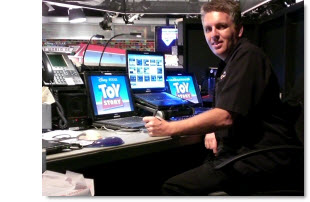
Here’s a quick photo of me and my computers for a recent meeting for Disney-Pixar (Toy Story is on the computer and a display for Cars is in the background). It’s always fun to be around the novelty of Pixar – and the meetings are a ton of fun (especially watching pre-release sections of movies :D).

– Troy @ TLC

By |2016-11-17T12:17:56-08:00December 1st, 2008|Personal, Portfolio|
Go to Top