The PowerPoint® Blog

I work with PowerPoint on a daily basis and I am very honored to be a Microsoft PowerPoint MVP. We have a talented team of presentation designers at TLC Creative Services and ThePowerPointBlog is our area to highlight PowerPoint tips, tricks, examples and tutorials. Enjoy! Troy Chollar

Office 2010 SP1 Released

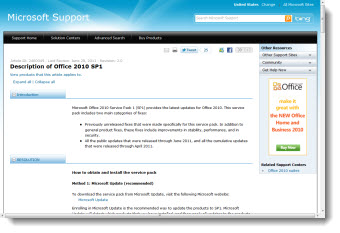
This week Microsoft released Service Pack 1 (SP1) for Office 2010.

Service Packs are major updates, same as when software companies adjust a version number (eg. version 10, becomes 10.1). This Microsoft webpage has all the details. Here is the list of PowerPoint related fixes (paraphrased by me):

– Presenter View now defaults to showing the slide show on the secondary monitor.
– Animation preview fixes.– Mouse pointer does not disappear with extended desktop (multiple monitors) and slide show being viewed on second monitor
– “PowerPoint Viewer is now included with the Package for CD option.” Note: This is only a text edit in the Package for CD dialog, no new feature/fix/or improvement (thanks Echo and Steve for letting me know about this one).
– If an Excel object has VBA) code, fixes error messages when you try to edit it (which is mainly seen with the error message “Microsoft PowerPoint can’t start the application required to open this object. An error occurred and this feature is no longer functioning properly. Would you like to repair this feature now?”).
– Coding issue fixed which gives wrong Runs.Count value is returned when a PowerPoint 2003 format presentation runs a PowerPoint 2010 object model command.
– Fixes issue with audio or video media not playing in presentation that was created on Mac and played on Windows.
– Fixes issue where .emf image displays incorrectly when you save a slide as an Enhanced Windows Medafile (EMF) file which is then printed.
– Fixes issue in which a pen cannot persist through the Slide Show mode when you use the pen as a pointer.
– Fixes issue where default language change is not used on new slides or new presentations.
– Fixes issue where a linked image is not saved when you insert the linked image in a presentation, and then save the presentation an Open Document Format (ODF) file.
– Note: updates in Excel and office wide fixes are not listed here, but also work with PowerPoint.

SP1 is part of Microsoft Updates (if turned on), or a direct download link is on this Microsoft webpage.

– Troy @ TLC

By |2016-08-16T10:11:46-07:00July 1st, 2011|PowerPoint, Resource/Misc|

See You In July!

It’s summer time – and I would like to say this is what my days look like:

But the reality is a little of the above with some precious time with my kids during summer break and a lot of the below. Just lots of lists with design projects, new clients (yeah!), getting the new TLC Creative Services office building up and running, and more.

Get ready for July! There is a full month of blog posts almost all there and a list of blog post ideas I have been accumulating for awhile that will keep things going!

– Troy @ TLC

By |2016-08-16T10:12:19-07:00June 15th, 2011|Personal|

The Ultimate Presentation – Hot Wheels Secret Race

This is a real building (Customs House, Sydney, Australia) with a lot of incredible projection on it that was a live event (eg. not something created with great video editing). Maybe it is a hint to future meetings with no screen, but an entire building, theater or even the moon as the “screen”!
[youtube src=”https://www.youtube.com/embed/wiSNuk3OvK8?rel=0″]

– Troy @ TLC

By |2016-08-16T10:12:37-07:00June 10th, 2011|Resource/Misc|

Memorial Day 2011

Have a wonderful Memorial Day! My family and I are enjoying the weekend in Washington DC – a great place to remember the reason for Memorial Day.

– Troy @ TLC

By |2016-08-16T10:13:01-07:00May 30th, 2011|Personal|

Vertical Lines and Masked AreasTemplate

This is a template developed for a recent project. It is a very visual template with rich, dark color scheme and great contrast of the vertical lines background to the horizontal lines of content. The same vertical line background is used on all master layouts. The primary design element used is adding masks of varying opacity and color over sections of the vertical line background to allow the content to stand out and be legible.

– Troy @ TLC

By |2016-08-16T10:13:20-07:00May 28th, 2011|Portfolio, Templates/Assets|

Raining Medication Template

Another presentation template in the series of talks on Medication in today’s environment was this visually fun template. The template goals were lots of content area, clean lines and visually conveying the concept of growth of the overwhelming number of medication options. The final template featured all of the formatting master layouts and formatting options preset with trees to represent continuous growth and raining medication on the title slide.

– Troy @ TLC

By |2016-08-16T10:13:47-07:00May 25th, 2011|Portfolio, Templates/Assets|

Is that a Liver? PowerPoint Template

As this client proves, medical slides do not need to be the standard boring blue background white and yellow text. The topic is Hepatitis liver function and the challenges in treatment. And we were free to explore visual cues in developing the PowerPoint template. The final approved template used a rock climber facing a challenge, a cliff that is actually the human liver, a hiking ridge made of viruses, a blood red title and a vast open mountainscape for the background.
Here is the theme graphic, title slide and general content master layouts.

Here is the theme graphic, title slide and general content master layouts.

-Troy @ TLC

By |2016-08-16T10:14:53-07:00May 18th, 2011|Portfolio, Templates/Assets|

Toy Story Template – and Lots of Master Layouts!

For Toy Story, I had lots of great character art to work with! The request for a white background and lots of character options made good use of the multiple master layouts in PowerPoint! I invested a full day in storyboarding the character combinations and slide combinations. The final template has 22 unique Master Layouts. Many of the layouts use the same placeholders and formatting, but different character art. The goal was to make it very easy to design a slide and reassign the Master Layout at any time to different characters without changing any of the slide content formatting.

– Troy @ TLC

By |2016-08-16T10:15:17-07:00May 16th, 2011|Portfolio, Templates/Assets|
Go to Top