The PowerPoint® Blog

I work with PowerPoint on a daily basis and I am very honored to be a Microsoft PowerPoint MVP. We have a talented team of presentation designers at TLC Creative Services and ThePowerPointBlog is our area to highlight PowerPoint tips, tricks, examples and tutorials. Enjoy! Troy Chollar

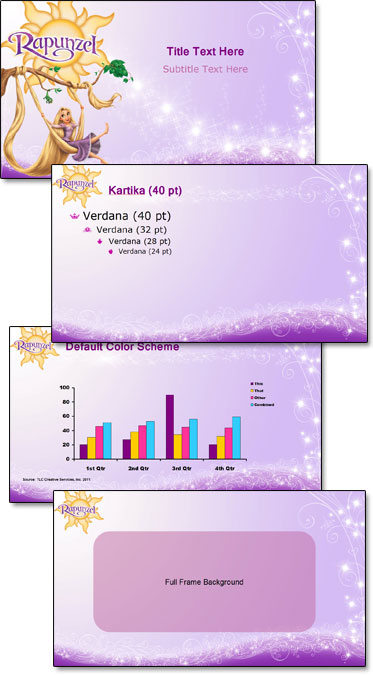
Rapunzel PowerPoint Template

At the other end of the entertainment spectrum from the previous WWE post is Disney’s Rapunzel. Using great animation art as the focal point for each master slide layout and adding plenty of princess glitter, here is the Rapunzel marketing template developed.

– Troy @ TLC

By |2016-08-16T10:15:38-07:00May 13th, 2011|Portfolio, Templates/Assets|

TLC PPT w/ Video Slide Used By Microsoft

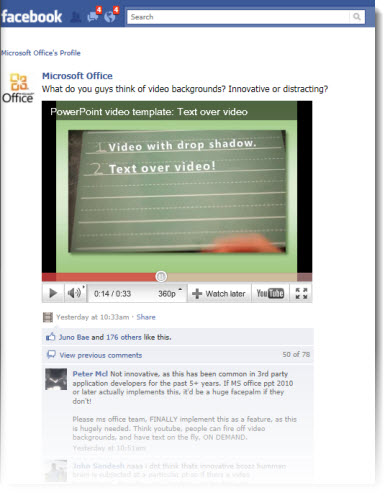
Seeing your work displayed to the world is always pretty great. In this case, it has also brought in hundreds of comments on a recent Facebook post by Microsoft.

From a recent project for Microsoft, here is one of the video “templates” I created to demonstrate the video capabilities of PPT 2010.

The Facebook post is here.

In reading the comments, I was surprised at the number of people requesting content-over-video be added as a feature. Maybe some additional advertising and market awareness campaigns are needed. Content-over-video is available in PPT 2010, works great, and the video being commented on was developed in PPT 2010.

– Troy @ TLC

By |2016-08-16T10:16:31-07:00May 9th, 2011|Personal, Portfolio|

Tech Deck for Green Lantern Presentations

Here is my tech area as I developed the marketing presentation for The Green Lantern on a recent show.

The computers are (left to right), production computer, primary show computer, backup show computer. Note my very nifty 7″ USB powered monitor near the center (right above the box of Excedrin…).

– Troy @ TLC

By |2016-08-16T10:17:18-07:00April 27th, 2011|Personal|

Animated Logo Loop

On a recent project, we were provided with a number of corporate logos and asked to create an animated presentation that would be able to seamlessly loop.

The logos were all supplied as Illustrator .eps files. So the first task was converting to .emf or .png format.

Then each logo was separated into many small image files to allow flexibility in animating. All animation is developed in PowerPoint 2010. Here is the result:

Troy @ TLC

By |2025-01-02T13:16:40-08:00April 25th, 2011|Portfolio|

IE9 Has Arrived

Last week, in a batch of 30+ updates nad security patches, Internet Explorer 9 was officially rolled out as an optional update.

I have running IE9 as my default browser for a week and everything is great. The minimal toolbar and tabs along the top provide larger web content area (which is great) and the integrated URL and search bar is easy to use. All of the MS Web Apps, which I use daily, work flawlessly.

Two features I really like are the ability to rearrange the tabs and the ability to “tear off” any tab and turn it into its own browser window!

– Troy @ TLC

By |2016-08-16T10:18:17-07:00April 20th, 2011|Software/Add-Ins|

Backstage – Caesars Palace

Just a few quick shots of my office for the week at Caesar’s Palace in Las Vegas for a corporate show.

Note the center screen flown out in front of audience with flown front projector.

– Troy @ TLC

By |2016-08-16T10:18:41-07:00April 20th, 2011|Personal|

PPT 2003 Corruptions Errors After April 2011 Updates?

I know the developers at Microsoft have a big job. I know they create updates to help all users. I also know they do a lot of testing before anything is released (almost too much testing as it slows down their release cycle by months and years…). I know the focus is on the newer PowerPoint format, but I still have PPT 2003 (and PPT 2010) installed on all computers here.

A small small security update on Tuesday, April 12, 2011 has brought countless users to a stop as it looks at okay content as a potential threat – offers no options to override its action – and only allows presentations to be opened in a useless state – arghhh!

Here is the fix:

1. Close all applications.

2. Open the control panel (START >> CONTROL PANEL)

3. Select UNINSTALL A PROGRAM

4. Select VIEW INSTALLED UPDATES

5. Scroll down list and select SECURITY UPDATE FOR POWERPOINT 2003 (KB2464588) POWERPOINT

6. Select UNINSTALL

7. Follow any prompts to confirm. When done, open any PPT 2003 presentation as normal with no need to restart computer.

– Troy @ TLC

By |2016-08-16T10:19:20-07:00April 18th, 2011|Tutorial|
Go to Top