I work with PowerPoint on a daily basis and I am very honored to be a Microsoft PowerPoint MVP. We have a talented team of presentation designers at TLC Creative Services and ThePowerPointBlog is our area to highlight PowerPoint tips, tricks, examples and tutorials. Enjoy! Troy Chollar
Make Your Desktop Presentation Worthy
This is one of the nifty features of Windows (XP) that no one seems to know about. Before a presentation, I use the “show/hide desktop icons” feature to hide every single item on my desktop. That way if I need to exit a presentation for any reason, the only thing projected is a my desktop wallpaper. After the presentation, I restore all in just one click.
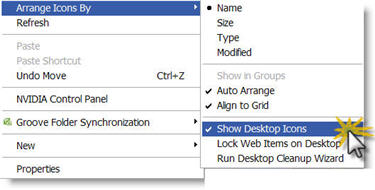
1. Right-click desktop
2. Go to Arrange Icons By
3. Select Show Desktop Icons
4. Let the screen refresh (may take a few moments) and you are left with a completely clutter free view!
– Troy @ TLC