The PowerPoint® Blog

I work with PowerPoint on a daily basis and I am very honored to be a Microsoft PowerPoint MVP. We have a talented team of presentation designers at TLC Creative Services and ThePowerPointBlog is our area to highlight PowerPoint tips, tricks, examples and tutorials. Enjoy! Troy Chollar

Unlimited Clip Art for $30/yr.

If you use clip art in presentations, or any design application, then this may be a good deal for you. The venerable ClipArt collection from IMSI (who remembers purchasing the 30+ CDROM sets….) is entirely online – and searchable! Of note this is just the vector clipart, not any of the photos, fonts, sounds, etc. and is at a clip-art only site iCLIPART.com.

Special pricing drops the year subscription from $99 to $29. Although I do not make use of much clip art these days, I do have need of it (in vector format) when developing custom graphics or template backgrounds.

Thought some people could make use of this.

– Troy @ TLC
By |2016-11-17T13:37:39-08:00January 25th, 2008|Resource/Misc, Software/Add-Ins|

Webinar on Creating Graphics in PPT2007

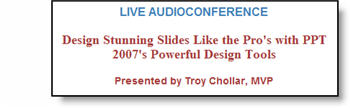
Most of December was posts highlighting many of the great graphics tools in PowerPoint 2007. I have been contracted by Eli Journals to do a live 1 hour webinar covering all the new PPT2007 graphic tools and lots of tips-and-tricks. You can check out the details at this page on the AudioSolutionz website here.

– Troy @ TLC

By |2016-11-17T13:38:33-08:00January 23rd, 2008|Resource/Misc, Tutorial|

NXPowerLite – version 3.5 now available!

I have been a long time user of NXPowerlite, a great presentation optimization application. Just recieved notice that they have released version 3.5!

What is great about this version is that it is compatible with Microsofts new Open XML formats (ie. Office 2007’s .pptx, .docx, etc.). It has better Outlook integration, is a free upgrade for v3 users and is even available in Chinese! Read about all the features and download a full function trial from their website here.

– Troy @ TLC

By |2016-11-17T13:39:32-08:00January 21st, 2008|Software/Add-Ins|

Change images WITHOUT losing attributes

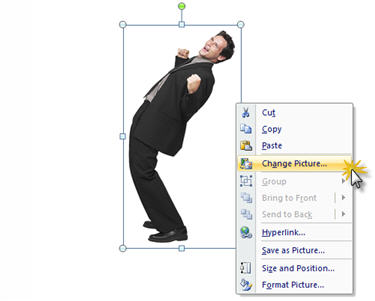
One of the great features of PPT 2007 is the ‘Change Picture’ tool. From a programming perspective this was not a monumentus task to implement because all inserted images are now automatically an autoshape with a fill effect (in this case filled with an image).

In previous versions if we went through the steps of creating an autoshape, doing the custom fill and being willing to live with some design limitations we could update the fill effects with a new image. The advantage was any animations would remain intact. The disadvantage was a lot of extra clicks.

With PPT 2007 changing out an image is just a matter of Right-Clicking the image and selecting the CHANGE PICTURE command!

Virtually any adjustments made to the original image are maintained. Animations, rotation, dropshadows, bevels, and the new image is automatically scaled to fit in the existing bounding box (which may or may not be exactly what you need).

– Troy @ TLC

By |2016-11-17T13:39:51-08:00January 18th, 2008|Tutorial|

Grouped Images in PPT 2007

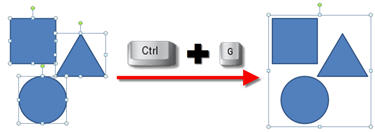
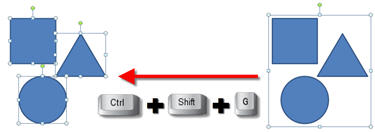
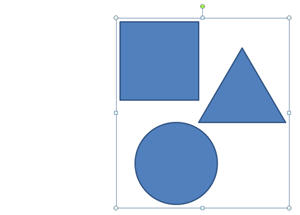
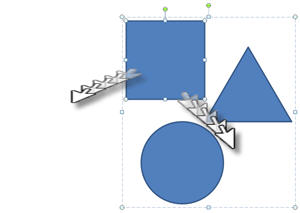
One of the great productivity updates in PPT 2007 is grouped images. Here is a set of three elements grouped:

The new feautre is that now any of the elements within the group can be selected AND adjusted. It can be moved (the group bounding box adjusts so it is not constrained to current group dimensions) or, rotatated or virtually any other adjustment – all while maintaining the group attributes.

– Troy @ TLC

By |2016-11-17T13:41:26-08:00January 14th, 2008|Tutorial|

Image Fun in PPT 2007

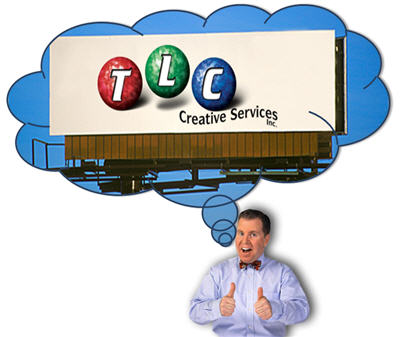
So with PPT 2007 we can quickly create fun, and editable, graphics. Using a stock photo and our sample image I quickly created this slide in about 45 seconds.

– I first set the image to appear in an autoshape (thought bubble).
– Then I used the autoshape adjustments to move the thought bubble trail to our characters head.
– I applied a stroke to the autoshape, colored it (dark blue) and made it thicker.
– Last I applied a drop shadow to the thought bubble and the character.

– Troy @ TLC

By |2016-11-17T13:42:29-08:00January 11th, 2008|Tutorial|

3D Perspective to Images and Shapes

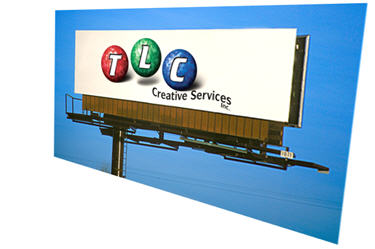
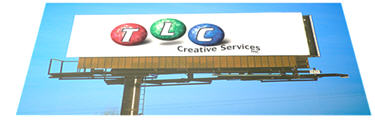
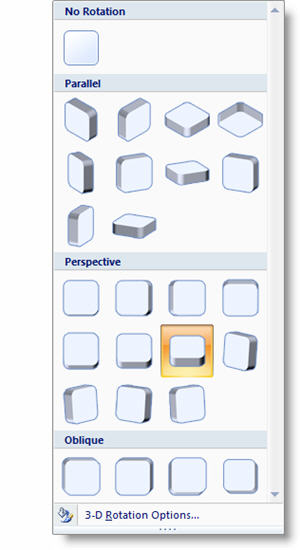
The ability to add perspective to images, and maintain editability/adjustability adds some great design tools. Here is my sample image with two 3D perspective styles applied.


Both of these styles were applied in a matter of seconds from the preset options.

– Troy @ TLC

By |2016-11-17T13:44:08-08:00January 9th, 2008|Tutorial|

Gates and Keynote ???

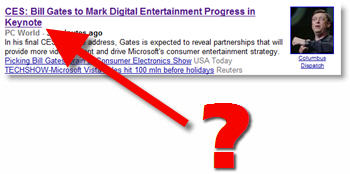
Yesterday I was looking at the news headlines and this one immediately jumped out!

Does it mean that Mr. Gates is using Apple’s presentation application Keynote for his CES speech… Of course the answer is no – but this is a journalist faux pas as “keynote” refers to Mr. Gates keynote speech, not the software used.

Hmmm, yet another good marketing move from Apple.

– Troy @ TLC

By |2016-11-17T13:45:35-08:00January 7th, 2008|Resource/Misc|

Holiday Blues…

First I want to wish everyone a Happy New Year and I hope 2008 is a great success for everyone!

The holidays were fantastic, but January 2nd everyone was back in their offices and we have had an avalanche of emails and calls this week! I have gone from relaxing to stress – and I still need to get the holiday decorations put away…

I will be back with more posts beginning Monday. Have a great weekend!

– Troy @ TLC

By |2016-11-17T13:46:00-08:00January 4th, 2008|Personal|
Go to Top