I work with PowerPoint on a daily basis and I am very honored to be a Microsoft PowerPoint MVP. We have a talented team of presentation designers at TLC Creative Services and ThePowerPointBlog is our area to highlight PowerPoint tips, tricks, examples and tutorials. Enjoy! Troy Chollar
Put PPT 2003 buttons and menus back in PPT 2007
Okay, the time has finally arrived. I am doing a major project in PowerPoint 2007! It is not that I have a problem with PPT 2007, I just have not had a client request. So up until now I have actually used PPT 2007 more when it was in Beta that after its release. Well, like many I am finding it somewhat tedious to learn where everything is in the new interface. I am also working under some tight timelines, so I do not have the luxury of learning at a leisurely pace. So for me a short term solution has been to add back some of the familiar PPT 2003 tool buttons.
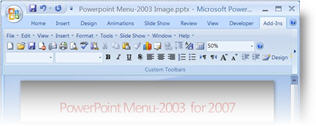
This is a limited interface – it does not give you all of your customized layout from PPT 2003 (I wish!), but it does give a familiar look and feel to things. This is a free add-in that can be downloaded from here.
– Troy @ TLC