The PowerPoint® Blog

I work with PowerPoint on a daily basis and I am very honored to be a Microsoft PowerPoint MVP. We have a talented team of presentation designers at TLC Creative Services and ThePowerPointBlog is our area to highlight PowerPoint tips, tricks, examples and tutorials. Enjoy! Troy Chollar

PPT and Vista’s Active Thumbnails

I often run PowerPoint with an extended desktop setup with PowerPoint in the design or slide sorter view on the local monitor and presentation/slideshow on the external monitor. One of the downsides of this setup is that if I cannot see the external monitor/projector I do have an indicator of what slide I am actually on.

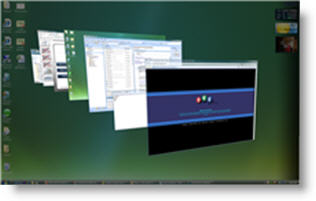
Windows Vista has some neat features, and some frustrations. Everyone has seen how Vista provides live thumbnails of all open applications and windows. Here is one example:
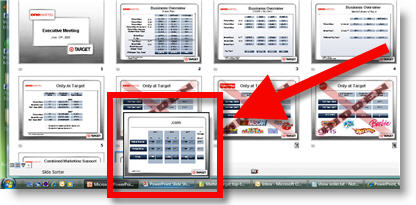
I can also use these active thumbnails to show me exactly what slide is active on an external monitor! By rolling over the ‘Slide Show’ tab it pops up a live thumbnail of the current slide. What’s even more hip is that the thumbnail will also show the animations in real time.
– Troy @ TLC


By |2016-11-17T16:08:05-08:00June 20th, 2007|Resource/Misc, Software/Add-Ins|

PPT Overlays To Graphics (4)

The final element was to create a placeholder for the financial information. I added another custom fill autoshape, this time a rectangle. After sized it was ‘sent to back’ and the appropriate text was added.

If you would like to download this slide, click here.

– Troy @ TLC

By |2016-11-17T16:07:33-08:00June 18th, 2007|Portfolio, Tutorial|

PPT Overlays To Graphics (3)

Because the globe is an animated .gif, not a Flash or movie file we are able to overlay elements (Flash and all movie formats always play on top of all PowerPoint content). The green semi-transparent circle overlay is the first layer. The next layer was each division logo – in this case I have added the TLC Creative logo.

The Problem here is that the logo is a bit flat and the black text is lost. Again, the solution was using a PPT autoshape. This time I created a glow, which was simply a white circle with a custom fill from center. Here is one done in blue (so it can be seen on this white background).

The result is a nice highlight spot that not only makes the logo text legible, but adds a 3D element to the overall globe.

– Troy @ TLC

By |2016-11-17T16:06:35-08:00June 16th, 2007|Tutorial|

Google and PowerPoint

This week Google made an integrated PowerPoint viewer option to its online tools. Basically if you receive a PowerPoint presentation in a gmail account, there are a few options for the attachment; view as HTML, view as Slideshow, and download. Of course the key new option is VIEW AS SLIDESHOW.



Clicking View as Slideshow opens a new window and the presentation is displayed in a Flash based application. It does not handle everything perfect (I tested with an animation heavy presentation) and it is only a viewer. So there are no editing capabilities – yet. In reading others news feeds I noted that Google said edit & create slideshow tools would come by this summer…

– Troy @ TLC

By |2016-11-17T16:06:10-08:00June 14th, 2007|Software/Add-Ins|

PPT Overlays To Graphics (2)

Because the globe is a circle, the solution to making it tie in with the template color scheme was to use a semi-transparent autoshape. I added a circle, sized it to the globe, then gave it a subtle 2-color fill.

This altered the “blue” globe to a “green” globe – without affecting the animated .gif

– Troy @ TLC

By |2016-11-17T16:05:20-08:00June 10th, 2007|Tutorial|

PPT Overlays To Graphics (1)

This was a nice effect I worked on for a recent presentation. The goal was to use an animated globe to visually bring in a “global” element while discussing a corporations global sales.

The problem was the blue earth did not tie in with the template color scheme.

– Troy @ TLC

By |2016-11-17T16:04:59-08:00June 8th, 2007|Tutorial|

PPT 2003 now available in 2007!

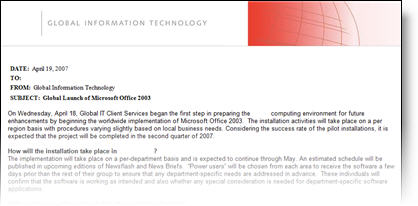
The below memo is true – date and all. Recently working onsite at a major corporation this memo was part of the weekly company updates sent to all employees.

– Note the date: April 19, 2007 (Office 2007 launched just weeks prior and Office 2003 is now almost 4 years old)

– Note the announcement: “…for future enhancements by beginning the worldwide implementation of Microsoft Office 2003.”

– Hmmm, the Microsoft sales team may have some work to do!

– Troy @ TLC

By |2016-11-17T16:04:18-08:00June 6th, 2007|Personal|

Mosaic Images

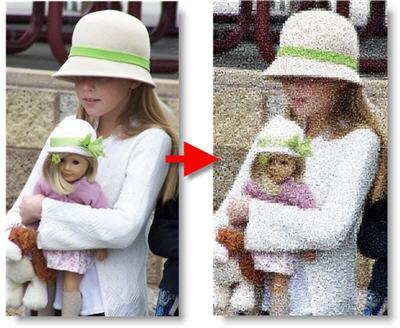
This is a nifty online (and free) application. I recently used it for an awards show image where the first photo of the recipient was a mosaic and then the ‘real’ photo faded in to reveal who won the award. I did this sample of my daughter for the blog.

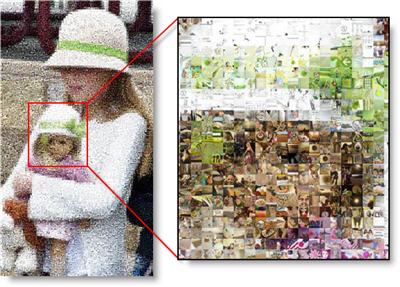
Here is a close-up that shows how the original image is converted to 1,000s of images that recreate the photo as a mosaic.

Give it a try at the “Image Mosaic Generator” here.

– Troy @ TLC

By |2016-11-17T16:03:57-08:00June 4th, 2007|Software/Add-Ins|

New Book – “Why Most PPT Presentations Suck”

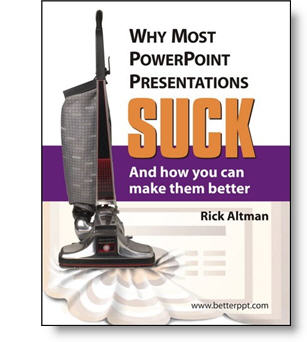
I received an announcement about a new PowerPoint book recently that I felt was newsworthy. I have known the author, Rick Altman, and believe this will not only be informative but very fun read (much as the title implies).

The problem exists, not because PowerPoint is hard,” Altman says, “but because it is easy. Most people learn PowerPoint in one day and then rarely seek further training. They know enough to get into trouble but not enough to get out of it, or avoid it in the first place.”

More info can be found at the books website, betterppt.com

– Troy @ TLC

By |2016-11-17T16:03:31-08:00June 2nd, 2007|PowerPoint, Resource/Misc|
Go to Top