The PowerPoint® Blog

I work with PowerPoint on a daily basis and I am very honored to be a Microsoft PowerPoint MVP. We have a talented team of presentation designers at TLC Creative Services and ThePowerPointBlog is our area to highlight PowerPoint tips, tricks, examples and tutorials. Enjoy! Troy Chollar

Instant Latte!!!

Life just got a bit better! While I am not a coffee connoisseur, I enjoy good flavor and something nice and hot while working backstage. Of course being backstage does not afford many opportunities to find a good coffee drink. But now a hot latte is always in my bag! Enter Wolfgang Pucks’ self heating can.

Pull the lid off the bottom – push in the tab to release the heating chemical reaction – wait 5 minutes – open the top and enjoy a hot Mocha or Carmel Latte!

WolfGang Puck Instant Hot Latte!
And if you’re really curious, here’s a review with photos of the can in action.

Troy @ TLC
By |2016-09-16T11:22:33-07:00February 9th, 2006|PowerPoint|

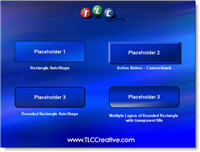
Placeholders for photos, diagrams, etc.

Plain text floating under a photo. A diagram that uses lots of bland color boxes. A solid color callout on a chart. All are things that generally make a slide boring and look standard/’off the shelf.’

To create a polished look I create virtually all of these placeholder elements in PhotoShop (with bevels, glows, highlights, drop shadows, etc.) and import into the presentation. But aesthetic placeholders can be created in PowerPoint with a bit of creativity with custom fills, bold lines and layered shapes.

Download a quick 1 slide sample here.

Download this 1 slide demo
Troy @ TLC

By |2016-09-16T11:22:11-07:00February 7th, 2006|Portfolio|

Movies and PowerPoint

https://www.tlccreative.co…ials/movies.htm

Frustration is getting things working perfect on your computer and then discovering they do not work on another computer. This is a very common tech support call I get when it comes to movies playing in PowerPoint.

Knowing some of the behind the scenes workings of PowerPoint and multimedia. I added a page that covers the big points and offers a few solutions that I have had good results with. To see it click here.

By |2016-05-12T10:02:59-07:00February 4th, 2006|Tutorial|

Movies from PowerPoint

I have just added a project write-up and movie that was ‘authored’ in PowerPoint. It is a good example of how PowerPoint is moving beyond PowerPoint and evolving into much more than slides for a presentation. Check it out here.

Troy @ TLC

By |2016-09-16T11:21:50-07:00February 3rd, 2006|PowerPoint|

Work Can Have Its Perks

We all have some perks from our profession. For me one recently occurred. I was asked to clean up the presentations for a corporate event and optimize the 40+ movie files so they would actually play when needed. All the work went great, but the producer called and requested I be there one evening to pick up some additional files – a bit of an inconvenience, but I agreed. When I arrived I was treated to a very cool, very candid Lance Armstrong speaking to a small group – A VERY COOL PERK!
Lance Armstrong - up close and personal

Troy @ TLC

By |2016-09-16T11:20:41-07:00February 1st, 2006|Personal, PowerPoint|

Jensen Harris on Office 12 User Interface (Ribbon)

I have been fortunate to have behind-the-scenes interaction with Microsoft’s PowerPoint development team. And I am admitting that the new “Ribbon” toolbar has some incredible ideas, innovation and research. But I also have a few reservations, so I am anxious to see what the final version ends up with customization capabilities (the developers at MS are revising it nearly daily).

If you are curious about the new ribbon and want some behind-the-scenes info and sneak peaks, visit Microsoft’s Jensen Harris’ Blog. I have been checking it for the past several weeks and some of the items I personally had concerns about have been covered (and resolved!). Check it out here.

Troy @ TLC

By |2016-09-16T11:19:36-07:00January 28th, 2006|PowerPoint|

Get World Wide Stereotypes from the WWW for Your Next Presentation…?

For your presentation you want to show how the world views a country, city or anything. Makes sense that the WORLD Wide Web could provide a world consensus on how something is viewed – right… While I am not going to recommend this for your next presentation, it does prove interesting (and I am sure a bit skewed).

Here is the resulting ‘Prejudice Map‘ that is subtitled “According to Google, people in the world are known for…” that Google Blogoscoped created.
Here is an example google search that was used to create the ‘German’ stereotype.

Troy @ TLC

By |2016-09-16T11:19:04-07:00January 27th, 2006|PowerPoint, Resource/Misc|

Resize Images Instantly!

Placing oversized images into a presentation only makes the presentation file oversized. I could suggest everyone go through my process; open each image in PhotoShop, crop, resize, optimize color, save as a .jpg or .png (as appropriate). But that is a lot of effort, and not the fastest process for a general use presentation.

Or, thanks to my brother-in-law who introduced me to Microsoft PowerToys, you could use Image Resizer. Once installed, simply right-click the image file in Windows Explorer, choose Resize Pictures and from the simple dialog choose a size and you are done! This free Microsfot application is somewhat limited in what it can accomplish, but it makes the process nearly instantaneous – produces good quality images – and works with .jpg and transparent .png images. Check out the details here.

Troy @ TLC

By |2016-09-16T11:18:34-07:00January 25th, 2006|Tutorial|

Disaster at the Server Level

Today has proven to have its challenges… Yesterday my web hosting server crashed. After many hours dealing with tech support it became obvious that the only item I would not be able to get back online was this blog.

So today I have started from scratch – reinstalling the blog software, building a new database, and uploading/re-creating as many of the posts as possble. I am sure to be missing a few posts, but the extended effort has the blog up and running again. I guess the only upside is that I did upgrade a few features and fix a couple of bugs from my first round of installs. Sometime technology makes for a big headache!

Troy @ TLC

By |2016-09-16T11:18:04-07:00January 24th, 2006|Personal|
Go to Top