Resource/Misc

PPT 2010 – PPT Web App – and SkyDrive = Perfect Partners for Interactive Online Tutorials

Fellow PPT MVPs Glenna Shaw and Luc Sanders have an online tutorial posted on the Microsoft MVP Blog that has great information. See it here.

While the PPT Web App is still limited compared to the full application, it is the best online option available at this point from any of the offerings (and it keeps your PPT file as a PPT file). If you have not tried the PPT Web App, this tutorial walks through the process of setting up the (free) account needed and offers tips on using it.

– Troy @ TLC

By |2016-08-16T09:35:45-07:00January 30th, 2012|Resource/Misc|

Opening “Stinger” Video

Design requests are always diverse and some things can still be developed more dynamically in video editing vs. PPT. TLC Creative Services did slide makeovers for all the presentations at this meeting, but I spent some time in the video edit suite to develop this quick animation to kick off one of the meeting segments.
[youtube src=”https://www.youtube.com/embed/buUOoE7jucc?rel=0″]

– Troy @ TLC

By |2016-08-16T09:42:53-07:00December 6th, 2011|Portfolio, Resource/Misc|

Showsite Setup in 30 Seconds

This is a fun video I created that shows a mid-size show being loaded in (setup) I was the graphics/PowerPoint designer and operator on (thanks to Paul Chrisope of Video Resources for sharing the photos).
[youtube src=”https://www.youtube.com/embed/5Y7mAk4x5ZE?rel=0″]
Check out the next post were I show how the video was created with PPT.
– Troy @ TLC

By |2016-08-16T09:43:17-07:00November 8th, 2011|Resource/Misc|

Desert Code Camp 2011

If you can head to Arizona this week, this Saturday, November 5 is the Desert Code Camp event. This is the first year it is offering an MS Office specific track – thanks for several Microsoft MVPs, including my friend Kathy Jacobs (OneNote MVP and former PPT MVP). The event is in Chandler, Arizona.

Get the details here.

– Troy @ TLC

By |2016-08-16T09:45:44-07:00November 2nd, 2011|Resource/Misc|

Review: PowerPoint To Go Free Templates

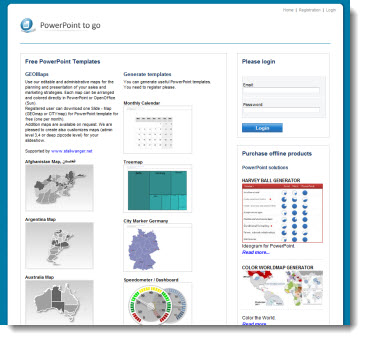
PowerPoint To Go (PPT-to-go.de) is a company based in Germany and offers a collection of PowerPoint templates that are free. The main categories are maps and nice looking 3D shapes in colorful layouts.

Unfortunately, we were not too impressed with the site. To access the free templates you must go through a registration process – for 1 template per month. While registering, the site timed out twice with a fatal error on the server being reported. It took four log in attempts before successfully accessing the downloads page. So the online experience was far from smooth.

The template downloaded is a .ppt (PPT 2003) and on our systems it opened with a corrupt file warning.

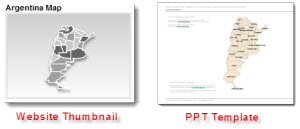
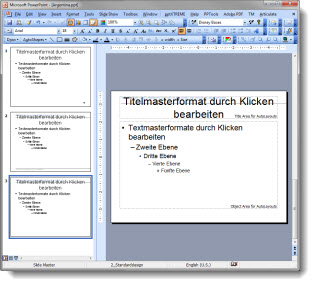
The thumbnail image on the download page was very different (and visually better) than the actual slide:

I had expected to see a full PowerPoint template with all of the master slide formatting preset. There is minimal template formatting in place and it is actually more jumbled than the MS default (and uses the German language dictionary).

Many of the thumbnails look great and I would recommend using just the content (map, 3D pyramid, etc.) by importing into your template and not using the PowerPoint to Go file as a template.

– Troy @ TLC

By |2016-08-16T09:53:03-07:00September 30th, 2011|Personal, Resource/Misc, Templates/Assets|

Review of FreeVectors.net

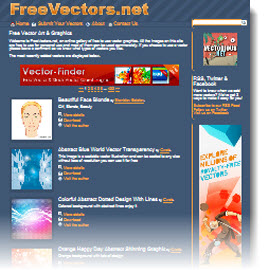
Free Vectors .net is an online resource to find a large variety of professional and free vector graphics (click here to open).

Navigating the site is not easy as the images are not organized into categories, but there is a good search bar at the very top that helps find the image type needed.

Once an image is found, click the download button. The Free Vectors.net website is an aggregator of images from lots of other small sites, so clicking the download button sends you to another web page. Each webpage has different download processes, but all images are assured to be free (of cost and use rights).

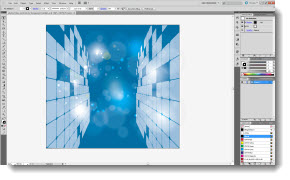
Because PowerPoint does not do well with .eps images, after downloading the image, it is best to open in Illustrator. Then use the “Save for web and devices” to create a PNG. image or “Export” as a .emf for a scalable vector image (Saving files from Adobe Illustrator will be next set of posts).

– Troy @ TLC

By |2016-08-16T09:57:21-07:00August 17th, 2011|Personal, Resource/Misc|

“FPO” – What Is It?

It may be the print design background or work with ad agencies, but I use “FPO” in presentation proofs all the time.

FPO = For Position Only
“FPO” is used for temporary or unapproved images. The images are usually low-resolution comp images from the image resource (ie. istockphoto, Dreamstime, etc.). Its purpose is to show the proposed layout and receive client approval on the image before purchasing. When approved, the FPOs are replaced with the high-res images.

– Troy @ TLC

By |2016-08-16T10:00:19-07:00August 5th, 2011|Resource/Misc|

Classic TV Commercials for Your Presentation – Free!

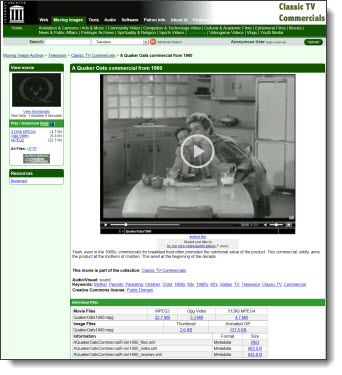
Integrating videos into a presentation is now a reality with the upgrades to computers and the better multimedia handling of PPT 2010. Using a nostalgic (ie. old) television commercial is a fun and unique video element. The Internet Archive has a collection of over 300 classic TV commercials and public service announcements to download for free.

Click here to search for a commercial.

– Troy @ TLC

By |2016-08-16T10:00:44-07:00August 3rd, 2011|Resource/Misc|

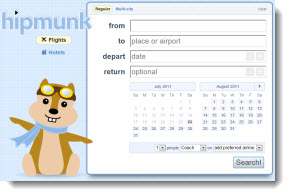
Best Travel Site for Flights – Hipmonk.com

Completely off topic, but I have been using the hipmonk website for the past few months and it is GREAT for all of the travel planning I do.

Clean and streamlined interface, instant results, and results that are functional! If you are planning a trip with airline flights, check this out – and no I am not a spokesperson for it, just really happy to find things that make my life easier.

Troy @ TLC

By |2016-08-16T10:01:51-07:00July 24th, 2011|Personal, Resource/Misc|
Go to Top