Resource/Misc

Where’s His Arm? Why is Stock Photo Doing That…

Presentations are visual communication and that means lots of images. I maintain a number of subscriptions to online stock photo sites. The one thing I see from all is the selective/artistic cropping that often makes it difficult to use an image.

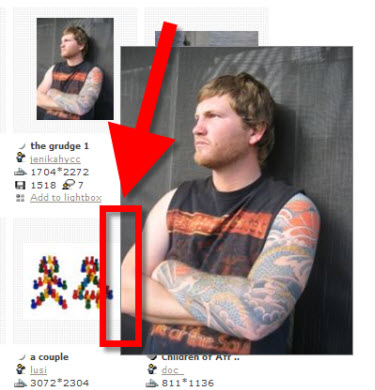
As example, here is a great image, but where did the rest of his arm go…

– Troy @ TLC

By |2016-09-16T09:50:24-07:00August 20th, 2009|Resource/Misc|

PowerPoint + OfficeFX Presenter = Fox TV

I develop PowerPoint presentations for large events that do not look like ‘standard PowerPoint’ with lots of animation, custom images, etc. I have also used the OfficeFX software for lots of events and awards shows because it takes PowerPoint to a new visual level with full motion backgrounds and custom transitions.

Recently a The Lawrence Company used the new Presenter 4 to produce a multi-screen HD show for a Fox TV event that was anything but ‘PowerPoint’ – although the whole thing was PowerPoint.

Here is link to video showing some of the great custom transitions and animations.

– Troy @ TLC

By |2016-09-16T09:57:03-07:00August 16th, 2009|PowerPoint, Resource/Misc|

Vector Images From ShutterStock.com

Just a quick note. For a specific project I have been searching many of the popular royalty free image sites for some needed vector (eg. Illustrator) art that will be used to develop a custom background. I have been really impressed with the image variety, selection and quality from ShutterStock.com.

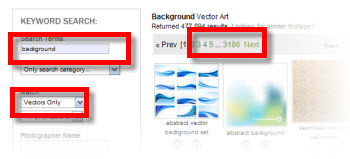
Guess in the past I have searched for photo images (eg. raster) and this was first time specifically looking at vector art. Here I searched ‘Background’ with ‘Vector Only’ and came up with 3,185 pages of 25 images each – good stuff!

– Troy @ TLC

By |2016-09-16T10:00:23-07:00August 8th, 2009|Resource/Misc|

“PowerPoint” is a Verb, Defined as “Any Presentation With ‘Slides'”

The sub-head for this article caught my attention:

The “No PowerPoint” part is what caught my attention. What if I choose to use the Open Office presentation software, Flash, or Mac’s Keynote – would I be allowed to present?

When a product takes over its category it becomes the default name for the category (eg. Scotch Tape, any type of clear tape, or Hot Wheels, any small toy car). And in our case “PowerPoint” has become a default that means any presentation that uses slides/visuals.

Just a thought of the day post.

– Troy @ TLC

By |2016-09-16T10:01:44-07:00August 2nd, 2009|Resource/Misc|

Guest Author 7-31-09!

As things evolve I am very excited to have a guest author doing the final post of July! Julie Terberg of Terberg Design and a Microsoft PowerPoint MVP will be sharing a great post this Friday – don’t miss it!

By |2016-09-16T10:03:16-07:00July 26th, 2009|Resource/Misc|

Mac Office 2008 SP2

At the beginning of this week Microsoft released Service Pack 2 (SP2) for Mac Office 2008. If you use a Mac for your presentations, this is a definite update to download and install.

It promises speed, stability, compatibility improvements, and a new tool called Document Connection for accessing SharePoint collaboration. Adds custom path animations (and play PPT Windows motion paths), default theme support and it is a 300MB download… which is download using AutoUpdate.

– Troy @ TLC

By |2016-09-16T10:03:36-07:00July 25th, 2009|Resource/Misc, Software/Add-Ins|

Sneak Peak at PPT 2010!

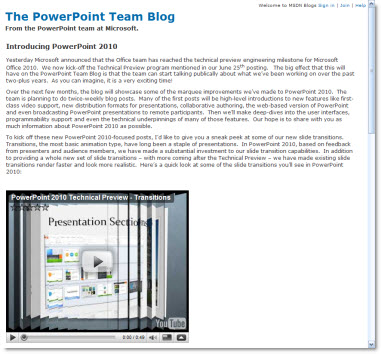
Being a Microsoft PowerPoint MVP is very cool – but it is difficult keeping things to myself, honor the many NDA’s, and simply say “I think the next version of PPT is going to be really good.” Well, the Microsoft Team Blog had a post last week with an embedded video that shows a lot more than I am currently permitted to talk about – and check back for more posts as they seem to be finally revealing to everyone some of the really really exciting things coming soon! So if you want a sneak peak head over to “The PowerPoint Team Blog” here.

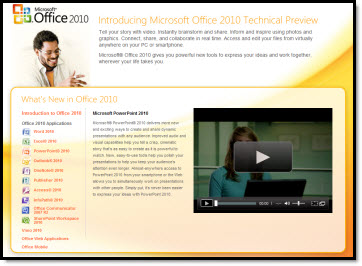
You can also see some videos of all the Office 2010 products at the Microsoft Office 2010 website (the PowerPoint video shows, or hints at, some of the really great new multimedia features). The link is here.

– Troy @ TLC

By |2016-09-16T10:03:55-07:00July 23rd, 2009|PowerPoint, Resource/Misc|

Anoto – A Pen For Presentations

At last years PPTLive conference I spent some time talking with the Anoto people about their new product and how it could be used for presenters. Well the product has launched and I look forward to talking more with them about presentation solutions.

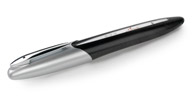
Anoto makes an ink pen that captures the writing and wirelessly (bluetooth) can make it show up onscreen.

For presentations, think of this as the ‘ink’ features on steriods. The idea is to print out your slides, then for each slide draw any notations on your printout and they show up onscreen – all without having to have a computer in front of you. You could be sitting with the audience with only a clipboard and your pen – as long as you are within range of the receiver.

The Boston Globe recently did a story on Anoto which has more information.

– Troy @ TLC

By |2016-09-16T10:07:57-07:00July 1st, 2009|Resource/Misc|

What Service Pack 2 (SP2) Brings To PowerPoint

I have had a lot of email and talking with people/clients about the recently released Service Pack 2 for Office 2007. I believe it is critical for PowerPoint users as it fixes, and adds, a number of key design features.

I pulled this list from Microsoft’s (Knowledge Base) KB article 953195.. It covers all Office applications, but these are the PowerPoint specific items – which I have reworded a few to make them easier to understand.

……………………………………………………………

Better Edit Points: Freeform shapes have usable Edit Points, plus increased interoperability with Office 2003.

Ungroup SmartArt Objects: Officially it says “A new XML-based representation of each SmartArt graphic in a document is saved with the file to optimize interoperability.” Which I believe is referencing the HUGE improvement that you can now ungroup any smartart object!

Faster File Save: Smarter picture compression in PowerPoint’s XML file format (.PPTX) now saves up to 90% faster than before when the presentation contains a lot of pictures.

Steadier Zoom While Editing: “Some commands, such as deleting the selected object when zoomed in would cause the slide view to snap to the center of the slide. Now the zoomed-in slide view does not move on its own.” This means less scrolling around while zoomed in and editing!

Adjust Lines without Extending to Infinity: Officially stated as “Fixes several issues that involve the object model. These fixes let you better achieve parity with Office 2003 when the object model works with graphical objects.” Which for me means I can resize a line while constraining with the Shift key and actually resize it (not have it zoom off into infinity).

Text Overlaps: Some third-party printer drivers could provide bad information, causing PowerPoint to misalign text. It now detect this situation and uses alternate settings that preserve the proper text spacing.

Vista Preview: PowerPoint is now compatible with the Vista file preview commands.

Image Exports: Images exported from PowerPoint could be corrupt or cropped. This is now fixed and the setting produces a good bitmap.

Slide Thumbnail Highlighting: Colors and effects used to indicate when the mouse was over a slide thumbnail, and when the thumbnail was actually selected could occasionally become confused and might indicate a slide was selected when it was not. These are now clearly defined and update properly.

Saving to .PPT with Styled Title Text: Some of the new text formatting in PPT 2007 has to be represented as a picture when saved to the older .PPT format. Sometimes this would cause both a picture and styled text to be saved when it appeared in a title placeholder, giving the text a jumbled or blurred look. It now detects and displays one element.

Built-in Save As PDF/XPS: Users no longer have to download the add-in separately to have the PDF/XPS option in the Save As menu, it is built into SP2 for Word, Excel, and PowerPoint.

……………………………………………………………

– Troy @ TLC

By |2016-09-16T10:11:49-07:00June 13th, 2009|Resource/Misc|
Go to Top