Resource/Misc

PowerPoint-to-Webcast Seminar

Eli Research and AudioEducator.com have been putting on some great seminars this year. And next week I will be the speaker! I am covering a more technical topic that has kept me very busy this year – converting PowerPoint presentations into webcasts.

The live web-based conference format is one I like best. Log-on from anywhere, view presenters computer (me) to see and hear each topic and demo file. Just like looking over the experts shoulder and getting practical information.

I would love to have anyone who visits ThePowerPointBlog, and has an interest in developing webcasts, to be there next Wednesday (note: there is a fee to audioeducator.com).

Click here for the info page on my “webcast on developing webcasts”

– Troy @ TLC

By |2016-11-17T16:36:38-08:00November 2nd, 2007|PowerPoint, Resource/Misc|

Should have waited for 24″ monitors

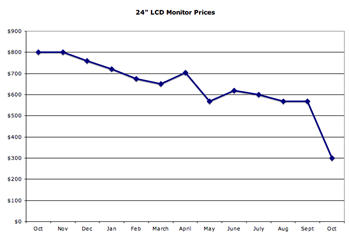
Here is an interesting graph showing the market price for 24″ LCD monitors over the past year.

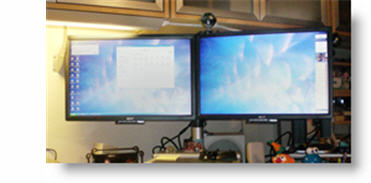
I have found running two widescreen monitors (shown here is my main work area with 21″ monitors) makes design work much more efficiant – but I should have held out for the 24″ monitors!

– Troy @ TLC

By |2016-11-17T16:33:58-08:00October 29th, 2007|Personal, Resource/Misc|

Favorite Shortcuts and Apps

I have mentioned before, but one of the wonderful aspects of my projects is always working with different people and interacting with a diversity of talented people. Recently a group of us started talking about favorite applications, add-ins and shortcuts. Everyone seemed to have something that none of the others (all highly experienced graphic designers) had not heard of before.

Taking my cue from that group discussion I have put together a series on some of my favorite Windows short-cuts and applications. Some may be useful, others not so much. And if you have one that goes with one of posts – send me an email – so this series may grow and help us all.

– Troy @ TLC

By |2016-11-17T16:28:05-08:00October 1st, 2007|Personal, Resource/Misc|

PowerPoint 2007 for Dummies

As mentioned, I have been entrenched in two large projects that are being developed in PowerPoint 2007. There are tons of great features in the version – and there are tons of old-and-new annoyances, bugs, etc.

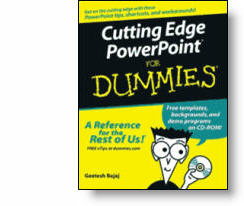
I could either fumble through many of the new features, or I could use some of the great resources that are available to all. Over the past few weeks I have referred to “Cutting Edge PowerPoint 2007” from the “For Dummies” series many times.

This great book is written by fellow PowerPoint MVP Geetesh Bajaj. Not really advocating this book over any other, but I am saying everyone – myself included – has some great resources available.

– Troy @ TLC

By |2016-11-17T16:26:06-08:00September 17th, 2007|Resource/Misc, Software/Add-Ins|

Creating the Theme Logo (4)

If you look back at the theme logos created so far, it is obvious how the template would be very different for each. So up to this point I am unable to really start working on the PowerPoint template.

But the goal is to make this event a success, and that begins with the client liking and appreciating the core visual to the whole thing – the theme logo.

– Troy @ TLC

By |2016-11-17T16:19:44-08:00August 8th, 2007|Resource/Misc|

Event Theme Graphic

For me, I cannot really begin working on a presentation for an event until some of the details are figured out – such the theme. Everything needs to coordinate and the theme can influence the color scheme used, the style of graphic treatment and much more. Sometimes the Theme is the starting point of an entire project.

– Troy @ TLC

By |2016-11-17T16:18:08-08:00July 31st, 2007|Resource/Misc|

Sobolsoft Add-Ins

I use and have tested a ton of PowerPoint add-ins. I was recently sent a link to a company I have never seen (thanks Josh) and discovered they have a wide range of Microsoft Office add-ins.

Many are very project specific (ie. not useful outside their exact use), but definitely a resource to bookmark. Click here to check it out.

– Troy @ TLC

By |2016-11-17T16:14:35-08:00July 14th, 2007|Resource/Misc|

Connection Speeds ARE Different

In developing webcasts for companies I continuously explain many of the factors that affect people’s ability to view, fast-forward, zoom, etc. “The internet is the internet and I have a fast connection – right?”

The simple answer is no. There are factors of your connection speed, your computers power, the server connection, the amount of traffic and geography. Yes, geography can have an impact on the connection speed. To illustrate, let’s look at a quick example.

I live in San Diego, CA (the red star in the lower left of the country). But if I connect to servers in different parts of the country I have different connection speeds; from 14.5MB down to 7MB.

Connection 1: San Diego to Los Angeles

Connection 2: San Diego to Seattle

Connection 3: San Diego to Chicago

Connection 4: San Diego to Atlanta

Note: For viewing a streaming movie, or webcast, the Download speed is the important number.
Note 2: Just noticed my ‘Atlanta’ circle is not over Atlanta…

All of these connection tests were done within 5 minutes. I used the connection test at Speakeasy.net (see 12/14/06 post for more info). Last, I am on a Fiber Optic connection, so your results may not reflect these numbers.

By |2016-11-17T16:11:03-08:00July 4th, 2007|Resource/Misc, Software/Add-Ins|

iFilm PPT Contest Voting Ends Today – Cast Your Vote

A few weeks ago I mentioned the iFilm PowerPoint contest. The went through all the entries and came up with the finalists for everyone to see and vote on. Well, today is the final day to cast your vote – click here to see the finalists and cast your vote.

I cannot say any of these presentations really jump out and wow me… My personal favorite, primarily because it made good use of many of the PPT 2007 effects (like the opening text) and lots of good animation (always something I look for!) is the “My Best Life Achievement” entry (and it got my vote).

– Troy @ TLC

By |2016-11-17T16:10:10-08:00June 29th, 2007|PowerPoint, Resource/Misc|
Go to Top