Resource/Misc

What is HDMI ???

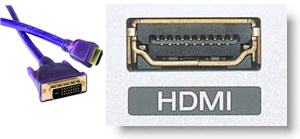
HDMI stands for “High-Definition Multimedia Interface”. From out perspective it is like combining DVI (high-def video) and high-quality audio into one connector.

This connector is not an option on computer graphics cards. There are a number of DVI-to-HDMI adaptors available. And with its growing use in plasma televisions, home theater systems and even new game systems it may end up on many computers in place of the S-Video connector.
Troy @ TLC
By |2016-11-17T14:31:03-08:00October 22nd, 2006|Resource/Misc|

What is DVI-I ???

The DVI-I connector is the best of both worlds; digital and analog. But it is also the least common connector, most likely because it is more costly to produce and purchase.

The DVI-I connection is able to go digital-to-digital (like DVI-D) or analog-to-analog (like DVI-A). It has the same appearance as a DVI-A connector, making it difficult to know if it is DVI-A or DVI-I. Basically, if you are lucky enough to have a DVI-I connector on your computer – be happy!

Troy @ TLC

By |2016-11-17T14:30:41-08:00October 21st, 2006|Resource/Misc|

The Real World and DVI-D

DVI-D is Digital Video Interface – Digital. Using DVI-D is the highest quality image because it is all digital all the way, and there are no exceptions. This is perfect for home theaters, or a big budget shows, where going all digital is ideal.

The real-world trouble with DVI-D is that it cannot be used to connect to an analog source, which is the majority of displays/projectors encountered today. (I should note that I did some research and there are a few DVI-D to VGA converters are out there, but they cost $200+). This limitation of only connecting to other DVI-D equipment is a major limitation for us with the wide range of euqipment we may be using.

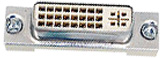
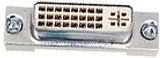
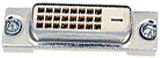
Looking at the connector it is easy to see if it is DVI-A or DVI-D. DVI-D does not have the 4 additional connector pins around the slotted connection (on the right side of this image).

Troy @ TLC

By |2016-11-17T14:30:08-08:00October 20th, 2006|Resource/Misc|

The Real World and DVI-A

DVI-A is a high-def analog signal. DVI-A connectors have the four pin connections around the slotted connector (on the right half of this image).

The conversion from digital to analog occurs in the video card. Technically the overall image quality it is much higher quality than standard VGA. But the reality is, very little difference can be seen with standard definition displays/projectors (eg. 1024×768 or 1280×1024).

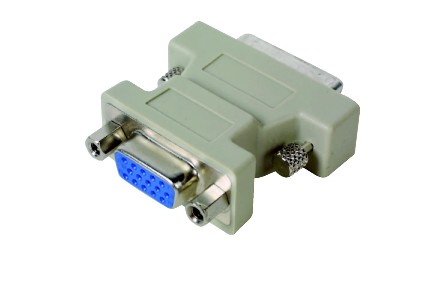
The real advantage of DVI-A is its flexibility with hardware connections. It can be connected to DVI devices, or easily converted to a VGA connection with a DVI-to-VGA adaptor (approx. $10).

– Troy @ TLC

By |2016-11-17T14:29:46-08:00October 19th, 2006|Resource/Misc|

The Many Flavors of DVI

Everyone is excited about DVI. And for the PowerPoint world it is important to be in-the-know as it has become a mainstay in connecting projectors and monitors to our computers for presentations.

Yes, it does mean an all digital signal. No, most people cannot see a difference between it and a analog signal. But as the image moves to more hi-def, especially with lots of motion (think PowerPoint animations, motion paths, slide transitions, etc), there is a difference to be seen. So know your DVI before investing in new hardware, or being asked advice.

There are 3 flavors of DVI:
DVI-A (Digital Video Interface, Analog)
DVI-D (Digital Video Interface, Digital)
DVI-I (Digital Video Interface, Integrated)

– Troy @ TLC

By |2016-11-17T14:29:22-08:00October 17th, 2006|Resource/Misc|

Laptop Consideration #2

On my new graphics powerhouse laptop I was excited with it having both VGA and DVI output. This is great as number of larger shows this year have requested DVI output.

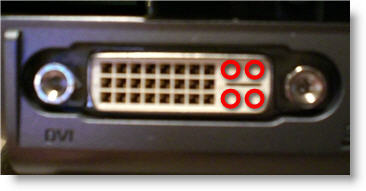
Again, I did not even think about looking further into things but was surprised when I started using the computer. There are a few flavors of DVI, the most common on computers, monitors, etc. is DVI-A. Well, this laptop surprised me by having a DVI-D connector. This is a big deal as it really limits the DVI options. On the plus side – it does have screw down connectors…

The big difference is it is missing the 4 connector slots that DVI-A (and DVI-I) connectors use (should be where the red circles are). Hmmm – maybe this is not the laptop to invest an additional 3 systems in.

– Troy @ TLC

By |2016-11-17T14:26:55-08:00October 13th, 2006|Resource/Misc|

Laptop consideration #1

I recently purchased a new laptop to test before purchasing several (needed to run large multi-screen presentations). The computer has lots of power, but there are a few things that caught me off guard that are not a part of the “usual” specs.

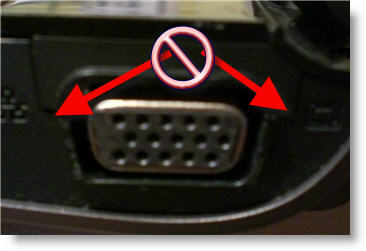
I have a very small Sony laptop I use as my personal/travel computer. One disadvantage of it is the lack of screw downs to secure the VGA cable. In this case not much of a problem, as it is not a show computer.

But on this new computer, a full featured graphics powerhouse with 256MB graphics chip, 2 GB RAM, dou core processor, etc., they are also missing. A feature I did not even think to look for as I figured it as a standard issue item. Guess I was wrong.

– Troy @ TLC

By |2016-11-17T14:26:18-08:00October 11th, 2006|Resource/Misc|

Graphics Cards For PowerPoint

Looking to purchase a new computer, or upgrade the graphics processor of a desktop. Have have added a write-up that overviews the 4 categories of graphics processors and makes some general recommendations specific to presentation use.

Click here to view on TLCCreative.com

-Troy @ TLC

By |2016-11-17T14:23:37-08:00September 25th, 2006|Resource/Misc|

Defining PowerPoint

Just a quick little interesting note. Here is the Wikipedia definition of PowerPoint:

“Microsoft PowerPoint is a ubiquitous presentation program developed for the Microsoft Windows and Mac OS computer operating systems. Being widely used by businesspeople, educators, and trainers, it is among the most prevalent forms of persuasion technology: according to its vendor, Microsoft Corporation, some 30 million presentations are made with PowerPoint every day.”

I just like the phrase “persuasion technology.”

-Troy @ TLC

By |2016-11-17T14:20:06-08:00September 9th, 2006|Resource/Misc|
Go to Top