
Working Backstage
Just a quick picture of myself backstage at a recent corporate show where I coordinated the presentation design and show computers (for what was projected). I am on the left – surrounded by computers.
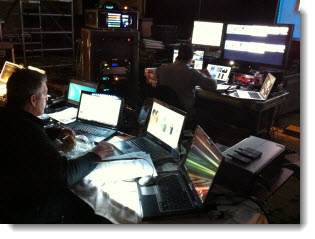
Thanks for the picture Paul!
– Troy @ TLC
Recolor .png Images in PPT
I am continously reflecting on how much more I can do inside PPT 2010 vs. going out to an external application such as Photoshop when developing slides. Here is an example from a recent project that was done in PPT in a matter of seconds vs. opening image in Photoshop, adjusting, saving, importing new version of image.
Here is my highly stylized trend line (used on a slide to show the economy is making progress, without showing any detailed numbers or facts). It is a .png image I prepared in Photoshop and inserted into the presentation.

Here is the same image, now full screen and on the presentation template backgound – it does not have enough contrast against the background.

By selecting the image and then going to FORMAT >> CORRECTIONS I used the presets (all based on the template color scheme) to recolor the trendline image to a color with more contrast.
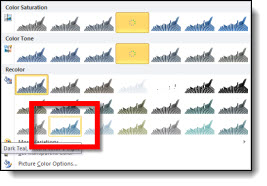
Done. Move on to next slide.

– Troy @ TLC
Happy Halloween!

Trick or Treat! That is what I will be hearing all evening from my daughters and the neighborhood kids – and it is great. I had the TLC Creative design staff develop a treat for everyone – a free Halloween themed PowerPoint .pptx template.

Download here (255K) . The ‘Happy Halloween’ text at the top was created in PPT 2010.
– Troy @ TLC
3 Views of a Corporate Show
Here is my show I just finished and the three views of it.
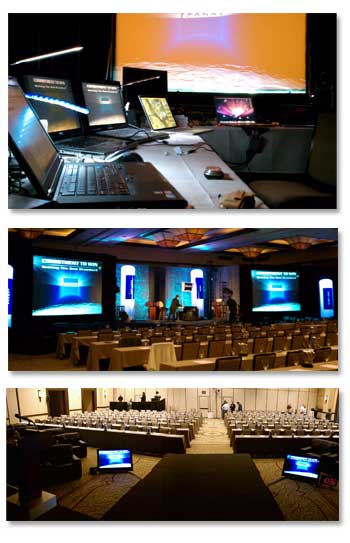
1. My view, the Graphics View.
2. The audience view.
3. The presenter view.
And all three views have the PowerPoint slides.
– Troy @ TLC
Being In The Audience…
On most projects my work area is setup backstage. But on this particular project, there was no backstage (front projection), and the tech table was completely in use. So I basically setup shop in the audience.

– Troy @ TLC
Renewed as Microsoft PowerPoint MVP!
Just a personal note that I am very honored by. I have been awarded as a Microsoft MVP for PowerPoint again (basically renewed)!

– Troy @ TLC
Green Screen Video for PPT Slides
On a recent show I was asked to develop the speaker IMAG slides with a curved design to match the set design (IMAG = Image MAGnification, and for this event it was live video of the speaker). The solution was to work with the video switch department and setup a green screen video area. Here is my slide:

We went with the standard green screen green. The key was to assure no slide had any solid green on the left half of the slides. During the show, the video switch would bring in the camera shot (rectangular) and it would fill the curved green area to create a custom speaker IMAG window.

– Troy @ TLC