
Melon Ball’s Presentation
If you have a few minutes online and need a distraction this is a very funny story written by an obviously funny guy. “Come watch the grim PowerPoint of death” has a good point that kids are using PowerPoint, often better than business people, that should not be missed.
– Troy @ TLC
Everything Is Jumping (Again) – Fix Selecting Objects
This same problem seems to pop up for many reasons. It is definitely a Windows Vista, and potentially Windows 7, issue. But it effects all versions of PowerPoint. It recently came up again on some of my computers after some Microsoft updates.
The problem is clicking on any object (text box, shape, image, chart, etc) and it jumps slightly. Very annoying.

The solution is (re)setting one of the application options.
1. Locate the actual PowerPoint .exe file. For Vista/Windows 7 it will be here:
c: >> Program Files >> Microsoft Office >> Office12
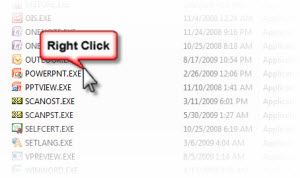
2. Right-click and open the PROPERTIES
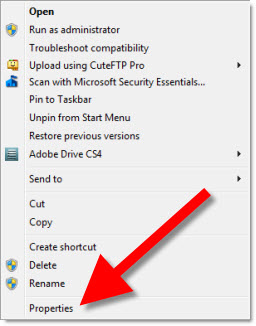
3. Go the the COMPATIBILITY TAB and be sure the DISABLE DESKTOP COMPOSITION is checked.
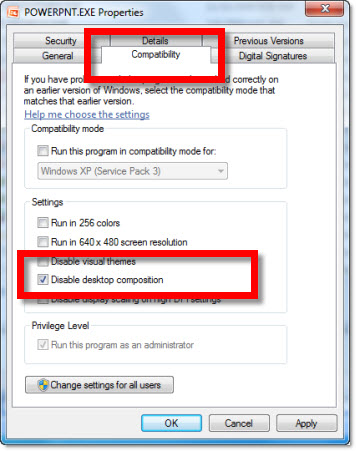
Run PowerPoint and all should be resolved!
– Troy @ TLC
Seach – Purchase – Insert Fotolia Images All Within PPT 2007
Fotolia is another resource for royalty free images. But this is the first one to have a PowerPoint add-in (also a Word version). Get details and download here.
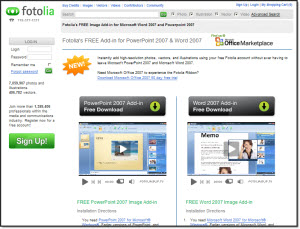
The install requires being online and easily goes through verifying computer has needed components and installing if needed. I did discover if you run multiple versions of PowerPoint, PPT 2007 needs to be the default setting for installer to run. This is also a PPT 2007 specific add-in and will not install in earlier versions.
Once installed there is a ‘Fotolia’ tab.

If you click the SEARCH button an action pane opens that is basically a gateway to the Fotolia website content.
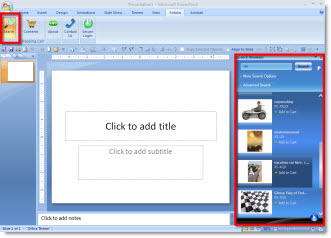
The search results show a thumbnail and one click options for purchase and download.

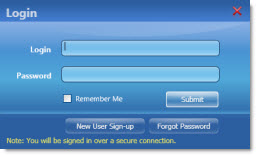
To purchase and use an image you need to use the LOG IN button and have a Fotolia account (with credits purchased).
This may be the first in a new wave of conveinence add-ins as the internet merges with applications.
– Troy @ TLC
MS Security Essentials (AntiVirus)
A year ago I was happy letting Microsoft’s Live OneCare handle the antivirus, update notification, backup duties and firewall management on a dozen computers. Then the service was discontinued and over the past 4-5 months I have migrated to a number of antivirus applications. And I have experienced more computer grief over firewall, virus and other issues as a result.
Well last week the follow-up to OneCare, Microsoft Security Essentials, was released to the public!

This is a FREE antivirus application, based on the same engine as OneCare (which kept all my computers safe and running for 2 years) and has a super easy interface. Microsoft Security Essentials is FREE and can be downloaded from Microsoft here.
– Troy @ TLC
SOAP (State of the Art Presentation)
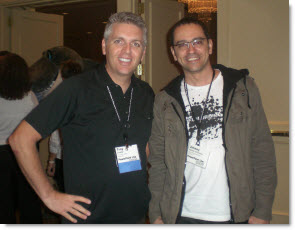
Had opportunity to meet Johnny Batista Galvao de Sousa (I asked for his card to get the name right) at PPTLive. Great guy, with a great company name SOAP, State of the Art Presentations.
If you want to check out a good PowerPoint site and blog – in Portguese – his site is www.soap.com.br

– Troy @ TLC
Dinner with the Stars!
PPT Live continues through Wednesday, but I am flying back to Los Angeles for a large project today. But I consider myself very fortunate to enjoy time with the other PowerPoint MVPs and some of the Microsoft PowerPoint program managers.

(front to back, left to right: Sandy Johnson, Echo Swinford, Glenna Shaw, Julie Terberg, Sandy Hu, Tony Ramos, Glen Millar, Troy Chollar, Ric Bretschneider, Jim Gordon, Steve Rindsberg, Bill Dillworth, John Wilson, Geetesh Bajaj)
– Troy @ TLC
PPTLive and Friends!
Every year Sunday is the official start of PPTLive with some pre-conference courses and everyone checking in.

Had a great dinner with a group of PPT MVPs and other Power Users – YUM, sushi!

– Troy @ TLC