
PowerPoint-to-Webcast Seminar
Eli Research and AudioEducator.com have been putting on some great seminars this year. And next week I will be the speaker! I am covering a more technical topic that has kept me very busy this year – converting PowerPoint presentations into webcasts.

The live web-based conference format is one I like best. Log-on from anywhere, view presenters computer (me) to see and hear each topic and demo file. Just like looking over the experts shoulder and getting practical information.
I would love to have anyone who visits ThePowerPointBlog, and has an interest in developing webcasts, to be there next Wednesday (note: there is a fee to audioeducator.com).
Click here for the info page on my “webcast on developing webcasts”
– Troy @ TLC
Work on the Go ?
This may be one instance of mobile computing gone too far…

I can hear the morning call now, “I’m commuting in right now – the presentation will be done by the time I arrive.”
– Troy @ TLC
Pumpkin Carving Party!
Every year we host a pumpkin carving party at our home and this year was lots of fun! Of course Southern California, where I live, has basically been on fire, so when it began to rain before the party it was hard to be upset. But the rain let up, lots of people showed up (60+), great food, lots of time with friends and the pumpkins were great!

– Troy @ TLC
Should have waited for 24″ monitors
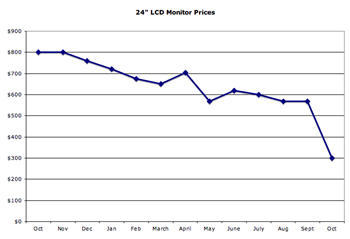
Here is an interesting graph showing the market price for 24″ LCD monitors over the past year.
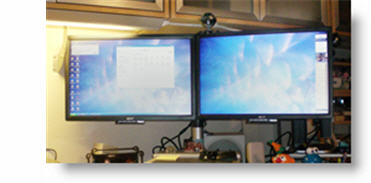
I have found running two widescreen monitors (shown here is my main work area with 21″ monitors) makes design work much more efficiant – but I should have held out for the 24″ monitors!
– Troy @ TLC
3 Screen Show Template
One of my recent projects was developing a 3 screen presentation for a large corporate event. Each screen was widescreen format (16×9). My goal was to create flowing template art that visually radiates from the center screen to the outer screens. Here are all three screens:
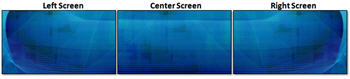
Here is a bit closer look at the left screen:

– Troy @ TLC
ClickArt online royalty free art
Many years ago for images in our projects we relied on $300-500 per disk photo CDs and for vector art things like the 20 CD ClickArt 1 Million collection. Well, ClickArt is back – and now online.

Although it features lots of photo images, they are relatively small at 800px wide and 72 dpi. The offering is wide, with many having those same 80/90’s fashions I remember from use years ago. But many are ultra new and even the same images I have pulled from sources like Photos.com (of course much smaller file size here).
And if you need vector art (aka: clip art or line art), having a searchable database and unlimited downloads for a year is worth the price!
As for price, they are currently offering a 1 year, unlimited download for only $40.00!!

Click here to check out all the details.
– Troy @ TLC
Make All Files Have SameTime Stamp
When working on multiple computers it is critical to be able to tell which files are new, or old, based on their time stamp. The solution is to run an application that updates the computer clock to an atomic clock through the internet.
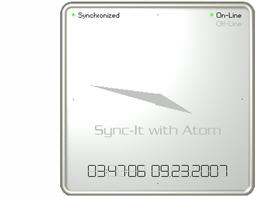
I run SYNCIT With Atom on all of my computers, but there are tons of applications available. I have mine set to update/verifty clock accuracy every 45 seconds. And guarantee I know which file is the latest-and-greatest based on the time stamp – no matter what computer I was working on.
Click here to go to info/download page.
– Troy @ TLC