
PowerPoint, Webcasts and Streaming Media
There is an explosion of activity around webcasts. This year I have had a ton of webcast projects – most involving PowerPoint content. The good news is PowerPoint once again finds itself at the center of the universe. The even better news is that software to make PowerPoint presentations web-ready are continuously being added to the mix. The bad news is most PowerPoint designers know very little about streaming media and are unprepared when the almost inevitable request to create a webcast from a presentation is put forth.

So there is at least one place to go and do a quick study of Streaming media/webcasts I have put together an eight part series on the topic. Check back as we cover all the behind-the-scenes “basics” about streaming media over the next week!
– Troy @ TLC
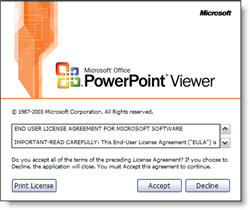
PPT Viewer Splash Window
One of the greatest things about the 2003 PowerPoint Viewer is that it does not require administrative rights to install. As a matter a fact, it does not need to be installed at all. It can run from the computer or from a CDROM, USB drive, etc. But it is important to know that on the first use of it on a computer its splash screen, which shows the official EULA, will show up.
– Troy @ TLC
Hey It’s For My Teeth!
Okay, this is way off topic, and off-season for that matter. But earlier this week I went through a fun morning of major dental surgery (you don’t want to know, but if you have kids, tell them to break bones not teeth – it’s a lot easier to deal with later in life!). The upside is that I was given permission to eat ice cream this week, as the cool will help.
Perfect timing, as Cold Stone Creamery put out a 2-for-1 coupon last week!

Yesterday I decided would be a good opportunity to use this coupon – but the link was dead. I called the corporate number, they said the coupon link was gone, but the coupon would be honored for those that have it through its January 31st expiration. Good thing I had saved the PDF to my computer! I highly recomend the Mocha + Chocolate Syrup + Yellow Cake!
Okay, so here is a link to the print-and-use PDF coupon.
– Troy @ TLC
Hardware Acceleration and The PowerPoint Viewer
The super-useful PowerPoint Viewer application does have one flaw – it does not have the ability to take advantage of a computers graphics card power with the “Use Hardware Acceleration” feature. So if you have a presentation that is going to be distributed and viewed with the PowerPoint Viewer I would recomend turning off the Hardware Acceleration and viewing the slideshow to get a better idea of what others will see.
– Troy @ TLC
Should I use Hardware Acceleration?
If your computer has dedicated graphics memory – yes.
If the computer has a shared memory graphics processor – no.
To check what you have, go to:
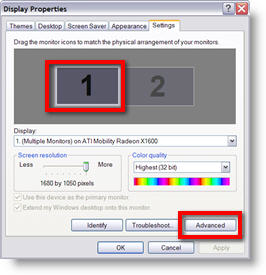
(1) START >> CONTROL PANEL >> DISPLAY >> SETTINGS tab
(2) Select “Monitor 1”
(3) Click the ADVANCED button
(4) Go to the ADAPTOR tab. Here you can see the manufacturer, model and amount of memory of the graphics card.
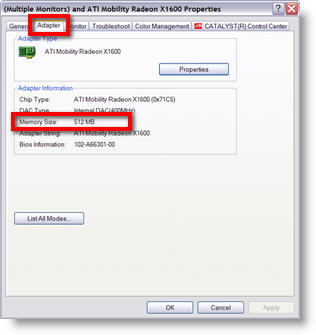
TIP: if the computer uses an Intel graphics processor, it is shared memory. ATI and NVidia manufacture both shared memory and dedicated memory cards.
– Troy @ TLC
Smoother Animation with Hardware Acceleration
If you notice some of your animations are not playing smooth, check to assure you are using all of your graphic processor’s power. Go to SLIDE SHOW >> SETUP SHOW >> check the USE COMPUTER HARDWARE ACCELERATION.
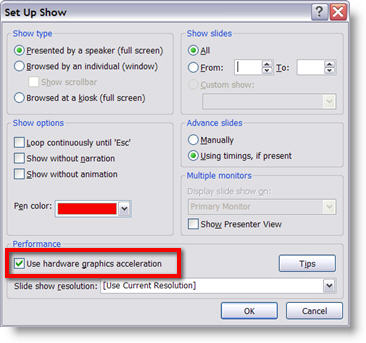
Now run the presentation and things should be running much smoother.
– Troy @ TLC
More Image Sites
Two additional “discount priced” image sites I have used are:
1. iStockPhoto

2. Fotolia

Like Big Stock Photo (Nov. 19 post), these sites allow professional and hobby photographers to add to their libraries. Nearly any needed image, conceptual or object can be found for just a few dollars.
– Troy @ TLC