
Disaster at the Server Level
Today has proven to have its challenges… Yesterday my web hosting server crashed. After many hours dealing with tech support it became obvious that the only item I would not be able to get back online was this blog.
So today I have started from scratch – reinstalling the blog software, building a new database, and uploading/re-creating as many of the posts as possble. I am sure to be missing a few posts, but the extended effort has the blog up and running again. I guess the only upside is that I did upgrade a few features and fix a couple of bugs from my first round of installs. Sometime technology makes for a big headache!
Troy @ TLC
Simultaneously View & Edit Presentations
For final edits on a presentation I take advantage of dual monitors, with PowerPoint on one screen and the slideshow on the other. As I adjust elements I can see the updates immediately.
If you do not have a dual monitor setup, you can do something similar by running the presentation in a smaller window by holding down the CTRL key while clicking the SLIDE SHOW icon in the lower left. You can move back-and-forth between the slideshow and edits while seeing the updates immediately.

Troy @ TLC
Add Captions/Subtitles To Movies – Easily!
With Today’s realease of Camtasia 3.1 a number of great tools and output options have been added. One of the very cool features is an intuitive and powerful captioning feature. PowerPoint MVP Glenna Shaw has created a set of examples that show the results. The movie file is from one of my clients (SWOT Expert). I supplied the movie and text file of the narration. Glenna created English Captions and with the help of PowerPoint MVPs Ute Simon and Enric Manas translation, she created German and Spanish subtitles.
The process is so streamlined in Camtasia that Glenna told me all three versions were created in less than 1.5 hours!
Check out the samples here:
English Captions
Spanish Subtitles
German Subtitles
Troy @ TLC
Turn Off PopUp Toolbar If Not Used
During church service I noted a very distracting onscreen prescence. Perhaps you have seen it too. During a slide show do you see this in the lower left corner:

If you do not know what it is or how to use it, I recommend turning it off. The PopUp Toolbar is designed for onscreen interactivity (advance, go back, notate, end, etc.) and is especially useful for tablet PC operation. But the vast majority of people (myself included) have no use for this tool. It is easy to turn off (more…)
Files That Will Not Go Away
Ever try to delete a file (any type of file) and instead get a message like this:
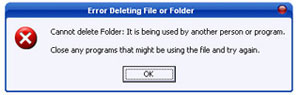
I had one that just would not go away. Very frustrating. After a bit of searching the web it was easy to see I was not the only one with troublesome files. I solved the problem (eg. deleted the file) with a free little application called unlocker.
Troy @ TLC
Dinner with the Stars
While in Detroit I was fortunate to have dinner one evening with Julie Terberg (Terberg Design) and another with the incredible Betsy Weber (TechSmith). Both are great people and I enjoyed hearing what is exciting and happening in their work.
Troy @ TLC

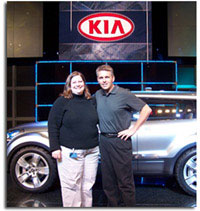
2006 Detroit Auto Show Kia Presentation
Today the presentation I have been working on for the past several weeks went off great! The Detroit Auto Show hosts “press days” before it opens to the public. On these days all of the auto manufacturers wow the press with keynote speeches, incredible staging and unveiling of new cars and of course great PowerPoint presentations! This year I am working with Kia as they recap their steady growth and unveil the new “Soul” concept sport utility vehicle.
Just two posts ago I mentioned OfficeFX for it motion backgrounds, transitions and text antialiasing. I used it extensively on this presentation.
Troy @ TLC
Here are a few photos of my work at the ’06 Auto Show: (more…)