The PowerPoint® Blog

I work with PowerPoint on a daily basis and I am very honored to be a Microsoft PowerPoint MVP. We have a talented team of presentation designers at TLC Creative Services and ThePowerPointBlog is our area to highlight PowerPoint tips, tricks, examples and tutorials. Enjoy! Troy Chollar

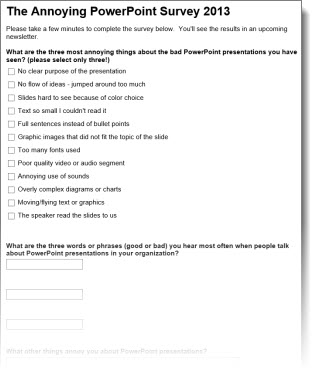
The Annoying PowerPoint Survey – 2013

Microsoft PowerPoint MVP Dave Paradi puts together the very informative and insightful (sometimes comical) “Annoying PowerPoint” survey.

The survey is live and everyone is invite to participate! I definitely recommend 3 minutes of time to anonymously add your PowerPoint opinion so we can all learn from the results (He is releasing the results at this years Presentation Summit in October). Access the survey here.
– Troy @ TLC

By |2016-08-10T10:19:35-07:00September 4th, 2013|Resource/Misc|

Outstanding Presentations Workshops – Starting Next Week

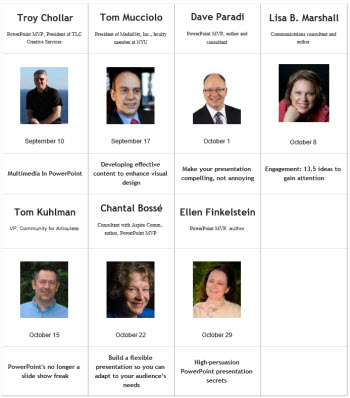
Microsoft PowerPoint MVP, Ellen Finkelstein, has organized the Outstanding Presentations Workshops again and they begin next week. These online webcasts are beyond a good value (all 7 workshops for $7!). The presenters cover a wide range of presentation topics, and the webcasts can be viewed any time (by paid attendees) after if you cannot make the live broadcast time.

Next Tuesday, Sept. 10th is the first of the workshops and I am very happy to be the presenter – “Multimedia in PowerPoint.” Join me for an hour of video in PowerPoint tips and tricks!

Info and details here.
– Troy @ TLC

By |2016-08-10T10:19:56-07:00September 2nd, 2013|Personal, Resource/Misc|

Do I have MSI or CTR Installed?

The previous post defined the two Microsoft install methods. But determining if your install of PowerPoint 2013 is from an MSI (full standalone installer) or CTR (streaming download installer) is not easy to determine. Microsoft has not given its end users any useful information in determining this. Here is one method that will tell you.

Open PowerPoint 2013.
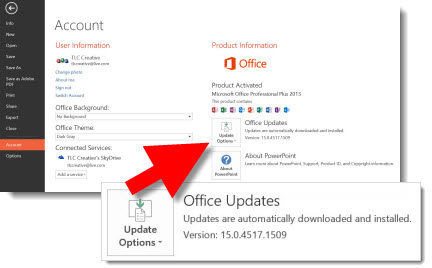
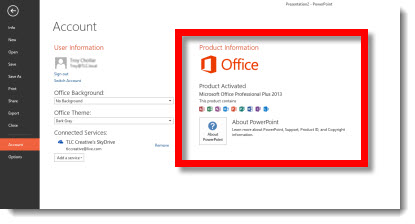
Go to FILE >> ACCOUNT.
In the far right pane under PRODUCT INFORMATION.

If the computer has a CTR install, there will be an UPDATES option.

If the computer has an MSI install, the UPDATES option is not available.

At this point, that is the only easy to access information piece within the application that I have found (thanks Glenna!) that indicates which version is being run. And lets not get into which Service Packs and Updates are installed! Office 2013 has taken away all of the familiar information to help troubleshoot issues…

For more info on CTR and MSI, the PPTFAQ has this page with a great overview and links to more details.

– Troy @ TLC

By |2016-08-10T10:20:51-07:00August 30th, 2013|Resource/Misc|

What is MSI and CTR?

MSI and CTR are both install methods for Microsoft Office.

MSI is “Microsoft Installer.” It is an installer file that has the full product in it. So it is a large file and most commonly used when installing from a DVD, but with high bandwidth internet, it has become more common to download the large installer file and then install the software.

CTR is “Click to Run.” It is a streaming installer that downloads the installation files during the install process. One of the key traits is the core application is installed, and can be used, while the additional features continue to install in the background. In general, a high bandwidth internet connection is needed (or lots of time to wait for the installer to stream the data needed to install). The technology was introduced with Office 2010, but with poor results. Today, CTR is most commonly used when installing Office 2013 as part of an Office 365 subscription or Office 365 Home Premium subscription.

– Troy @ TLC

By |2016-08-10T10:21:25-07:00August 28th, 2013|Resource/Misc|

Promo Reel of Prezi Presentations

Many projects start with “Do you create Prezi presentations?”

Yes, TLC Creative Services develops Prezi presentations! We apply years of professional presentation design to the unique capabilities of Prezi so presenters have something dynamic and different than other presenters. Here is a promo reel that shows a sampling of Prezi presentations we have developed.
[youtube src=”https://www.youtube.com/embed/-iRdyRQ60Jc?rel=0″]

– Troy @ TLC

By |2016-08-10T10:22:26-07:00August 23rd, 2013|Portfolio, PowerPoint|

Slide Design InfoGraphic

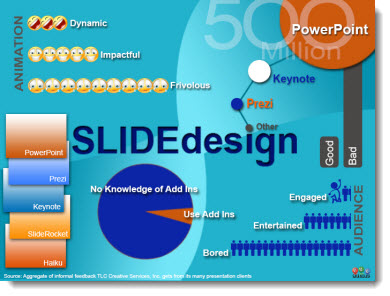
In developing our newly designed website, which is finally live, we created some graphics to accent the text. This is one example that TLC staff designer Jennifer developed specific for the website.

Note: This is full of fun, non-sourced, completely made up statistics (okay, they are based on my opinion of the slide design world…). But it is real Infographic design.

– Troy @ TLC

By |2016-08-10T10:23:40-07:00August 21st, 2013|Portfolio|

PowerPoint 2013 Selection Pane – Drag and Drop!

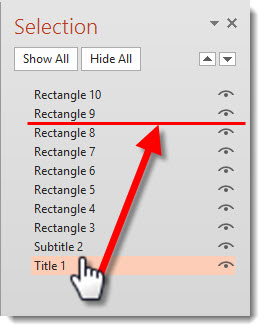
PowerPoint 2007 introduced the much needed Selection Pane feature. PowerPoint 2013 has added another much needed feature to the Selection Pane – drag and drop to reorder!

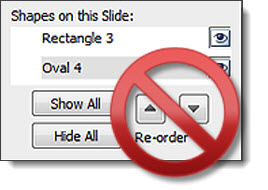
The repeated clicking the up/down arrows to move objects to the front or back (z order) is happily now updated with the ability to select, drag, reposition (yay!).

– Troy @ TLC

By |2016-08-10T10:24:39-07:00August 19th, 2013|Personal|

Staffing a Live Event

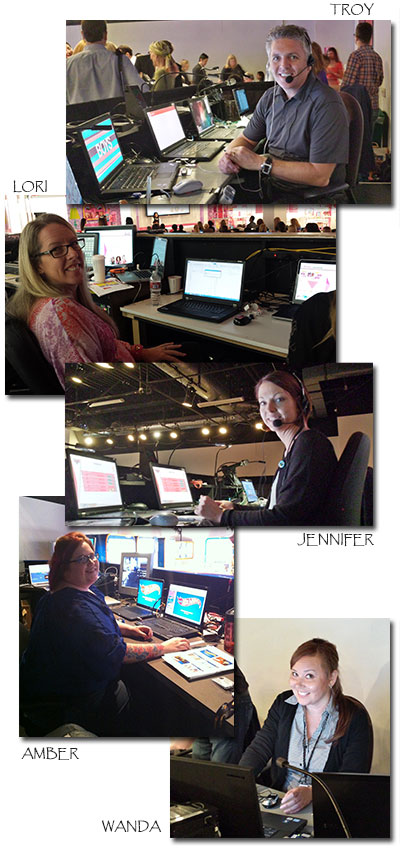
For the past 2 weeks, the TLC Creative office has been virtually empty (thanks Josh and Kristen for staying on top of everything!) as 5 of us were onsite designing presentations, handling rehearsals and running show presentations with the AV crew(s).

– Troy @ TLC

By |2016-08-10T10:25:33-07:00August 16th, 2013|Resource/Misc|

Mac Keynote Sample – Toyota

Does TLC Creative Services use Keynote? That is a question I hear from many new clients. Of course we do! Presentation design, with any of the available presentation software options, has the same design principles to engage the audience. Some of the technology and visual effects change, but the layout, messaging and use of animation “rules” remain the same.

We have recently added a video of a Keynote presentation project to our portfolio section. TLC Creative Services developed the template, did lots of custom Photoshop work to bring the provided script to life using the unique capabilities of the Apple’s Keynote app. See it here.

– Troy @ TLC

By |2016-08-10T10:25:52-07:00August 14th, 2013|Portfolio, Software/Add-Ins|
Go to Top