The PowerPoint® Blog

I work with PowerPoint on a daily basis and I am very honored to be a Microsoft PowerPoint MVP. We have a talented team of presentation designers at TLC Creative Services and ThePowerPointBlog is our area to highlight PowerPoint tips, tricks, examples and tutorials. Enjoy! Troy Chollar

Google’s “Template”

A lot of our design is developing PowerPoint templates. Often, we are working within a corporate style guide that directs the colors, font and overall styling, and the biggest effort is effectively setting up PowerPoint to adhere to those guidelines in presentation design. On other projects, we are creating the look and a style guide through the template options selected.
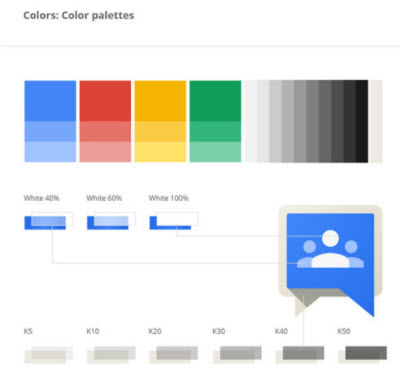
I found this online overview of Google’s brand style guide, which is very interesting, has some great before and after design items and goes to show that every company should have visual branding rules (aka a style guide).

Full article and style guide samples is here.

– Troy @ TLC

By |2016-08-10T10:38:17-07:00June 14th, 2013|Personal|

Online Art with Silk

Silk is an online interactive art generator, where you create the art. The art is based on mirrored, or reflective, creation and it is much easier to experience than explain – so go experience it here.

I have saved out some images from Silk to use in PowerPoint template background development and also used the abstract art as images on slides. It is definitely a unique site that quickly produces unique art images.

– Troy @ TLC

By |2016-08-10T10:39:05-07:00June 12th, 2013|Resource/Misc|

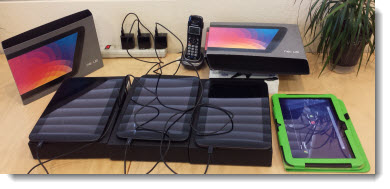
Stack of Nexus 10 Tablets

Friday we were loading a completed interactive brochure project onto Nexus 10 tablets to be shipped to the client’s tradeshow event (can you guess which tablet is our staff test one…).

So how was PowerPoint involved in a 300+ page interactive brochure? The full project was storyboarded as a slide deck so the client could review and do copy edits before moving to the HTML5 coding.

– Troy TLC

By |2016-08-10T10:41:24-07:00June 3rd, 2013|Resource/Misc|

Google and its New Image Searches

Click here to read the full commentary article on Google’s new/refined image search process.

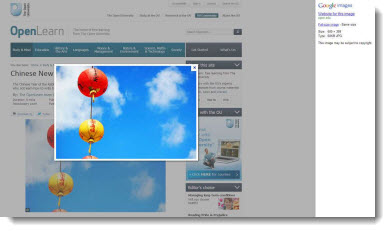
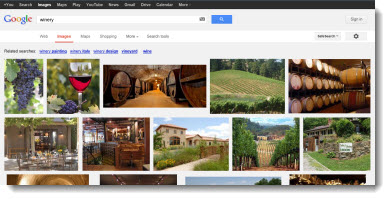
“I did a Google search for the image” has become a standard phrase I hear a lot. It is said without thought of image quality (which often is why I am asking where the image was sourced from, in hopes of getting a higher resolution image to work with), ownership or copyright issues. Recently, Google has revised its image search display process to simplify the process. For presenters, this may be helpful, but I can definitely understand the loss of website recognition and ease of “borrowing” images.

Example of the “old” Google search results (shows source website in background):

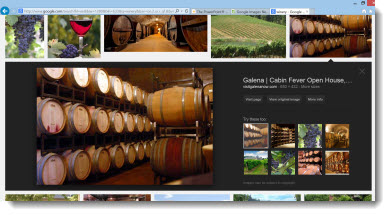
Here is what is seen from a Google image search today (shows only image, mage specs, and related images):

– Troy @ TLC

By |2016-08-10T10:42:19-07:00April 22nd, 2013|Resource/Misc|

Is This Dangerous – or Bad?

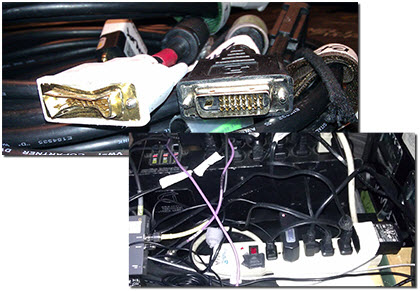
AV equipment is pretty amazing. It is shipped all over the country, connected-unconnected continuously (unlike the cable monitor on your desktop that was connected once and then ignored for its life) and usually setup and used in fairly dark venues. With all of this use in harsh environments, I get to see some pretty spectacular uses and failures.

This poor cable has met the end of its life (although it was setup for me to connect one of my show computers too). And just like in “A Christmas Story,” this may be a scary power setup.

– Troy @ TLC

By |2016-08-10T10:42:47-07:00April 19th, 2013|Resource/Misc|

Guy Kawasaki and Me

At a recent show, the keynote presenter was Guy Kawasaki, who remains a fantastic speaker. I did some refinement of his presentation slides, made sure the multimedia worked in PowerPoint, enjoyed his talk, and received a very nice thank you for the effort.

– Troy @ TLC

By |2016-08-10T10:43:25-07:00April 15th, 2013|Personal|
Go to Top