I work with PowerPoint on a daily basis and I am very honored to be a Microsoft PowerPoint MVP. We have a talented team of presentation designers at TLC Creative Services and ThePowerPointBlog is our area to highlight PowerPoint tips, tricks, examples and tutorials. Enjoy! Troy Chollar
Always Open A Recent Document (PPT 2007)
Most people have a handful of presentations that they access routinely. PowerPoint has had the ‘Recent Documents’ feature to make it easier to reopen those presentations – and it is a helpful tool many times. But PowerPoint 2007 has made that feature even more powerful and usable.
Here is the PPT 2007 Start Menu and mine shows 1 Recent Document (okay the list was full, but I cleared it for this tutorial).
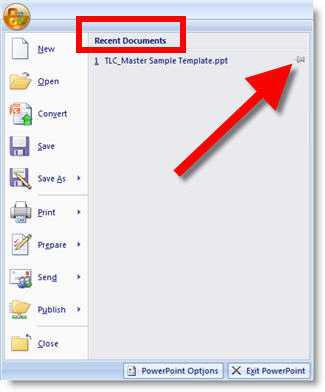
The important addition to PPT 2007 is the small thumbtack icon on the right. It is the same icon that has existed since PPT XP on the Master Slides to preserve masters. The one on the Recent Documents does the exact same thing – it preserves that presentation to always be in the Recent Documents list!
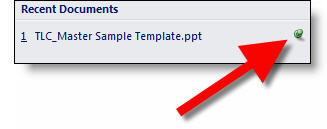
By clicking the thumbtack it goes from grey to green – and now you can always open that presentation with ease! (note: works as long as the presentation stays in its original location)
– Troy @ TLC