
Portfolio

Placeholders for photos, diagrams, etc.

Plain text floating under a photo. A diagram that uses lots of bland color boxes. A solid color callout on a chart. All are things that generally make a slide boring and look standard/’off the shelf.’

To create a polished look I create virtually all of these placeholder elements in PhotoShop (with bevels, glows, highlights, drop shadows, etc.) and import into the presentation. But aesthetic placeholders can be created in PowerPoint with a bit of creativity with custom fills, bold lines and layered shapes.

Download a quick 1 slide sample here.
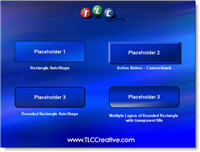
Download this 1 slide demo
Troy @ TLC

By |2016-09-16T11:22:11-07:00February 7th, 2006|Portfolio|

From Good to WOW with OfficeFX

I just finished adding a new project overview to the TLC Creative website. It includes a movie of a walk-in looping presentation I developed for an event, which highlighted the event sponsors. Online is a write-up and movie that shows how it was transformed from good to WOW!

Basically, after developing a custom PowerPoint presentation, I used OfficeFX‘s ability to render realtime 3D moving backgrounds and transitions to add that extra something special! To see the write-up and movie click here.

Troy @ TLC

By |2016-09-16T11:15:01-07:00January 7th, 2006|Portfolio, Software/Add-Ins|

PowerPoint for the Mime

The requests for presentations always prove to be interesting. But this one initially was out of the ordinary even for me. A professional mime was the opening act of a corporate event and they needed a presentation to correspond with the mime’s acting. A speaker support presentation – but with no speaking 🙂

Click here to see the project write-up, online movie of the presentation AND download of the full editable presentation.

Troy @ TLC

By |2016-09-16T11:13:07-07:00January 3rd, 2006|Portfolio|
Go to Top