Resource/Misc

Windows 10 Start Menu

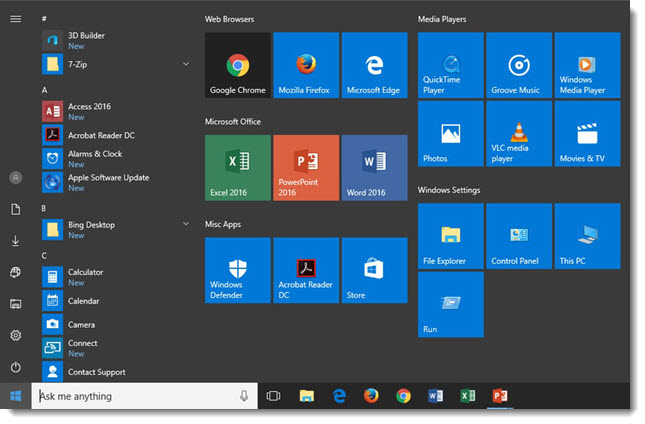
For a recent project, I rebuilt 5 of the supplied show computers as they were all very out-of-date. The Windows 10 Start Menu is a good hybrid of the legacy (ie. Windows 7 and earlier) and interactive Windows 8 options. But I do find much of the preset options unneeded for business (vs. personal) computing. Each show computer has dozens of settings customized to optimize performance. The Start Menu removes all unneeded options and adds many of the now buried features, along with a logical organization to everything (Side note: I am not a fan of forcing users to see the APPS scrolling window and forcing users to only have small icons for the much more used left action buttons). Here is a screen shot of the Windows 10 Start Menu on the 5 graphics computers I setup:

Windows 10 Start Menu

-Troy@TLC

By |2016-10-19T09:35:33-07:00October 17th, 2016|Resource/Misc|

PowerPoint’s “What’s New” Dialog

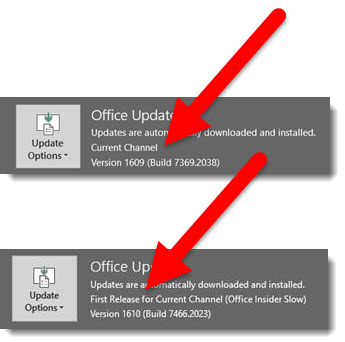
The Office 365 version of Office Apps, including PowerPoint, is on a continuous update cycle. Often, it is difficult to know what is new. Well, there is a newer dialog option within all office apps to give you a summary of “What’s New.”

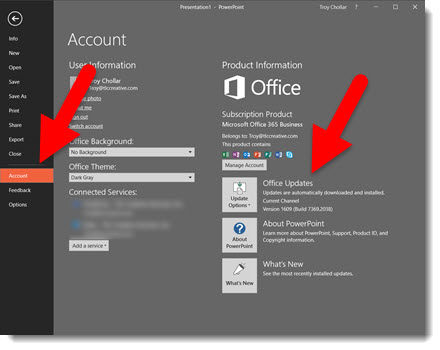
To see what the new features are in PPT, simply go to the file tab, scroll down to account, and click on the What’s New Dialog below the “Office Updates” box.

Once clicked, a window will pop up either asking the user to update PPT or simply show what new features have been added.


What's New Dialog 1


What's New Dialog 2

Click the LEARN MORE link to open a web browser and get the full details and history of all feature updates.

What's New Dialog 3


-Troy @ TLC

By |2016-09-20T09:28:11-07:00September 30th, 2016|Resource/Misc, Tutorial|

Panoramic Photos for Presentations

FotoSolution is a digital photo specialty group based in Hanoi, Vietnam. They sent TLC info and a link to one of their site pages with 20 FREE beautiful panoramic photos. These images would be great to use in a number of presentations. 

panoramic-1

The panoramic images on FotoSolution are not just wide angle lens images, but lots of overlapping photos stitched together into a single, perfectly in perspective image.

panoramic-2

I downloaded a few of the panorama images and, unfortunately, the overall size was not super large – I was hoping to use Morph to create some great movement animation effects using one. But as an image on a slide, the size was good.

Check out the panorama images here.

-Troy @ TLC


By |2016-09-19T13:26:02-07:00September 19th, 2016|Resource/Misc|

Ellen Finkelstein Presents the 2016 Outstanding Presentations Workshop

outstanding16_1

Learn from some great presentation experts with this year’s Outstanding Presentations Workshop series. This is the 7th year for the workshops and this year, the series of webinars start this Thursday (9/15). This year, the entire series costs $17 (that’s total, for all 4 workshops!). Registered attendees have access to the recordings to view later (which is great for me because I cannot attend 2 of the workshops during their live presentations as I am on showsite).

Click here to get more details and registration information.

-Troy @ TLC


By |2016-09-12T09:43:59-07:00September 12th, 2016|Resource/Misc|

Presentation Guild – Microsoft Webinar Demonstrating Zoom

guildLogo_1

On August 16, 2016, the Presentation Guild put on this open-to-public webcast with a Microsoft PowerPoint Program Manager demonstrating the app’s newest tool, Zoom. The replay video is now available and the Presentation Guild has posted it on YouTube. Enjoy!

[youtube src=”https://www.youtube.com/embed/RE7Y7IefVy8?rel=0″]

If you are in the presentation field, I definitely encourage you to look into the Presentation Guild’s association and benefits.

-Troy @ TLC

By |2016-08-31T09:09:50-07:00September 2nd, 2016|Resource/Misc|

Blogs Infographic

Every now and then, I find something that is worth sharing. This infographic is not only well designed (lots of good ideas for iconography and layouts for presentations), but has lots of great information about coordinating and adding posts to a blog.


Check out this infographic at webmag.co “70 Tips to Boost Your Blog” and be inspired.


Boost your blog

– Troy @ TLC

By |2016-08-19T09:28:31-07:00August 19th, 2016|Resource/Misc|

Zoom Demo Webinar Today

Today at 11:00am PST / 2:00pm EST, The Presentation Guild is hosting a Free Webinar with a Microsoft Program Manager demonstrating a new PowerPoint Zoom tool – with Troy Chollar from TLC Creative Services as the moderator/host for this live demo. Hope you can join everyone!

Zoom Demo Webinar

Register and get details here.

Or, view the webinar recording here.

-Troy @ TLC

By |2016-08-24T07:16:50-07:00August 16th, 2016|Resource/Misc|
Go to Top