Resource/Misc

Media Players for Streaming Media

There are four common media players for streaming media to play with.
1. Windows Media Player
2. Flash
3. Quicktime
4. Real Player
See the September 1, 2006 post for an overview of the pro’s and con’s of each player.

All four have browser plug-ins that give a browser the ability to play the streaming media directly in the browser. Note: having the media player application installed does not necessarily mean its browser plug-in is installed. To further complicate things, not all plug-ins work the same in the various browsers. For example, a Windows Media file may not play the same in FireFox as it does in Internet Explorer, or it may playback in Quicktime on a Mac (using the Flip add-in). I personally find Flash to be the most universal format and usually my format of choice.

There are no fix-all solutions. Once you have developed the streaming media it is critical to test on multiple platforms and browser applications. Most important is to be aware of the potential issues – and at least inform viewers of them.

– Troy @ TLC
By |2016-11-17T15:12:19-08:00December 9th, 2006|PowerPoint, Resource/Misc|

What is Streaming Media?

“Streaming” means part of a file is being played while the rest of it is downloading in the background. When you click “play” on a movie, webcast, or audio file initially a small portion of the file is downloaded. While the initial portion is playing, the next portion downloads in the background. The process continues until the entire file has been downloaded.

So the big question is how do you convert a PowerPoint presentation to a streaming format that downloads the fastest? No matter what software is used, or what format is chosen, the overall goal of creating streaming media is to throw away data that is not needed.

There are lots (and lots) of variables in how to decide what is thrown away, what software to use, what format to create, etc. First, there is no one answer or way to create the “best” streaming media. The reason is developing streaming media is all about compromises. How much data can be thrown away while maintaining needed quality? What is the needed playback size? What is the best format for the intended audience? What is the connection speed of the audience? Based on the answers to all of these questions we figure out what process to develop our streaming media in.

– Troy @ TLC

By |2016-11-17T15:11:44-08:00December 7th, 2006|PowerPoint, Resource/Misc|

PowerPoint, Webcasts and Streaming Media

There is an explosion of activity around webcasts. This year I have had a ton of webcast projects – most involving PowerPoint content. The good news is PowerPoint once again finds itself at the center of the universe. The even better news is that software to make PowerPoint presentations web-ready are continuously being added to the mix. The bad news is most PowerPoint designers know very little about streaming media and are unprepared when the almost inevitable request to create a webcast from a presentation is put forth.

So there is at least one place to go and do a quick study of Streaming media/webcasts I have put together an eight part series on the topic. Check back as we cover all the behind-the-scenes “basics” about streaming media over the next week!

– Troy @ TLC

By |2016-11-17T15:10:52-08:00December 5th, 2006|PowerPoint, Resource/Misc|

What is “Royalty Free”

If adding photos to a presentation they are most likely “royalty-free” photos. The term is used a lot, so here is a quick overview of what it really means.

Royalty free photographs are offered for a one-time fee. When you purchase a rolyalty free image you can use the image as many times as you want, in as many projects as you want. As opposed to a fee for a specified number of times the photo is permitted to be used (which was the dominant business model 10+ years ago).

Royalty free also means the image is purchased for use in a product, not for resale as a stock image or as an image alone. Every royalty free company has slightly different guidelines, so be sure to review before use. The last tip is to check the image size (although with PowerPoint/multimedia this is not as critical as print design).

– Troy @ TLC

By |2016-11-17T14:58:45-08:00November 21st, 2006|Resource/Misc|

Stock Photography Site – “Big Stock Photo”

Years ago when I specialized in print design and royalty free/stock photography was a bit more expensive (think $300-500 for a CD with 20-50 images) and much harder to find just the right image (it is much easier and more economical to be a designer now!).

Another great resource I have been making use of recently is “Big Stock Photo. This online stock photography site has a very good library of images with lots of diversity of topics. The cost is incredible at just a couple of dollars each.

Add this one to your resources – “Big Stock Photo

– Troy @ TLC

By |2016-11-17T14:58:23-08:00November 19th, 2006|Resource/Misc|

Hands-On PowerPoint Training

There is a big difference between hearing a PowerPoint skill explained – having it demonstrated – and being able to do it hands-on.

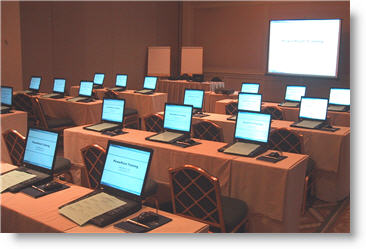
Here is a photo of a recent hands-on training session that I developed the training course materials for (of course setting up the rental computer settings made for a very early morning before attendees arrived).

– Troy @ TLC

By |2016-11-17T14:36:47-08:00November 1st, 2006|Resource/Misc, Software/Add-Ins|

One Last Look at DVI

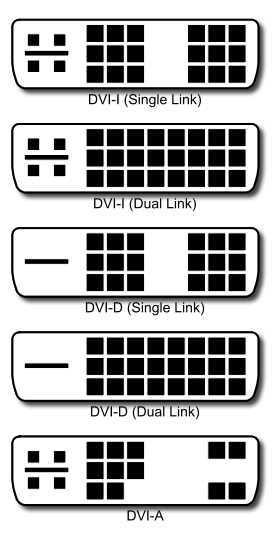
Just as a final parting look at all the flavors of DVI, here is a diagram of each connectors pin configuration. The important thing is DVI-A and DVI-I have the four connectors around the slotted connection, while DVI-D does not.

Dual-Link, the simple explanation: for high-resolution displays (eg. 2560×1600).

– Troy @ TLC

By |2016-11-17T14:31:56-08:00October 24th, 2006|Resource/Misc|

What is “DisplayPort” ???

This is one to take note of – possibly more than all the previous posts on VGA, DVI, HDMI (and others not discussed such as SDI, etc.). DisplayPort is a NEW display standard that was approved by VESA in May of this year (2006).

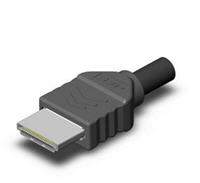
DisplayPort is a one-stop connector solution that looks to be implemented across the board on LCD monitors, CRTs, Plasma TVs, projectors, etc. It looks similiar to the HDMI connector and it transmits both high-definition video and multichannel audio.

The reason it looks to be the next big thing is it already has the support of big companies like HP, Dell, ATI, Nvidia, Phillips, Samsung and many others. Remember, you heard it here.

– Troy @ TLC

By |2016-11-17T14:31:27-08:00October 23rd, 2006|Resource/Misc|
Go to Top