
Why Does My Add-in Not Install With 64-bit Office?
Following the previous post, this is another confusing issue I am hearing a lot. Here is the scenario:
– Super cool new 64-bit operating system computer
– Install the latest and greatest MS Office 64-bit
– Attempt to install favorite PowerPoint add-ins and nothing works….

Add-ins need to be written/coded to work specifically with the 64-bit version of PowerPoint. At this moment there are very few add-ins that have 64-bit versions. So, if you are running the 64-bit version of PowerPoint, do not plan on using any add-ins.
This of course will change over time as the add-in developers have opportunity to create 64-bit versions of the existing 32-bit versions (and I am waiting just like you for this to happen!).
– Troy @ TLC
64-bit Office vs. 64-bit Operating System
This question, or rather confusion, seems to be coming up quite a bit and I thought it would be good to clarify things.

1. Your computer operating system (Windows XP, Vista, Windows 7) can be either 32-bit or 64-bit. To be 64-bit the computer hardware/motherboard must support 64-bit processing. BUT you can have a 64-bit capable computer running a 32-bit operating system (OS).
2. Office 2010 is available in 32-bit and 64-bit versions. To install the 64-bit Office 2010, the computer must have a 64-bit operating system. AND the 32-bit Office 2010 can be installed on a 64-bit operating system.
– Office 2000, XP and 2007 are only available in 32-bit versions.
Basically, Office and the operating system are separate entities. Just because it is a 64-bit computer, does not mean it must use a 64-bit version of PowerPoint.
– Troy @ TLC
Great Callout from Story About Presentations!
“[It is] estimated that more than 50 million presentations take place each day across the world, with a majority being poorly designed and/or delivered.”

Oh, that is a GREAT callout! I found it in an August 16 article called “Making that next presentation requires preparation”. The story itself I found just okay. But the opening statistics and position that presentation design is important to virtually every career was especially good. Read the full article here.
– Troy @ TLC
Online Seminar – Convert PPT to Webcast (by me)
The funny thing is I received this email, probably like many of you. What caught my attention is that I am the instructor for the seminar, but it is not on my calendar… Oh, this is a “re-run” of a training I did awhile ago!
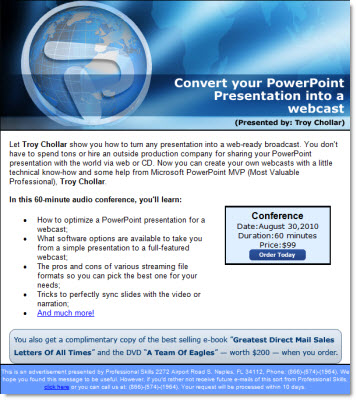
I won’t be at this one in person, but it is good. Details here.
– Troy @ TLC
PowerPoint presentation outlines couples future
Seriously, the title for this post says it all. Here is the original story from the Los Angeles Times.

“Though the wedding was steeped in traditional elegance, there was nothing traditional about this couple’s courtship. After they’d dated for six years, (the Bride) asked for a timeline of their future. (The Groom) responded by presenting a full PowerPoint presentation outlining their next three to five years together. Six months later — true to the plan’s first benchmark — the two were engaged.” And they where married in July (I am assuming also outlined in the PowerPoint presentation timeline).
– Troy @ TLC
“The PowerPoint Balancing Act”
This recent article caught my attention and the author stays on track with solid advice about presenting AND using PowerPoint. You can read the full article at Bloomberg Businessweek here.

It may be perceived as a harsh statment, but I believe the best point is the 2nd to last paragraph:
“PowerPoint is a convenient whipping horse for failed presentations. Yes, the program—and others like it… allow for the creation of elaborate (slides). A plethora of material is not the problem. The fault for a poor presentation lies not with the technology, but with the presenter.”
– Troy @ TLC
A Day With Photoshop Guru Bert Monroy
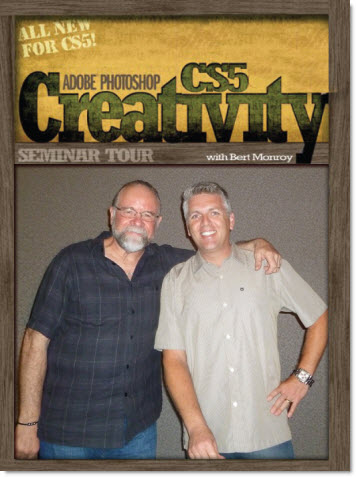
A few weeks ago back Kelby Training had a Photoshop CS5 seminar in San Diego. It was a good day and the instructor was Photoshop guru Bert Monroy – who was kind enough to let us take a photo together.
– Troy @ TLC