
“Create A Spark” PPT Contest
The folks over at Microsoft Office Online are hosting a PowerPoint contest!

“Create a Spark” is for PPT 2007 entries of short presentations (10 slides max). Submissions due by June 26 and win global fame on the internet!

Find all the details here.
– Troy @ TLC
Check Out the PowerPoint “Office Intervention” Episode
I do not know the full background on the ‘Office Intervention’ clips, but they are well done and entertaining. Courtney is a real person who really is a law student with a real report (so the show premise is real). My friend Julie Terberg, a PowerPoint MVP, was called in as the expert for this episode.
Here is the link to the episode on Channel 10.

– Troy @ TLC
Even Easier -How Do You Know If SP2 Is Installed?
This is a follow-up to Monday’s post, which is one of the comments submitted to that post (thanks Adam!). We can eliminate 1 step and get the answer to what Service Pack is installed even faster!
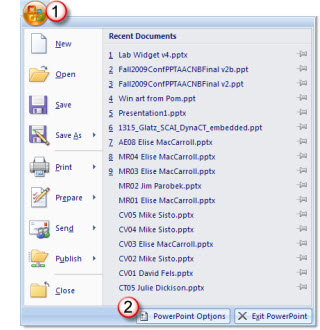
1. Office Button >> PowerPoint Options
2. Resources >> About
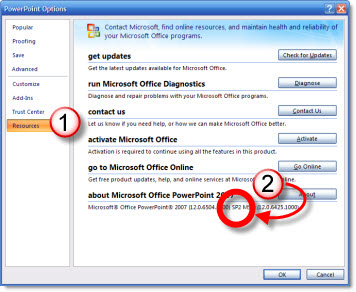
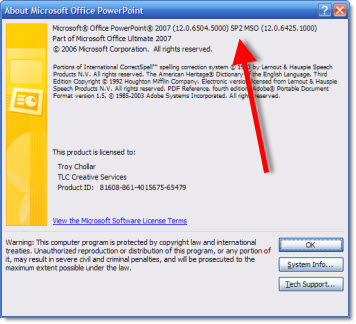
I overlooked it, but the answer is right here in the About window – even easier!
– Troy @ TLC
Bing!
Microsoft unvieled it’s new search engine that has received some high praise within the industry. And yesterday it was released to the world early!

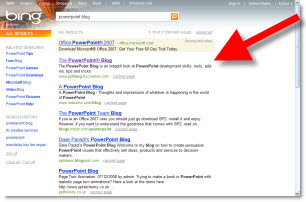
Bing has a lot of new features and technology for a search engine. Two of my favorites are type in a company name and it gives all the standard results, but also a customer service phone number. The other is great thing is ThePowerPointBlog remaining #1 when searching “powerpoint blog”! (actually 1st result is an ad for MS Office, it is MS’s search engine…)
– Troy @ TLC
How Do You Know If SP2 Is Installed?
Service Pack 2 (SP2) was released for MS Office just a short while ago. For PowerPoint it definitely fixes a number of design annoyances. But I am getting the question how to know if it is installed. Here is the process:
1. Office Button >> PowerPoint Options
2. Resources >> About
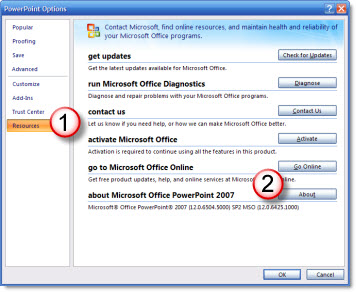
3. Top line, near end
– Troy @ TLC
Category Upgrades to ThePowerPointBlog
You may have noticed the search options have been updated with new categories. With over 3 years of PowerPoint related posts even I was finding it difficult to find things – and I wrote them all. Now searches can either be done by key word(s) in the Search bar, or with the expanded category list.
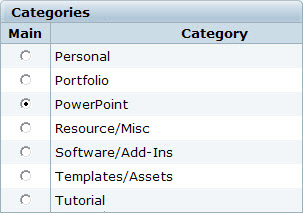
All posts, all the way back to January 2006 have been tagged with the new categories. Hopefully this will make ThePowerPointBlog a better resource for you. Try doing a category search for templates to find downloadable TEMPLATES and get ideas, or search for TUTORIALS to see all the tips and tricks in one long list of posts.
– Troy @ TLC
Any Ideas on Creating a Quiz Like This in PowerPoint?
So this is a bit different – I figure with 3-5k views a day I am asking you for advice. A recent project seemed simple enough, develop a kiosk quiz with 4 questions and showed the results, then reset for the next person. No need to capture data or integrate with a data base. I figured easy, I will just develop a set of slides and use one of the conversion apps. Turns out the simple quiz is quite difficult – but if I want to capture data, integrate with a LMS, etc. all is a part of the pre-packaged solutions.
Well I spent a few days researching options and finally coded the project in Flash. Client was happy, end result looked and functioned great, I was just a bit surprised I could not find a PowerPoint solution.
So here is the storyboard of what was needed (created in PPT 2007). Anyone have suggestions on software (add-in or stand alone) that could accomplish this?

– Troy @ TLC