
Custom Chart Sample
From yesterday’s post here is the real purpose of keeping a hidden backup. I saved out the chart as a .png image. Opened it in Photoshop, used the bars for reference to create a cut out line for the image. Then saved the new ‘chart’ out as a .png image and placed on the slide.

– Troy @ TLC
Before Ungrouping Chart – Make a Hidden Backup
For many projects I find myself ungrouping charts for custom animation or any number of other reasons. But what often happens is there is need to adjust the chart… oops it is now 50+ individual text boxes and autoshapes.
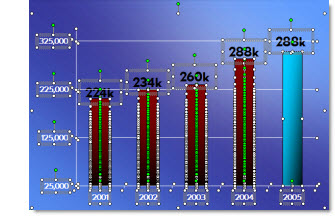
My solution is before I break apart a chart is to create a duplicate it.

Then shrink the duplicate to a miniature size.

I then move the miniature version off the slide so it is not seen during a slide show (or I have also ‘hidden’ it under another graphic).

Now I can ungroup the chart on the slide and do whatever the special needs are – and still have a backup option should the data need to be adjusted.
– Troy @ TLC
Happy Halloween!
It’s the last day of October – and Halloween. Kids are ready to go trick-or-treating and everyone is set to have fun! Last weekend Lori and I hosted our annual Pumpkin Carving Party. Everyone had lots and lots of fun and there were some really creative ideas – as well as some classics. Among the food, carving and kids the time comes for everyone to vote for the ‘kid’ and ‘Big Kid’ winner in 5 categories. My girls each won in one of the categories and my cell phone challenged pumpkin guy won one too! Have a safe and fun Halloween.

– Troy @ TLC
Free Halloween Template
This year my girls are enjoying the fun dressed as a Jester, Super Girl, and a Pirate Maiden. Hope you have lots of fun – especially if you have kids!
My treat to everyone is a custom PowerPoint template!
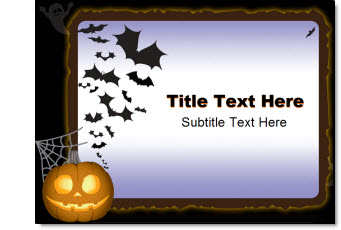
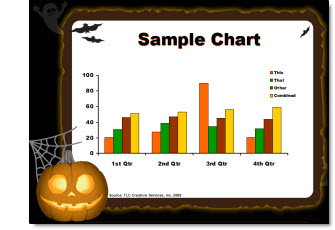
Artwork I developed this template from was purchased at Stockexpert.com.
To download the template (as a .ppt) click here (300k).
– Troy @ TLC
Insert Movie Player With Controls (PPT 2007)
To insert an instance of Windows Media Player in PPT 2007 there are a few things that need to adjusted in the application first:
1. Office Button >> PowerPoint Options >> Popular Tab
2. Check SHOW DEVELOPER TAB IN RIBBON
3. Okay
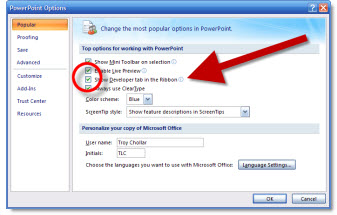
Now your PPT 2007 ribbon has a new tab available – the Developer Tab
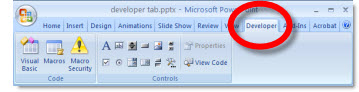
To insert Windows Media Player from PPT 2007:
– Go to the developer tab
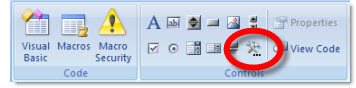
– Click hammer icon
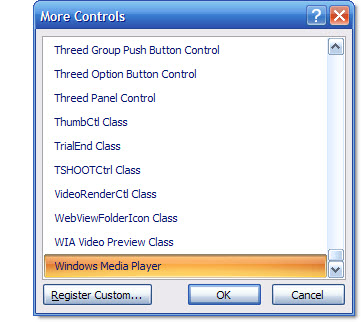
– Scroll to bottom of list and select windows media player
Drag a marque to the size and position you would like the media player (it can be adjusted after inserted) and slide will look like this:

– Troy @ TLC
Insert Movie Player With Controls (PPT 2003)
You can insert a full instance of Windows Media Player on a slide so you have all of the playback controls for a movie. So you have a slide like this:

In PowerPoint 2003:
– Insert >> Object
– From the bottom of the list choose WINDOWS MEDIA PLAYER
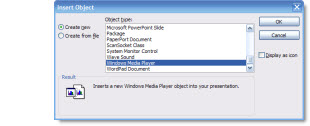
The media player is now inserted on the slide.
– Troy @ TLC
Express Card Sizes – Which One Are You?
There are some great new products coming out that make use of laptop PCI Express Cards – such as SD card readers or the ultra cool MoGO Bluetooth mouse/presentation remote.
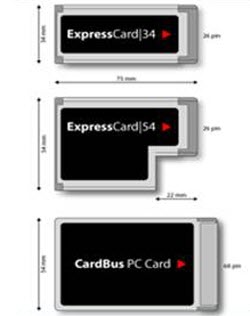
But the confusion comes from the fact that there are actually 2 “standards” for express cards, each a different size and they look similiar to the older PC Card. An important note is that the express card 34 will fit and work in the larger express card 54 slot.
So for reference here are the 3 cards, just match up shape/size to the plastic sleeve in your laptop and you know what to purchase.
Troy @ TLC