
Download Office 2007 today (or pay)
In an interesting move, Microsoft will begin charging a $1.50 to download Beta 2 of Office 2007.
“We are thrilled with the incredible excitement around the upcoming 2007 Microsoft Office system as evident by more than 3 million people using the beta 2 since its release two months ago. Having exceeded our beta 2 participation goals by 500%, we have had to make the business decision to implement a cost recovery measure for future downloads of beta 2 beginning 2 August, 2006.” (source: The Register.com)
New Ribbon UI Movie
Microsoft’s Jensen Harris recently posted this movie showing how the new Ribbon can be minimized and still used. While not a big fan when I first viewed the ribbon in the pre-beta, there has been A LOT of good work going on at Microsoft and my expectations are looking better! Check this 38 second movie here (or high-bandwidth version here).
-Troy @ TLC
Online Demo of PowerPoint 2007
If you have not installed the Office 2007 Beta and want to see what is really new about the next version of PowerPoint, check out this online movie from Microsoft that does a good job a showing many of the new interface’s features. Click here to view.
-Troy @ TLC
Line Spacing and the Magic of F4
Here is our sample text.

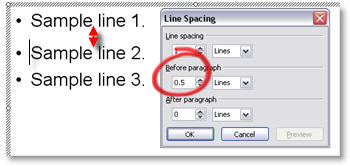
To help visually cluster the information by the primary bullets we position the cursor on the second bullet and add additional spacing BEFORE PARAGRAPH of 0.5
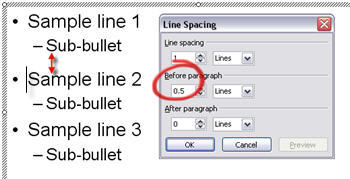
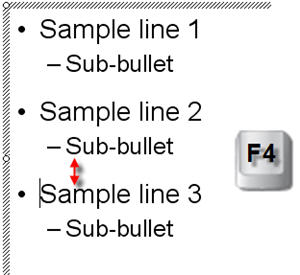
Now to do the same for the third bullet we can either position the cursor on the third bullet line, open the Line Spacing dialog and enter the new distance OR we position the cursor on the third bullet line and click the F4 button!
F4 is a keyboard shortcut in PowerPoint that repeats whatever the last action was. In this case it automatically changes the BEFORE PARAGRAPH line spacing from 0.2 to 0.5, matching the bullet above!
-Troy @ TLC
What Does Line Spacing Do?
Here is a sample three lines of text and the default line spacing dialog.
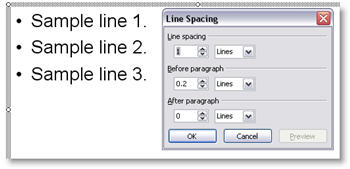
If I select the entire text box and change the LINE SPACING all of the lines move further apart as you can see here.
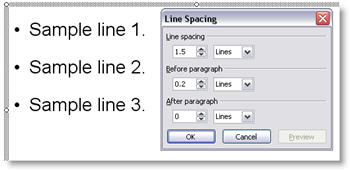
If I place the cursor in line 2 and add BEFORE PARAGRAPH space, the distance between line 2 and line 1 increases. The distance between line 2 and 3 remains the same.
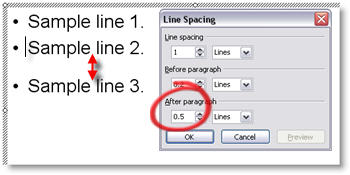
If instead I place the cursor on line 2 and add AFTER PARAGRAPH space, the distance between line 2 and 3 increases. While the distance between line 1 and 2 remains the same.
-Troy @ TLC
Access Line Spacing Dialog
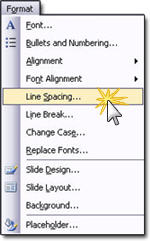
With your cursor positioned at the line to be adjusted, or with the entire text box selected (will globally change all lines in text box), go to FORMAT LINE SPACING.
This brings up the Line Spacing Dialog which has three settings that can be adjusted.
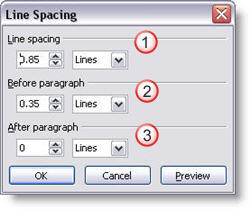
(1) Adjusts the distance between the lines of a paragraph.
(2) Adjusts the distance between the start of this paragraph and the one above it (separated by a hard return).
(3) Adjusts the distance between the last line of this paragraph and the one below it (separated by a hard return).
-Troy @ TLC
Use Line Spacing to Increase Legibility
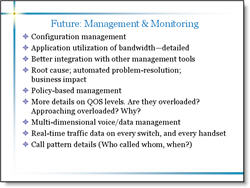
Here is a sample from a recent project (logos, names and telling content have been removed to protect the design challenged). Here is the original slide:
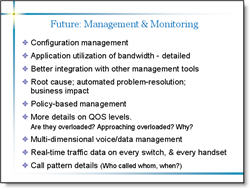
Here is the revised slide:
I was somewhat limited in what could be done. Things like the template could not be altered, content could not be edited, etc. But here are some details of what was adjusted:
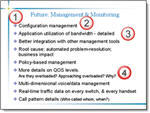
(1) I adjusted the template so the content text box was separated a bit more from the header text.
(2) I changed the font to a more legible Arial, which does not have the serifs (small ‘hooks’ on the end of the letters)
(3) I adjusted the overall line spacing from 0 to .35, this gives a bit of room between each bullet and allows the brain to “clump” the content into sections – which makes it more legible.
(4) Used a soft return (SHIFT RETURN) and made sub-content on its own line and reduced its font size. Did the same with the sub-content at the end of the last bullet.
There is a lot of small things that can be done to text heavy slides to make them more legible. The problem is that this usually involves modifying the content on a slide-by-slide basis, which can be time consuming. But the results are an audience the is able to understand your message clearer!
Troy @ TLC