Monthly Archives: September 2026

Free PowerPoint QAT Profile!

The PowerPoint Quick Access Toolbar, or QAT, is the #1 native PowerPoint feature everyone should be using to improve their productivity!

  • Included with PowerPoint
  • PowerPoint for Mac QAT has limited options (hopefully something the PowerPoint dev team will update to match the Windows PowerPoint QAT!)
  • The tedious process of setting up the QAT layout with buttons is super easy by importing a saved profile!
  • note: if the buttons on the QAT are words and not icons, go to this earlier post with the steps to change things back to icons (My QAT is All Words! Give Me Back My Icons, Dec 26, 2204)
  • Note: all of the examples, and the downloadable preset QAT profile, are all for Windows PowerPoint

FIRST

  • The default setup for the QAT is to be above the Ribbon.
  • Move it to under the ribbon.

DOWNLOAD AND INSTALL

  • Download the TLC Creative QAT (CLICK TO DOWNLOAD)
  • Open Microsoft PowerPoint.
  • Go to File > Options > Quick Access Toolbar (or Customize Ribbon).
  • Click Import/Export
  • Select Import Customization File.
  • Choose either a QAT you have saved, or the downloaded “TLC Creative Custom QAT_PowerPoint Customizations.exportedUI”

THE TLC CREATIVE PRESET QAT

  • This version of the QAT is all native PowerPoint functions (search “QAT” for previous blog posts where I talk about add-in functions I also have on my design computer).
  • 44 formatting functions always available!

Hoping this makes your work time in PowerPoint faster and more efficient!

-Troy @ TLC

By |2026-09-14T16:13:23-07:00September 15th, 2026|PowerPoint, Resource/Misc, Software/Add-Ins|

Rounded is Here to Stay in PowerPoint

Back in July 2021, we wrote about PowerPoint’s visual refresh and Microsoft’s generous use of rounded corners throughout the user interface. At the time, Microsoft was referring to the style as “Soft Corners,” and we pointed out how it showed up across the Ribbon, the QAT, and, especially, the slide thumbnails in the left filmstrip.

Now we have an update, five years later.

THE UPDATE

The rounded corners are still there, and for presentation design work, they are still not great. 
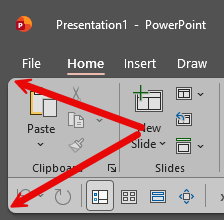
The main issue still is the slide thumbnails. A PowerPoint slide is a rectangle, and designers build around that rectangle. And while the actual slide canvas still displays correctly, the thumbnail preview rounds off the corners, which slightly changes how the slide appears at a glance. 
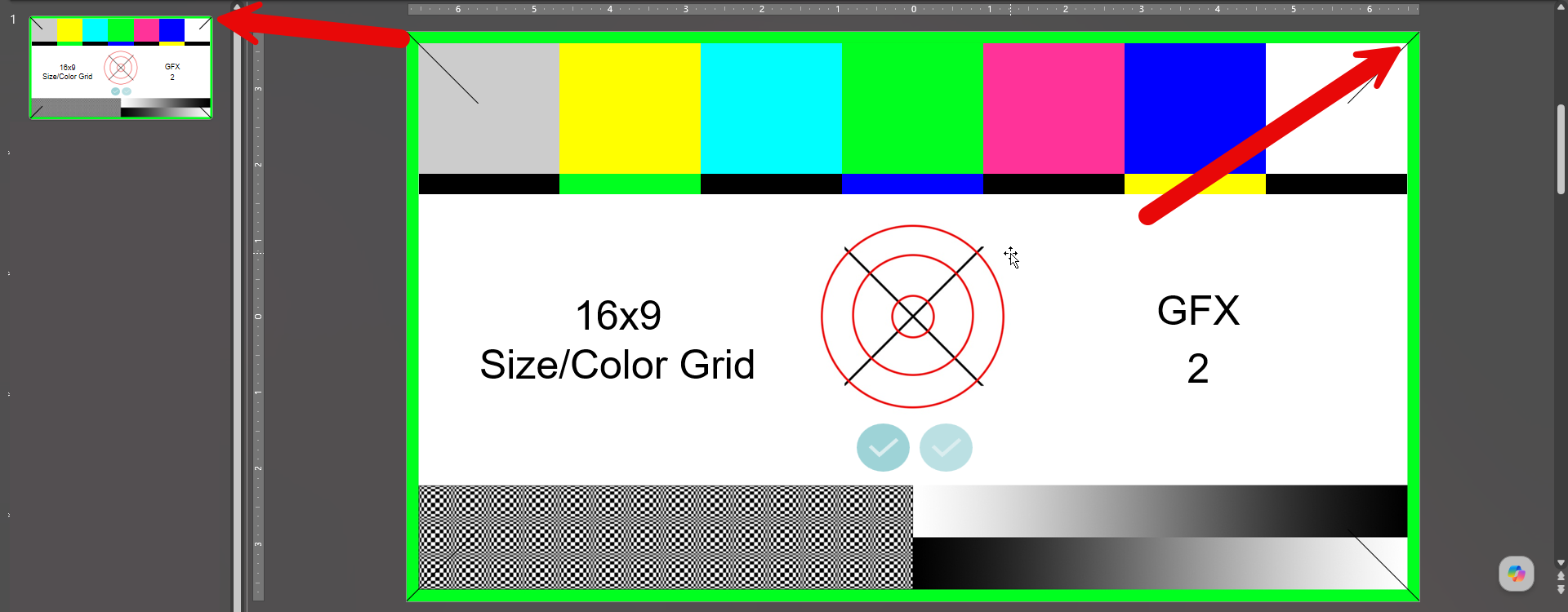
Sometimes that is barely noticeable… but other times, especially with slides that use strong borders, corner details, or a very clean linear style, the thumbnail can make the slide look different from what it actually is!

That sounds like a tiny UI detail, but in a visual design tool, small UI details like this matter so much. 

Rounded corners can make an interface feel modern and consistent with current app and web design trends, but in PowerPoint, the slide thumbnail is not just decorative; it’s a working reference. Designers use thumbnails to scan layouts and spot design issues quickly. When the thumbnail changes the perceived shape of the slide, it becomes less reliable as a reference tool. 

So, five years later, our view has not really changed: the rounded UI is still part of PowerPoint, and the rounded slide thumbnails are still not ideal.

-Troy @ TLC Creative

By |2026-09-01T11:49:24-07:00September 3rd, 2026|Resource/Misc|

New Podcast Episode Available! “What Makes the 2026 Presentation Summit a Must-Attend Event for Presentation Professionals?”

Episode 253 welcomes Presentation Summit founder Rick Altman to chat with hosts Troy Chollar, Sandy Johnson, and Nolan Haims about the upcoming 2026 Presentation Summit. Celebrating its 24th year, the Summit remains the gold standard for presentation training and networking.

It is a fully virtual event, globally accessible (for both attendees and presenters!), a packed schedule with the industry’s best presentation instructors, and amazing non-industry guest keynotes.  Want to know what makes this year’s event special? Tune in and get a behind-the-scenes preview before the conference begins. Listen on your favorite podcast app, or at The Presentation Podcast site here. 

By |2026-08-25T09:27:04-07:00September 1st, 2026|Resource/Misc|
Go to Top