
New Podcast Episode, #256, AND A Reusable Framework for PowerPoint Interactive Slides
New episode of The Presentation Podcast now available! Microsoft’s new Interactive Slides feature brings dashboards, simulations, and app-like experiences directly into PowerPoint – all on a single slide. For episode 256, Troy Chollar of TLC Creative Services talks about what he found impressive and limiting. Listen to his review unfold into the conclusion that Interactive Slides aren’t any easy fit in traditional presentations, but they are a new tool for audience interaction, or standalone kiosk environments. Listen on your favorite podcast app, or at The Presentation Podcast site here.
Here is the 5-sentence reusable framework Troy uses to build PowerPoint Interactive Slides. In PowerPoint, with a Copilot Premium license, click INSERT > INTERACTIVE SLIDE:
- Create a new interactive slide based on [source].
- Audience: [audience]. Purpose: [decision, explanation, exploration, training, comparison].
- Allow the user to [filter, click, expand, drill down, adjust, reveal].
- Include [KPIs, charts, filters, tabs, tooltips, reset button].
- Match the presentation theme, preserve the source slide, and make the initial state useful as a static image.
Click Here to Download (.pptx, 250K) and experiment with this Interactive slide created from this prompt:
“Create a new interactive slide based on this slide’s template. Audience: podcast listeners learning about PowerPoint interactive slides. Purpose: is to showcase interactive slide functionality and design. Allow the user to click buttons to pick their favorite host (Troy, Nolan, Sandra), and use a slider to emphasize their favorite podcast conversation type (PowerPoint design skills, the business of presentation, speaker skills, guest episodes). Include the Presentation Podcast logo (attached), charts, filters, tooltips, and a reset button. Make the initial state useful as a static image.
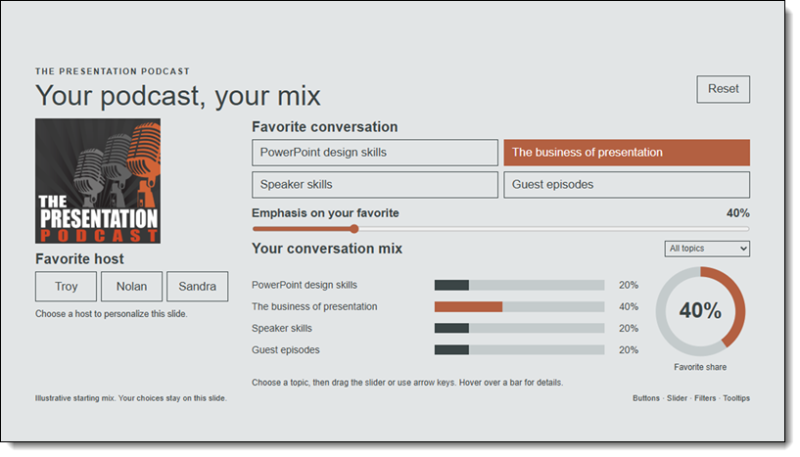
After opening the presentation, read the Presenter Notes and click, drag the slider, experience an interactive slide!
– Troy @ TLC