The PowerPoint® Blog

I work with PowerPoint on a daily basis and I am very honored to be a Microsoft PowerPoint MVP. We have a talented team of presentation designers at TLC Creative Services and ThePowerPointBlog is our area to highlight PowerPoint tips, tricks, examples and tutorials. Enjoy! Troy Chollar

Arghhh – the frustration of automation!

Hello, Tech Support. Yes, I have a problem, none of my blog posts have shown up…

Happily, it is very busy here at TLC Creative Services. But I am not happy with the blog. I setup 2 weeks of posts that everyone should have been enjoying while I bury myself in presentation design, new office build out and other design tasks. But apparently you have to click the “publish” button to make those spooled up posts show up on the days they are suppose to! Sorry, my oversight. The good news is between the posts that did not show up, the new ones I have been working on, and the great upcoming events I have the next two months of posts covered! I will reorganize things and start the process (again) tomorrow.

– Troy @ TLC

By |2016-08-16T09:56:57-07:00September 2nd, 2011|Personal|

Review of FreeVectors.net

Free Vectors .net is an online resource to find a large variety of professional and free vector graphics (click here to open).

Navigating the site is not easy as the images are not organized into categories, but there is a good search bar at the very top that helps find the image type needed.

Once an image is found, click the download button. The Free Vectors.net website is an aggregator of images from lots of other small sites, so clicking the download button sends you to another web page. Each webpage has different download processes, but all images are assured to be free (of cost and use rights).

Because PowerPoint does not do well with .eps images, after downloading the image, it is best to open in Illustrator. Then use the “Save for web and devices” to create a PNG. image or “Export” as a .emf for a scalable vector image (Saving files from Adobe Illustrator will be next set of posts).

– Troy @ TLC

By |2016-08-16T09:57:21-07:00August 17th, 2011|Personal, Resource/Misc|

Digital Signage Via PowerPoint – On It’s Side

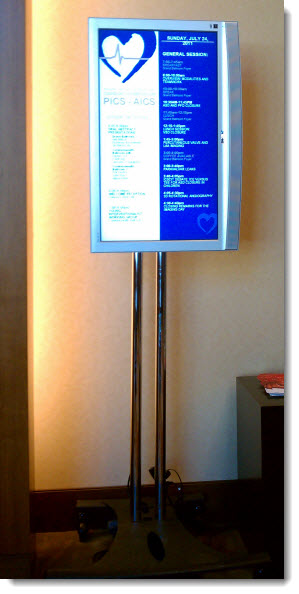
This is the digital signage at a recent show. It was updated every morning with the attendee schedule for that day. There were a number of these 52″ plasma screens outside each ballroom entrance, all displaying a PPT slide.

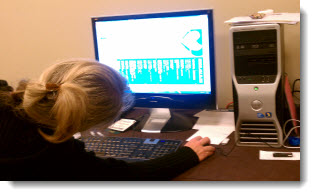
But designing these slides is a bit challenging. The plasma screen is rotated, but the computer still sees a horizontal 1920×1080 display. The solution is to create a sideways slide, as Lori is skillfully doing.

– Troy @ TLC

By |2016-08-16T09:58:16-07:00August 15th, 2011|Personal|

Really Big Tech Area

This was a much bigger production over previous posts with my graphics tech area backstage with a several other tech departments. My department and five computers are highlighted by the red line.

– Troy @ TLC

By |2016-08-16T09:58:46-07:00August 11th, 2011|Personal|

Bigger Tech Table

This recent show was another where I was “front of house” (where the tech area is in the audience area, facing the stage). You can see my 3 show computers in the foreground and the fantastic staging design and work of the lighting director.

– Troy @ TLC

By |2016-08-16T09:59:12-07:00August 9th, 2011|Personal|

“FPO” – What Is It?

It may be the print design background or work with ad agencies, but I use “FPO” in presentation proofs all the time.

FPO = For Position Only
“FPO” is used for temporary or unapproved images. The images are usually low-resolution comp images from the image resource (ie. istockphoto, Dreamstime, etc.). Its purpose is to show the proposed layout and receive client approval on the image before purchasing. When approved, the FPOs are replaced with the high-res images.

– Troy @ TLC

By |2016-08-16T10:00:19-07:00August 5th, 2011|Resource/Misc|

Classic TV Commercials for Your Presentation – Free!

Integrating videos into a presentation is now a reality with the upgrades to computers and the better multimedia handling of PPT 2010. Using a nostalgic (ie. old) television commercial is a fun and unique video element. The Internet Archive has a collection of over 300 classic TV commercials and public service announcements to download for free.

Click here to search for a commercial.

– Troy @ TLC

By |2016-08-16T10:00:44-07:00August 3rd, 2011|Resource/Misc|

My IP Address Shows What?

This is a pretty amazing use of technology. An IP address (Internet Protocol Address) is unique to every web enabled device. When you log onto the internet, you provide some details about yourself, such as the country and region you are in. But this website overlays that information on a Google map and shows where you are!

Click here to go to IP-Address.cc to see where you are with the IP address lookup.

– Troy @ TLC

By |2016-08-16T10:01:33-07:00August 1st, 2011|Software/Add-Ins|

Best Travel Site for Flights – Hipmonk.com

Completely off topic, but I have been using the hipmonk website for the past few months and it is GREAT for all of the travel planning I do.

Clean and streamlined interface, instant results, and results that are functional! If you are planning a trip with airline flights, check this out – and no I am not a spokesperson for it, just really happy to find things that make my life easier.

Troy @ TLC

By |2016-08-16T10:01:51-07:00July 24th, 2011|Personal, Resource/Misc|
Go to Top