The PowerPoint® Blog

I work with PowerPoint on a daily basis and I am very honored to be a Microsoft PowerPoint MVP. We have a talented team of presentation designers at TLC Creative Services and ThePowerPointBlog is our area to highlight PowerPoint tips, tricks, examples and tutorials. Enjoy! Troy Chollar

Animation Pane is Smart Enough To Disappear

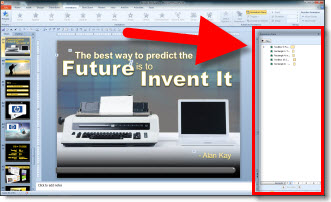
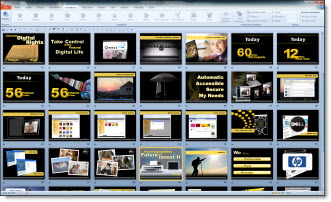
With PPT 2010 the animation has a new trick. When editing a slide the Animation Pane can be opened in its standard right-side position.

But when switching to Slide Sorter view it automatically closes.

It is a minor thing, but the animation pane is of no use in slide sorter view. In all early versions it remained open/visible just taking up screen realestate. And when you go back to editing a slide it appears open again until you close it.

– Troy @ TLC

By |2016-08-16T11:36:55-07:00May 10th, 2010|Software/Add-Ins|

Get Office 2010 for $59 – really

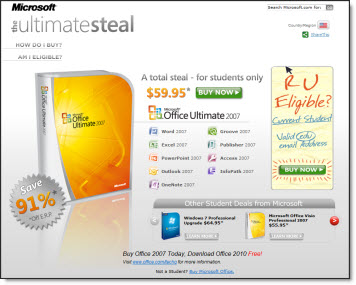
Read about this deal at Techinch which is a great deal – if you are a college/university student or faculty.

To summarize the deal:
– Purchase Office 2007 at super price at Ultimate Steal here. Need a valid .edu (education) email address to purchase
– When Office 2010 is released in June, use Microsoft’s free upgrade offer

– Troy @ TLC

By |2016-08-16T11:37:34-07:00May 4th, 2010|PowerPoint|

3D Metalic Text Style (Update)

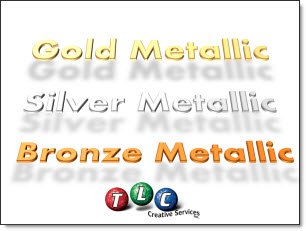
Earlier this month I showed an example of PowerPoint 3D metallic text I stylized for a presentation. Recently Matthew T. added a Bronze color to the mix and sent it back to me.

First, thanks Matthew for sharing your efforts! The updated slide can be downloaded here.

Second, for the awards show I created the effect for there was only Gold and Silver awards. So Bronze is perfect – just not needed when I created…

– Troy @ TLC

By |2016-08-16T11:37:53-07:00May 2nd, 2010|Portfolio|

Defending PPT – Easy When This is the Sample Slide

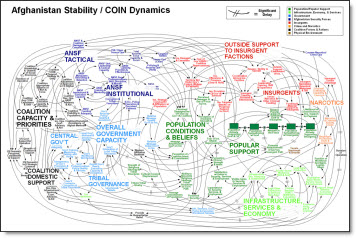
Recent headlines quote Army Gen. Stanley McChrystal, who heads U.S. and NATO forces in Afghanistan, criticizing PowerPoint presentations for creating “the illusion of understanding and the illusion of control. Some problems in the world are not bullet-izable.” When I looked a bit further I found this is the slide being referenced as not providing clear information.

hmmm…… I think action should be taken – and it has nothing to do with PowerPoint as an application, but against the company that decided this was worthy of being included in a presentation.

The offending “slide” was sourced from MSNBC. And I am confident it was not created in PPT, but by another application and imported as a graphic. Last, here is a really good webpage with a lot of people’s comments in defense of PPT. Among my favorites are:

This tool is highly misused and abused by presenters, secretaries and supposed PowerPoint ‘experts.’

It’s not the tool on the computer, it’s the tool AT the computer

I think a good strategy is to drop old PowerPoint slides from military briefings behind enemy lines. This should really confuse them…”

– Troy @ TLC

By |2016-08-16T11:38:31-07:00April 30th, 2010|Resource/Misc|

PPT 2010 and Addins

After installing Office 2010 one of the items I noticed is at launch it lists the add-ins being loaded (previous versions did not display this information).

This is most noticeable the first time the application is launched as each addin is recognized and setup. Subsequent launches go much faster, which is very good.

– Troy @ TLC

By |2016-08-16T11:40:18-07:00April 26th, 2010|Software/Add-Ins|

Facebook and Office Files with Docs.com

Well it has happened. The first application I have seen that takes advantage of the new Microsoft Office 2010 Web Apps launched Wednesday. Docs.com lets you upload Office docs (PowerPoint, Word, Excel) either on your computer or using the MS Web Apps and then share them with your Facebook friends.

It was easy to start using. I opened Facebook and logged in. Then opened a new tab and went to docs.com and was automatically setup with the Facebook connector. It is a beta, so get on the waiting list.

And if you have not seen the MS Web Apps in action, just click on any of the available docs and it will open in the MS Web App. Here is one of the PowerPoint decks viewed in the MS Web App on Docs.com

– Troy @ TLC

By |2016-08-16T11:46:19-07:00April 23rd, 2010|Resource/Misc|

3D Metallic Text Style

For a recent presentation I decided to develop this text in PPT using the text style options (vs. creating in Photoshop using preset filters). The result was liked by client and being able to edit text quickly within the presentation vs. adjusting in Photoshop and updating image was great.

Download sample slide here.

– Troy @ TLC

By |2016-08-16T11:47:08-07:00April 19th, 2010|Portfolio|
Go to Top