I work with PowerPoint on a daily basis and I am very honored to be a Microsoft PowerPoint MVP. We have a talented team of presentation designers at TLC Creative Services and ThePowerPointBlog is our area to highlight PowerPoint tips, tricks, examples and tutorials. Enjoy! Troy Chollar
Where are ‘Macro Security Settings’ in PPT 2007?
When installing add-ins in PowerPoint, the macro security settings need to be lowered from the default setting of HIGH to MEDIUM or LOW. But how do you do this in PowerPoint 2007?
First the names have changed and second the where you find them is a bit difficult if you are not familiar with the new Ribbon layout.
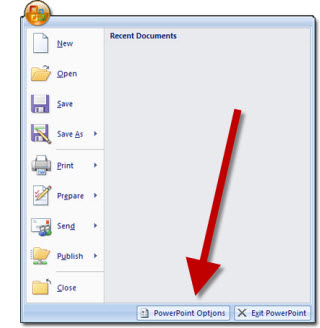
1. Click the circle Office button in the upper left corner.
2. Click on POWERPOINT OPTIONS.
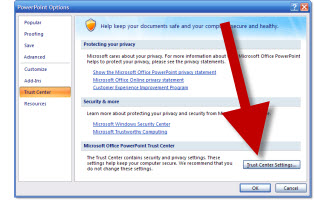
3. Go to TRUST CENTER in the left column.
4. Click on TRUST CENTER SETTINGS.
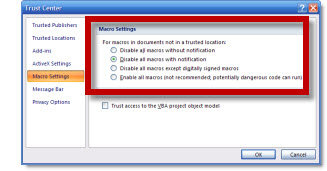
5. Adjust to needed setting, click OK and exit PowerPoint to save setting.
– Troy @ TLC