The PowerPoint® Blog

I work with PowerPoint on a daily basis and I am very honored to be a Microsoft PowerPoint MVP. We have a talented team of presentation designers at TLC Creative Services and ThePowerPointBlog is our area to highlight PowerPoint tips, tricks, examples and tutorials. Enjoy! Troy Chollar

PPTXtreme MoreEdit Released

I have been happily using a beta version of this add-in for quite awhile. Now it is available to all (approx. $40 US). Here is their official press release:

pptXTREME releases moreEdit for Microsoft PowerPoint

pptXTREME has released moreEdit for Microsoft PowerPoint 2000, XP, 2003 and 2007. moreEdit consists of eight tools: SaveSelected, MakeHeader, MakeBody, Edit Word Art, MatchWidth, MatchHeight, Hide/Unhide and Notes.

With moreEdit’s MakeHeader and MakeBody, shapes that are created in PowerPoint without using the slide master can be formatted to the master. The process also removes “fake” bullets and extra lines and spaces left by the author to give the appearance of PowerPoint bullets.

The SaveSelected tool saves slides selected by the user into a file from within PowerPoint’s own sorter view.

Multiple elements on a slide can be aligned and formatted with the same width or height using the MatchWidth or MatchHeight tools. moreEdit’s Edit Word Art maintains the Word Art’s font size and formatting when you edit the Art’s text.

moreEdit’s HideSlide and UnhideSlides adds to PowerPoint’s default “hide” capabilities by making the hidden slides more visible in sorter view.

The Notes tool inserts text boxes for notes to the author that are formatted to be seen but can be hidden.

Get the full-function trial, click here.

– Troy @ TLC

By |2016-11-17T16:17:23-08:00July 23rd, 2007|Software/Add-Ins|

German PPT Blog

Ute Simon, a Microsoft PowerPoint MVP, sent me a link to their
PowerPoint-User-Team blog. The great thing is that an entire group of power users take turns with the posts.

Note: Ute and the entire PowerPoint-User-Team are in Germany, so the blog is also in German. Now if I could only understand it all…

Look at it here.

– Troy @ TLC

By |2016-11-17T16:16:37-08:00July 20th, 2007|Software/Add-Ins|

(Updated) PPT Overlays To Graphics

Sorry for the bad link posted a week ago. I just updated the download link to actually allow you to download the sample file. Here is the original post again (link also works in original post too).

————-
The final element was to create a placeholder for the financial information. I added another custom fill autoshape, this time a rectangle. After sized it was ‘sent to back’ and the appropriate text was added.

If you would like to download this slide, click here.

– Troy @ TLC

By |2016-11-17T16:15:53-08:00July 19th, 2007|PowerPoint|

Sobolsoft Add-Ins

I use and have tested a ton of PowerPoint add-ins. I was recently sent a link to a company I have never seen (thanks Josh) and discovered they have a wide range of Microsoft Office add-ins.

Many are very project specific (ie. not useful outside their exact use), but definitely a resource to bookmark. Click here to check it out.

– Troy @ TLC

By |2016-11-17T16:14:35-08:00July 14th, 2007|Resource/Misc|

SpinArt Presentation

A recent project had me reminiscing about my childhood. This “presentation” was basically very large wall art to accompany the event theme. Remember doing Spin Art projects…

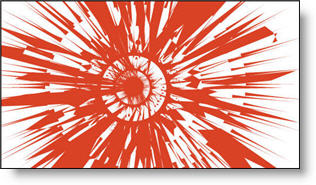
Using some graphics designed in Illustrator (vector based, exported as .EMF’s, and imported into PowerPoint) and some creative animation I recreated these red spin art elements.

Full presentation had several different spin art elements and was a 9 minute loop. Happily, the SpinArt was a huge success and spun all night long!

To see a quick movie of two of the spin art elements animation click here.

– Troy @ TLC

By |2016-11-17T16:13:56-08:00July 12th, 2007|Portfolio, PowerPoint|

Wedding Day!

Just a personal note, but one I am extremely excited about!
Today we will be attending my sister’s wedding!

Congratulations Julie and Tim!!

By |2016-11-17T16:12:01-08:00July 8th, 2007|Personal|

Connection Speeds ARE Different

In developing webcasts for companies I continuously explain many of the factors that affect people’s ability to view, fast-forward, zoom, etc. “The internet is the internet and I have a fast connection – right?”

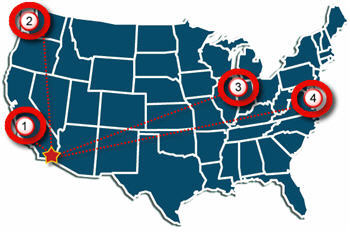
The simple answer is no. There are factors of your connection speed, your computers power, the server connection, the amount of traffic and geography. Yes, geography can have an impact on the connection speed. To illustrate, let’s look at a quick example.

I live in San Diego, CA (the red star in the lower left of the country). But if I connect to servers in different parts of the country I have different connection speeds; from 14.5MB down to 7MB.

Connection 1: San Diego to Los Angeles

Connection 2: San Diego to Seattle

Connection 3: San Diego to Chicago

Connection 4: San Diego to Atlanta

Note: For viewing a streaming movie, or webcast, the Download speed is the important number.
Note 2: Just noticed my ‘Atlanta’ circle is not over Atlanta…

All of these connection tests were done within 5 minutes. I used the connection test at Speakeasy.net (see 12/14/06 post for more info). Last, I am on a Fiber Optic connection, so your results may not reflect these numbers.

By |2016-11-17T16:11:03-08:00July 4th, 2007|Resource/Misc, Software/Add-Ins|

Whose Idea Was This? (Vista Recycle Bin)

So I have been working with Windows Vista on my primary machine for a while now and I still keep finding things that make me pause.

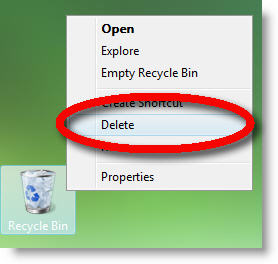
Now when you right-click the recycle bin to empty (delete) your files there is a new option – Delete. But this is not the delete your files delete, it is the delete the recycle bin delete!

Hmmm, maybe not the best place for a command named this…

– Troy @ TLC

By |2016-11-17T16:10:35-08:00July 2nd, 2007|Software/Add-Ins|
Go to Top