I work with PowerPoint on a daily basis and I am very honored to be a Microsoft PowerPoint MVP. We have a talented team of presentation designers at TLC Creative Services and ThePowerPointBlog is our area to highlight PowerPoint tips, tricks, examples and tutorials. Enjoy! Troy Chollar
PPT Autoshape BG (1)
My goal was to use a blue from the corporate color scheme and develop a visual with a sense of depth and subtle motion.
The first element is a full screen autoshape. The base color is a blue from the corporate color scheme. The secondary color is a darker version of the same blue.
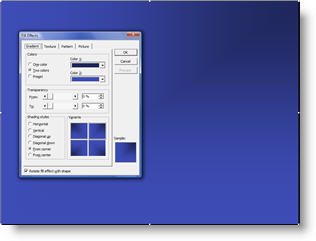
Using the FILL EFFECTS options the darker blue radiates from the top right corner. Next we begin layering autoshapes.
– Troy @ TLC