I work with PowerPoint on a daily basis and I am very honored to be a Microsoft PowerPoint MVP. We have a talented team of presentation designers at TLC Creative Services and ThePowerPointBlog is our area to highlight PowerPoint tips, tricks, examples and tutorials. Enjoy! Troy Chollar
Why Do My Slides Start at Zero?
Had a client call with this situation – which is frustrating if you don’t know where to look.
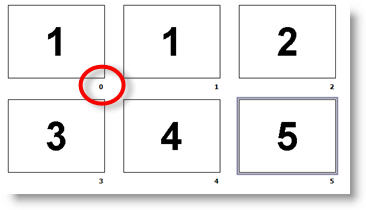
You look at your slides in Slide Sorter view, or on a printout, and the first slide is not labeled as #1, but as #0.
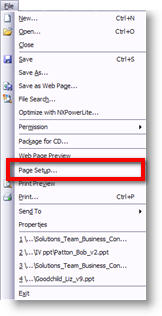
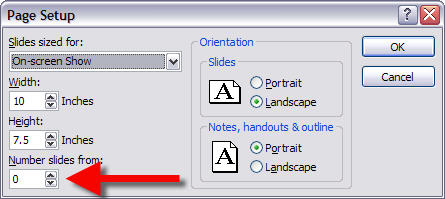
To “fix” go to FILE >> PAGE SETUP
In the Page Setup Dialog note the NUMBER SLIDES FROM option. Change the “0” to “1” and all is back to normal.
– Troy @ TLC