Resource/Misc

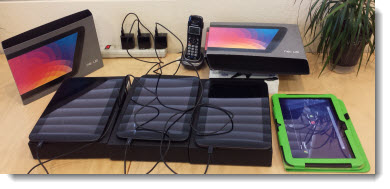
Stack of Nexus 10 Tablets

Friday we were loading a completed interactive brochure project onto Nexus 10 tablets to be shipped to the client’s tradeshow event (can you guess which tablet is our staff test one…).

So how was PowerPoint involved in a 300+ page interactive brochure? The full project was storyboarded as a slide deck so the client could review and do copy edits before moving to the HTML5 coding.

– Troy TLC

By |2016-08-10T10:41:24-07:00June 3rd, 2013|Resource/Misc|

Google and its New Image Searches

Click here to read the full commentary article on Google’s new/refined image search process.

“I did a Google search for the image” has become a standard phrase I hear a lot. It is said without thought of image quality (which often is why I am asking where the image was sourced from, in hopes of getting a higher resolution image to work with), ownership or copyright issues. Recently, Google has revised its image search display process to simplify the process. For presenters, this may be helpful, but I can definitely understand the loss of website recognition and ease of “borrowing” images.

Example of the “old” Google search results (shows source website in background):

Here is what is seen from a Google image search today (shows only image, mage specs, and related images):

– Troy @ TLC

By |2016-08-10T10:42:19-07:00April 22nd, 2013|Resource/Misc|

Is This Dangerous – or Bad?

AV equipment is pretty amazing. It is shipped all over the country, connected-unconnected continuously (unlike the cable monitor on your desktop that was connected once and then ignored for its life) and usually setup and used in fairly dark venues. With all of this use in harsh environments, I get to see some pretty spectacular uses and failures.

This poor cable has met the end of its life (although it was setup for me to connect one of my show computers too). And just like in “A Christmas Story,” this may be a scary power setup.

– Troy @ TLC

By |2016-08-10T10:42:47-07:00April 19th, 2013|Resource/Misc|

Microsoft Launches New MVP Award Website

I count being awarded as a Microsoft MVP for PowerPoint since 2004 as one of the “career” recognitions I am very proud of. The PowerPoint MVPs are fantastic, good friends and people you can trust to provide real answers to presentation questions.

Today, Microsoft launched a new version of MVP Award public website at https://mvp.microsoft.com. And this year is the 20 year anniversary of the program (pretty big accomplishment considering most software companies have not been around for 20 years yet).

Not a lot for you to see, but it is a good resource if you want to see who the MVPs for any Microsoft application are, and something I am humbled to be listed at.

– Troy @ TLC

By |2016-08-10T10:43:49-07:00March 25th, 2013|Personal, Resource/Misc|

Creating a PowerPoint Shamrock

Working with PowerPoint shapes, the shape merge and edit points tools, and some gradient fills, 3D and other effects, Kristen, a TLC Creative Services designer, created this PowerPoint shamrock.
[youtube src=”https://www.youtube.com/embed/DDtBgQCodDI?rel=0″]

Download the final slide here 200KB

– Troy @ TLC

By |2016-08-16T08:41:53-07:00March 13th, 2013|Resource/Misc|

Gigapixel.com – Amazing Technology!

Gigapixel.com is a service that produces extremely high resolution images. A Gigapixel image is a digital image bitmap composed of one billion pixels (1,000 megapixels), or more than 100 times the information captured by a 10 megapixel digital camera.

For example, here is a photo of the mass crowd of Canadians at the Vancouver Canucks Fan Zone along Georgia St. for Game 7 of the 2011 Stanley Cup Final. The image was captured at 5:46 pm on June 15, 2011. It is made up of 216 photos (12 across by 18 down) stitched together, taken over a 15-minute span, and is not supposed to represent a single moment in time.

Note the zoom control in the left portion of the above image. Here is maximum zoom on the image! This street sign is where the red arrow above is pointing. Plus you can pan around and identify virtually everyone’s face.

Of course, this image is 69,394 X 30,420 pixels (or 2,110 megapixels). A widescreen PowerPoint slide image through an HD projector or monitor is 1,920×1080 – we have a long way to go before needing this resolution for presentations, but it is amazing!!

Click here to view image in browser (Note: Needs Flash)

– Troy @ TLC

By |2016-08-16T08:42:38-07:00March 8th, 2013|Resource/Misc|

PowerPoint Video Slides/Templates By TLC Creative Services (Free!)

At the beginning of last year, Microsoft posted a series of PowerPoint 2013 slides and templates that TLC Creative Services, Inc. developed (for Microsoft Office.com). These were the items referenced in the previous blog post that many emailed and asked about.

There are a lot of templates and sample slides available at Office.com. Just go here and search in the Templates and then PowerPoint.

Here is a direct link to PowerPoint slides and videos with templates, many were created here at TLC Creative Services, and all are free to download and use!

– Troy @ TLC

By |2016-08-16T08:42:56-07:00March 6th, 2013|Resource/Misc, Templates/Assets|

I Was An Audience Guest at Microsoft’s Office.com “The Office 15-Minute Webinar”

While at Microsoft a few weeks ago, I was able to sit in on the production of an episode of “The Office 15-Minute Webinar.”

Dave Ludwig, Chris Downs, Doug Thomas, Troy Chollar, Bruce Bracken

Doug Thomas (3rd from left) is the ring leader for the series and does a great job. I have been around a lot of video production, live events, podcast and webinar production and Doug has definitely assembled a full team and has all aspects covered. In addition to his computer, a 2nd computer viewing the webcast as any viewer does is giving audience view feedback, a professional microphone, video camera (actually the DSLR camera shooting HD through a real lens), professional audio recording system, backup video camera and crew to monitor audio, video and feed web search information are a part of every production. Doug’s previous video series was “Office Casual” and part of the theme carries over to “The Office 15-Minute Webinar” in that there is a lot of pre-planning, scenarios to handle live situations and manpower in each produciton, but he works very hard to make the production feel casual and friendly (all good things!).

– Microsoft’s Office.com division does offer a lot of good resources. This team is in the CPub (Content Publishing) area and TLC Creative Services contributed to another area last year with a series of PowerPoint video templates.
– The webinar home site is here. It airs live every Tuesday at 9:15am PT and recorded episodes are available.
– And the webinar I watched be produced was the MVP special here.

It was a fun day and great to meet the crew of “The Office 15-Minute Webinar.”

– Troy @ TLC

By |2016-08-16T08:43:20-07:00March 4th, 2013|Personal, Resource/Misc|

Attention University of Minnesota People – here is a free UofM themed template!

We completed a project recently that involved the University of Minnesota. As part of the presentation project, we developed a great UofM themed template. Because all of the content is clear for distribution, I thought it would be good to make the full template available here.

The template is native to PPT 2010 (.pptx), 4×3 aspect ratio, and has all of the PowerPoint presets customized. Let us know if the template is useful to you!

Download here – 254KB

– Troy @ TLC

By |2016-08-16T08:44:09-07:00February 27th, 2013|Portfolio, Resource/Misc, Templates/Assets|
Go to Top