Resource/Misc

Webex + PPT = Add-ins Not Working

If you use Webex, and have installed the Webex PPT add-in (to convert presentations to be uploaded), you may find that some of your add-ins don’t work.

Apparently the Webex installer is very clever and smart, but too clever and smart for some addins. It uninstalls all (or a lot) other add-ins, then reinstalls after it is installed. Most add-ins are okay with this, but many of the more robust ones cannot simply be removed and replaced, they access other files that this process breaks.

Webex does make upgrades to its software and I have been told by at least one add-in developer they are working on fixing things… but just last week it rendered a few add-ins broken on a new system I was building.

So no solution or work around, but now we all know.

-Troy @ TLC

By |2016-09-16T09:02:16-07:00February 10th, 2010|Resource/Misc|

PowerPoint Heaven’s eConvention

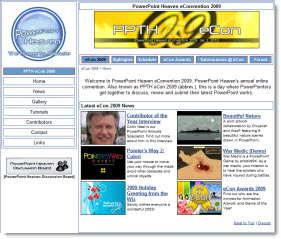
I am bit late in posting about this inspiring event that fellow Microsoft PowerPoint MVP Shawn Toh “Tolhz” from Singapore hosted on his website back in December. The eCon Awards are for PowerPoint Animation, Artwork, and Game of the Year. This year there are also a number of entries from PowerPoint communities from China.

I pride myself on developing presentations that have people questioning if it is PowerPoint being used, through creative layout, lots of custom graphics and of course animation. But I am inspired by downloading and viewing the entries at the eCon! Preview, download and be inspired here.

– Troy @ TLC

By |2016-09-16T09:02:49-07:00February 8th, 2010|Resource/Misc|

Need to Access a Mac Hard Drive ?

We live in a cross platform work environment with Windows computers and Mac computers. But they do not necessarily work together 100%.

Mac sytems do not like Windows NTFS hard drive format. They can read, but cannot write to them.

Windows systems do not like the Mac ‘macdrive’ format. It cannot read or write to them… And this is a problem when someone hands you a USB drive and says “My presentation is on this.

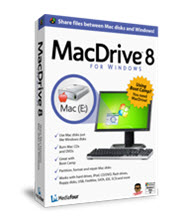
MacDrive by MediaFour is a Windows computer best friend in this situation. It seamlessly recognizes macdrive formatted hard drives and they work just as any other drive, all accessed from Windows Explorer.

Just one of those software items needed to be ready for everything.

– Troy @ TLC

By |2016-09-16T09:03:15-07:00February 4th, 2010|Resource/Misc|

PowerPoint 2010 Pricing

It is still a few months out, but here is the pricing I found:

– Office Professional
– $499 boxed / $349 Product Key Card

– Office Home and Student
– $149 boxed / $119 Product Key Card

– Office Professional Academic (students and teachers)
– $99 boxed

The Product Key Card is an electronic distribution (eg. no packaging or disc). Basically it is full function trialware, either pre-loaded on new computers or downloaded, that is unlocked and purchased with the Product Key Card.

– Troy @ TLC

By |2016-09-16T09:05:05-07:00January 27th, 2010|Resource/Misc|

Real Presentations From Your SmartPhone

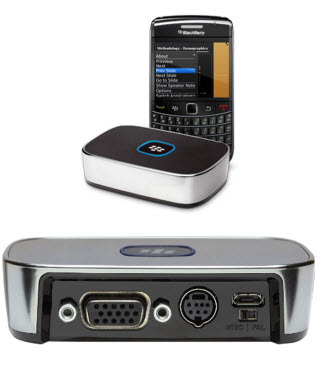
RIM (Research In Motion / Blackberry cell phones) announced at CES their new “Blackberry Presenter”. This small standalone box connects to the projector via VGA or TV via s-video and your Blackberry connects to it by Blue Tooth.

So this is not a mini projector, but a graphics card to connect to a real projector for real meetings.

– Supports PPT 2003 and PPT 2007
– Supports almost all animations and transitions (no multimedia)
– 1024×768 resolution (no High Def shows yet)
– AND is open to third party developers to work with other phones

– Troy @ TLC

By |2016-09-16T09:05:35-07:00January 25th, 2010|Resource/Misc|

Picturing The Past 10 Years (as Icons)

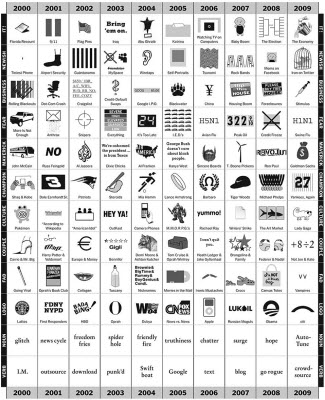
Thanks to Suan Ramlet and Echo Swinford for discovering this very cool infographic. It is interesting for several reasons:
– It wraps up the past decade into 12 topics and 120 icons
– It is humorous and also amazing that some things seem like just yesterday, but are actually many years old
– It is a good study in icons, which can be found in lots and lots of presentations

See it here.

– Troy @ TLC

By |2016-09-16T09:12:08-07:00December 31st, 2009|Resource/Misc|

WOW – 76 MB Per Second!

Last week I posted about SpeedTest.net (Dec. 12 Post). I was just on a project in Las Vegas at the Mirage (coordinating presentations for 50 physicians) and checked my internet connection. First test was 76 megabytes per second! I ran the test again later in the day (eg. not 6am when no one was on the network) and still came up with an impressive 62 MB connection. Even more impressive (but less used) was the 30+ MB upload connection.

Needless to say, pushing 8 GB files across the network to various ballrooms, listening to Pandora and IM’ing was no problem!

– Troy @ TLC

By |2016-09-16T09:14:03-07:00December 20th, 2009|Resource/Misc|

20,000 Online Games at Y8.com

This week I have been enjoying a fantastic time skiing with my wife and kids in Colorado (snow is a novelty for us being from San Diego). Each evening as the hot cocoa is ready, all the laptops come out (it’s a vacation, but still lots of projects) and my kids have been playing games on Y8.com.

Pretty impressive website with literally thousands of free Flash games. Enough to entertain for a full week of snowy nights.

– Troy @ TLC

By |2016-09-16T09:14:33-07:00December 18th, 2009|Personal, Resource/Misc|

Says Here Steve Jobs Uses PowerPoint…

This is a good (news) article from this week on The Wall Street Journal Blogs entitled “Should Start-Up Founders Forget About Business Plans?” Check out item #1 in the to do list.

1) A PowerPoint presentation – “Ten slides long, that’s it, really simple,” Halligan said. “If you want to learn how to build a great PowerPoint, watch Steve Jobs’ PowerPoint presentations. He builds very simple, elegant PowerPoint slides.”

The concept is great – strive for a simple and elegant presentation.

The hard part is the 10 slides rule, which I do not believe in. Actually I do not prescribe to a presentation being a set number of slides, but rather a set amount of time. Following this rule, someone is going to cram 5 slides of content onto 1 slide to maintain the magical 10 slide allotment.

And the funny part is saying Mr. Jobs uses PowerPoint, where I am sure he uses his companies presentation software ‘Keynote’. Maybe I could fact check their presentation related stories….

– Troy @ TLC

By |2016-09-16T09:14:56-07:00December 16th, 2009|Resource/Misc|

Check Your Internet Connection with SpeedTest.net

This is a newly discovered website for me that is pretty nifty – speedtest.net

Here is the full webpage:

The first thing it does is check your IP address and pin point you on the U.S. map. Then it locates a close server in its network to run a speed test. Here it shows me in San Diego (my office):

Click the ‘Begin Test’ button at the top and see what your connection speed is – both download and upload. Here I am pretty close to what my service is (20/5):

– Troy @ TLC

By |2016-09-16T09:15:47-07:00December 12th, 2009|Resource/Misc|
Go to Top