Resource/Misc

#10 – Animation Painter

Okay, this one is great! Actually, I have enjoyed this function since PPT XP thanks to the PPTXtreme Edit add-in. The Animation Painter makes my top 10 because it is that much of a needed feature and will be used by everyone.

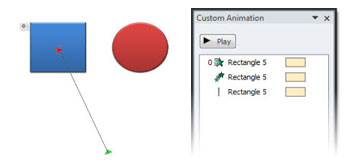
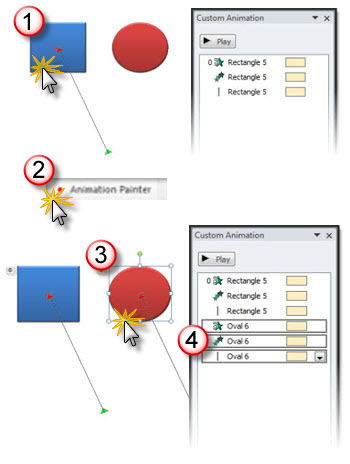
Here are my sample shapes that I want to animate:

I setup the first image (square) with a complex animation that involves 3 animations all set WITH PREVIOUS for a dynamic entrance.

The Animation Painter works like the Format Painter. Select an object with an animation, click the Animation Painter, and apply that animation to any other object – on any slide.

I want the same animated entrance for the circle, but do not need to spend the time applying the 3 animations and setting their attributes. Now I:
1. select the square
2. select the Animation Painter
3. Select the circle
4. click the animation painter again and all of the animations are set!

As a side note: You know you are running pre-beta software when the buttons do not have icons, but a generic dot….

– Troy @ TLC

By |2016-09-16T09:19:02-07:00November 22nd, 2009|Resource/Misc, Tutorial|

Melon Ball’s Presentation

If you have a few minutes online and need a distraction this is a very funny story written by an obviously funny guy. “Come watch the grim PowerPoint of death” has a good point that kids are using PowerPoint, often better than business people, that should not be missed.

https://www.stltoday.com/stltoday/lifestyle/columnists.nsf/suburbanfringe/story/8B0A7450F84C700386257654006A8A8C?OpenDocument

– Troy @ TLC

By |2016-09-16T09:27:16-07:00October 25th, 2009|Resource/Misc|

SOAP (State of the Art Presentation)

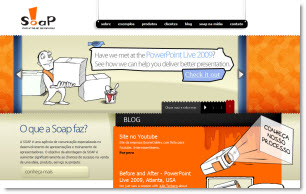
Had opportunity to meet Johnny Batista Galvao de Sousa (I asked for his card to get the name right) at PPTLive. Great guy, with a great company name SOAP, State of the Art Presentations.

If you want to check out a good PowerPoint site and blog – in Portguese – his site is www.soap.com.br

– Troy @ TLC

By |2016-09-16T09:30:50-07:00October 17th, 2009|Resource/Misc|

The Eco-Green Font For “Green” Presentations

If you want the ultimate in eco-friendly presentations, then consider using the EcoFont font. Okay, presentations really do not qualify for EcoFont’s eco-friendly qualities unless they are going to printed as handouts.

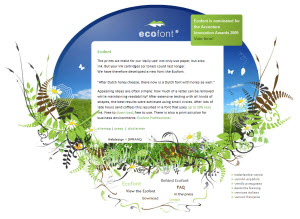
The concept is ink is another landfill item (ink cartridges, toner, etc.). So this custom font is designed to be stylish, yet print with less ink, thereby reducing the need to replace your ink or toner cartridges as often.

Here is what the ultimate green font looks like:

– Troy @ TLC

By |2016-09-16T09:33:48-07:00October 10th, 2009|Resource/Misc|

Need a Flag for a Presentation?

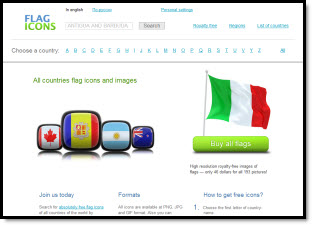
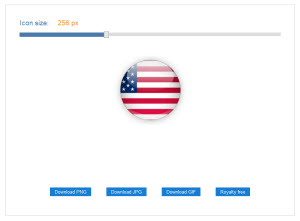
In researching images for a recent presentation I discovered this great website – Flag Icons.

Every country looks to be represented. But the part I used was the “web 2.0” design styles for each. Just find the country you need a flag for and then select the flag style that works best with the presentation.

In addition there are options for saving as a .jpg (white background) or .png (transparent background) and sized from 50-800px wide.

– Troy @ TLC

By |2016-09-16T09:35:01-07:00October 6th, 2009|Resource/Misc|

123RF – International Flavor and High Quality Images

123RF is a smaller image site with a very international flavor. When I want a unique image such as a road, horizon or group of kids I always find something. Most of the images appear to be from international photographers – in international settings – and just offer a different perspective to even model shots. Image quality is great, rates are super, but the search offerings can be less than others.

Raster/Photo images: Yes
Vector images: Yes
Video: No
Audio: No
Pay Per Image: Yes – approx. $2 for standard PPT use (web, 600px)
Subscription Download: Yes (eg. 1 year 5 images day = $750)

Test Search Results:
1. “Fast Car” = 5,162 results
2. “Medical Consultation” = 840 results

– Troy @ TLC

By |2016-09-16T09:35:23-07:00October 4th, 2009|Resource/Misc|

StockExpert – Images and Video

StockExpert seems similiar to iStockPhoto when I do a search – lots of the same or similiar images. They are all good quality and the pricing is good (or looking better as sites like iStockPhoto slowly raise their rates). One new feature is the selection of videos – which will be more important with the release of PowerPoint 2010 and the whole world goes video crazy. The search engine is intuitive and gives more precise results than some others – this may be because StockExpert was acquired by Jupiter Images who injected much of there meta tagging and search technology.

Raster/Photo images: Yes
Vector images: Yes
Video: Yes
Audio: No
Pay Per Image: Yes – approx. $2 for standard PPT use (small, 800px)
Subscription Download: Yes (eg. 1 year unlimited = $1,500)

Test Search Results:
1. “Fast Car” = 4,449 results
2. “Medical Consultation” = 958 results

– Troy @ TLC

By |2016-09-16T09:36:21-07:00October 2nd, 2009|Resource/Misc|

Photos.com (and Clipart.com)

Photos.com is venerable, being one of the few companies around before the internet. I have a collection of (costly) Photo CDs from them. And if you every purchased one of the bright boxes full of “4 Million Images of CD/DVD” you know photos.com. Of course, that long history means some of the images are a bit dated, or perhaps seen in many other layouts over the years.

But the images are good quality, the search is nice and the thumbnails easy to review and use. The subscription rates are some of the best, so another reason you see the images a lot. You can also get some things here not available at others: a sound effects library, custom fonts and Flash animations.

Raster/Photo images: Yes
Vector images: Yes
Video: Yes
Audio: Yes
Pay Per Image: Yes – approx. $5 for standard PPT use (‘multimedia’, 500-800px)
Subscription Download: Yes (eg. 1 year unlimited of photo images only = $450 OR photos+vector+Flash+audio+fonts = $1,200)

Test Search Results:
1. “Fast Car” = 4,670 results
2. “Medical Consultation” = 7,348 results

– Troy @ TLC

By |2016-09-16T09:36:55-07:00September 30th, 2009|Resource/Misc|

Getty Images – Real People, Royalty Free

Getty Images is an industry force, owning many of the other services, used by major media (newspaper, magazine, TV) and the place to get images of real (famous) people, real-life video and audio. This is the benchmark for professional quality images and breadth of search options. It does come at a price, but you definitely get what is paid for. Everyone should click the “Search Tips” button and read how to maximize search results (same tips apply to virtually all sites).

Raster/Photo images: Yes
Vector images: Yes
Video: Yes
Audio: Yes
Pay Per Image: Yes – approx. $35-150 ($35 = “web & Multimedia” 413px)
Subscription Download: Yes (this goes to photos.com – one of the many they own)

Test Search Results:
1. “Fast Car” = 5,301 results
2. “Medical Consultation” = 11,616 results

– Troy @ TLC

By |2016-09-16T09:37:23-07:00September 28th, 2009|Resource/Misc|

Dreamstime Images

Dreamstime has been around for a while, but I do not hear a lot of people talking about it. One reason may be their Royalty Free license has more options than most and the image price can vary quite a bit based on the options (which seem confusing and easier to find images elsewhere without the confusion). But the images are great, with lots of unique photography for topics not found on other sites.

Raster/Photo images: Yes
Vector images: Yes
Video: No
Audio: No
Pay Per Image: Yes – approx. $3 for standard PPT use (small, 800px, level 2 RF)
Subscription Download: Yes (eg. 25 images per day for 6 months = $1,250)

Test Search Results:
1. “Fast Car” = 12,918 results
2. “Medical Consultation” = 1,150 results

– Troy @ TLC

By |2016-09-16T09:37:50-07:00September 27th, 2009|Resource/Misc|
Go to Top