Software/Add-Ins

Office 2003 SP3 Release

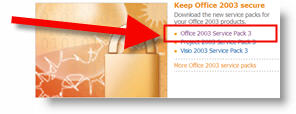
Yesterday Microsoft released the largest Office Service Pack ever (SP3). It covers security, improvements, Vista compatability and interoperability with Ofifce 2007.

Here is some of the facts Microsoft sent me:
• Over 6000 fixes.
• Over 70% focused on security.
• Includes 600+ new hotfixes (including fixes to Watson crashes).
• Includes 50 public updates/security bulletins.
• Includes SP1 and SP2.
• Total of 77 languages and 398 distinct patches.

Easiest way to download is from Microsoft Office Update.

– Troy @ TLC

By |2016-11-17T16:26:29-08:00September 19th, 2007|Software/Add-Ins|

PowerPoint 2007 for Dummies

As mentioned, I have been entrenched in two large projects that are being developed in PowerPoint 2007. There are tons of great features in the version – and there are tons of old-and-new annoyances, bugs, etc.

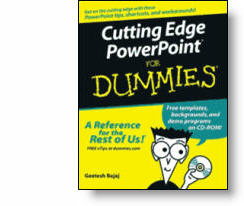
I could either fumble through many of the new features, or I could use some of the great resources that are available to all. Over the past few weeks I have referred to “Cutting Edge PowerPoint 2007” from the “For Dummies” series many times.

This great book is written by fellow PowerPoint MVP Geetesh Bajaj. Not really advocating this book over any other, but I am saying everyone – myself included – has some great resources available.

– Troy @ TLC

By |2016-11-17T16:26:06-08:00September 17th, 2007|Resource/Misc, Software/Add-Ins|

NXPowerlite Soon for Office 2007

Over the past few days I have been testing a beta version of the next NXPowerlite. Tommy over at Neuxpower Solutions contacted me at a perfect time, as I have been working exclusively in PPT 2007 for two large projects and have plenty of test subjects.

NXPowerlite is compression software for PowerPoint, Word and Excel files. I have been using this software for at least 3 years, so it has a proven track record with me. Version 3.5.1(beta) works with the new .xml format of Office 2007 files (ie. pptx, docx, etc.). The results have been great. One file produced an error, but they are still working out the kinks of embedded objects. The rest of my files did as promised – they got small, without visible quality loss. As example:

File 1: lots of large images and several charts created within Powerpoint. Original 20.8MB, after compression (at the ‘excellent’ level) 12MB.

File 2: LOTS of large images. Original 146MB, after compression 44MB!

When I hear the new product is available I will let you know. In the mean time, you can get the details about NXPowerlite here.

– Troy @ TLC

By |2016-11-17T16:25:39-08:00September 12th, 2007|Software/Add-Ins|

What is it; Macromedia or Adobe Flash?

Mergers and acquisitions even effect the most seemly stable companies. So the question came up that a client could not find the Macromedia Flash Player, would the Adobe Flash Player work?

Both are the same thing. The Flash format was developed by Macromedia, hence – Macromedia Flash (player). Recently Macromedia was purchased by Adobe and now the Macromedia Flash products have been rebranded Adobe Flash.

– Troy @ TLC

By |2016-11-17T16:25:10-08:00September 10th, 2007|Software/Add-Ins|

Put PPT 2003 buttons and menus back in PPT 2007

Okay, the time has finally arrived. I am doing a major project in PowerPoint 2007! It is not that I have a problem with PPT 2007, I just have not had a client request. So up until now I have actually used PPT 2007 more when it was in Beta that after its release. Well, like many I am finding it somewhat tedious to learn where everything is in the new interface. I am also working under some tight timelines, so I do not have the luxury of learning at a leisurely pace. So for me a short term solution has been to add back some of the familiar PPT 2003 tool buttons.

This is a limited interface – it does not give you all of your customized layout from PPT 2003 (I wish!), but it does give a familiar look and feel to things. This is a free add-in that can be downloaded from here.

– Troy @ TLC

By |2016-11-17T16:23:35-08:00September 3rd, 2007|Software/Add-Ins, Tutorial|

PPT and Vista/Wacom Bug Fixed!

Once again I have good news and one less reason to reformat my computer! Wacom has recently released a new set of drivers for its tablets – which I use. If you look back to the May 13, 2007 post I mentioned an annoyance with objects jumping around when selected.

Well I narrowed it down to either the Logitech or Wacom drivers, but had no solution. Over the weekend I installed the newly released Wacom driver and PowerPoint behaves once again!

If you a Wacom tablet on a Vista machine, go here and get the latest drivers.

Okay, one more reason to keep Vista installed.

– Troy @ TLC

By |2016-11-17T16:22:09-08:00August 22nd, 2007|Software/Add-Ins|

Vista Display Driver Updated!

So I have been tempted to reformat my primary computer, which is running Vista Ultimate, and go back to XP (on many occasions). What keeps me from this drastic action? Really it is a lack of time – if I am in front of a computer I am busy working on a project (which almost 24/7 lately) and the thought of taking time to deal with the nusances of Vista just does not make my priority list right now.

One of the major issues has been this fantastic 512MB graphics card having the features of a 10 year old model. In other words, it had no advanced features – Such as Flat Panel Scaling.

Well NVidia has finely come through provided a robust update to its control panel and now I can actually use this computer to run a show if needed (which I generally don’t do – this is my production computer, I have a small fleet of ‘show’ computers for that task). Of course my thought has been that by next year all of the Vista issues I am experiences will be resolved as software catchs up. But for now – one annoyance resolved!

– Troy @ TLC

By |2016-11-17T16:21:48-08:00August 20th, 2007|Software/Add-Ins|

Where’s My .PCB File in Vista?

So your PowerPoint toolbars have exploded and you need to reset them with your backup .pcb file (file that contains your customized toolbar settings). But you have just upgraded to Vista and it is no where to be found!

Here is where you need to go:
C: >> Users >> (Your Name/Account) >> App Data (will need to be able to view hidden folders) >> Roaming >> Microsoft >> PowerPoint

– Troy @ TLC

By |2016-11-17T16:20:48-08:00August 13th, 2007|Software/Add-Ins|

PPTXtreme MoreEdit Released

I have been happily using a beta version of this add-in for quite awhile. Now it is available to all (approx. $40 US). Here is their official press release:

pptXTREME releases moreEdit for Microsoft PowerPoint

pptXTREME has released moreEdit for Microsoft PowerPoint 2000, XP, 2003 and 2007. moreEdit consists of eight tools: SaveSelected, MakeHeader, MakeBody, Edit Word Art, MatchWidth, MatchHeight, Hide/Unhide and Notes.

With moreEdit’s MakeHeader and MakeBody, shapes that are created in PowerPoint without using the slide master can be formatted to the master. The process also removes “fake” bullets and extra lines and spaces left by the author to give the appearance of PowerPoint bullets.

The SaveSelected tool saves slides selected by the user into a file from within PowerPoint’s own sorter view.

Multiple elements on a slide can be aligned and formatted with the same width or height using the MatchWidth or MatchHeight tools. moreEdit’s Edit Word Art maintains the Word Art’s font size and formatting when you edit the Art’s text.

moreEdit’s HideSlide and UnhideSlides adds to PowerPoint’s default “hide” capabilities by making the hidden slides more visible in sorter view.

The Notes tool inserts text boxes for notes to the author that are formatted to be seen but can be hidden.

Get the full-function trial, click here.

– Troy @ TLC

By |2016-11-17T16:17:23-08:00July 23rd, 2007|Software/Add-Ins|
Go to Top