Software/Add-Ins

German PPT Blog

Ute Simon, a Microsoft PowerPoint MVP, sent me a link to their
PowerPoint-User-Team blog. The great thing is that an entire group of power users take turns with the posts.

Note: Ute and the entire PowerPoint-User-Team are in Germany, so the blog is also in German. Now if I could only understand it all…

Look at it here.

– Troy @ TLC

By |2016-11-17T16:16:37-08:00July 20th, 2007|Software/Add-Ins|

Connection Speeds ARE Different

In developing webcasts for companies I continuously explain many of the factors that affect people’s ability to view, fast-forward, zoom, etc. “The internet is the internet and I have a fast connection – right?”

The simple answer is no. There are factors of your connection speed, your computers power, the server connection, the amount of traffic and geography. Yes, geography can have an impact on the connection speed. To illustrate, let’s look at a quick example.

I live in San Diego, CA (the red star in the lower left of the country). But if I connect to servers in different parts of the country I have different connection speeds; from 14.5MB down to 7MB.

Connection 1: San Diego to Los Angeles

Connection 2: San Diego to Seattle

Connection 3: San Diego to Chicago

Connection 4: San Diego to Atlanta

Note: For viewing a streaming movie, or webcast, the Download speed is the important number.
Note 2: Just noticed my ‘Atlanta’ circle is not over Atlanta…

All of these connection tests were done within 5 minutes. I used the connection test at Speakeasy.net (see 12/14/06 post for more info). Last, I am on a Fiber Optic connection, so your results may not reflect these numbers.


By |2016-11-17T16:11:03-08:00July 4th, 2007|Resource/Misc, Software/Add-Ins|

Whose Idea Was This? (Vista Recycle Bin)

So I have been working with Windows Vista on my primary machine for a while now and I still keep finding things that make me pause.

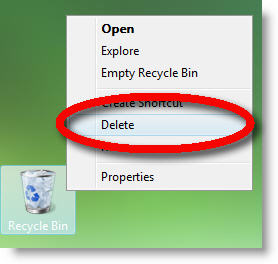
Now when you right-click the recycle bin to empty (delete) your files there is a new option – Delete. But this is not the delete your files delete, it is the delete the recycle bin delete!

Hmmm, maybe not the best place for a command named this…

– Troy @ TLC

By |2016-11-17T16:10:35-08:00July 2nd, 2007|Software/Add-Ins|

Caution: Quicktime Pro and Vista’s Ready Boost

Last week while developing an OFX based awards presentation (OfficeFX is a 3D****) I needed to convert provided Quicktime movies to a supported format. No problem, open each movie in Quicktime Pro and Export to an .avi. WRONG – export errored out. I then spent the next several hours troubleshooting by installing, uninstalling, hacking option settings and registry entries – nothing worked.

A few days later I figured out the problem. I have been taking advantage of Vista’s ReadyBoost technology (using a USB memory stick as an extended memory cache). Turns out Quicktime’s export feature is not compatible with ReadyBoost. Remove the USB memory stick – export movies from Quicktime Pro. Now you know too.

– Troy @ TLC

By |2016-11-17T16:08:28-08:00June 22nd, 2007|Software/Add-Ins|

PPT and Vista’s Active Thumbnails

I often run PowerPoint with an extended desktop setup with PowerPoint in the design or slide sorter view on the local monitor and presentation/slideshow on the external monitor. One of the downsides of this setup is that if I cannot see the external monitor/projector I do have an indicator of what slide I am actually on.

Windows Vista has some neat features, and some frustrations. Everyone has seen how Vista provides live thumbnails of all open applications and windows. Here is one example:

I can also use these active thumbnails to show me exactly what slide is active on an external monitor! By rolling over the ‘Slide Show’ tab it pops up a live thumbnail of the current slide. What’s even more hip is that the thumbnail will also show the animations in real time.

– Troy @ TLC

By |2016-11-17T16:08:05-08:00June 20th, 2007|Resource/Misc, Software/Add-Ins|

Google and PowerPoint

This week Google made an integrated PowerPoint viewer option to its online tools. Basically if you receive a PowerPoint presentation in a gmail account, there are a few options for the attachment; view as HTML, view as Slideshow, and download. Of course the key new option is VIEW AS SLIDESHOW.

Clicking View as Slideshow opens a new window and the presentation is displayed in a Flash based application. It does not handle everything perfect (I tested with an animation heavy presentation) and it is only a viewer. So there are no editing capabilities – yet. In reading others news feeds I noted that Google said edit & create slideshow tools would come by this summer…

– Troy @ TLC

By |2016-11-17T16:06:10-08:00June 14th, 2007|Software/Add-Ins|

Mosaic Images

This is a nifty online (and free) application. I recently used it for an awards show image where the first photo of the recipient was a mosaic and then the ‘real’ photo faded in to reveal who won the award. I did this sample of my daughter for the blog.

Here is a close-up that shows how the original image is converted to 1,000s of images that recreate the photo as a mosaic.

Give it a try at the “Image Mosaic Generator” here.

– Troy @ TLC

By |2016-11-17T16:03:57-08:00June 4th, 2007|Software/Add-Ins|

PFC Pro 2007

I have been fortunate enough to beta test and enjoy using the PFC Media add-ins since their inception. For those unfamiliar PFC stands for “Plays For Certain”. If you look at my top 10 recommended PPT add-ins on the TLC Creative website you will see PFC Media listed. The developer goes to enormous effort to assure this software works!

Just a few weeks ago the official 2007 compatible version of PFC Pro was released. If you add movies to presentations, I definitely endorse this as the best solution available. Click here for the PFC website.

Kathy Jacobs’ full review of PFC Pro 2007 is posted here.

– Troy @ TLC

By |2016-11-17T15:59:51-08:00May 19th, 2007|Software/Add-Ins|

PointClips.com = Great PPT Images

Jeff Koke of PointClips recently emailed me a few samples of their PowerPoint images. Pointclips offers “hand-crafted artwork and icons, built in PowerPoint.”

What impressed me was that not only did I see good quality, but that all were made of grouped vector images (autoshapes) and could be resized and even re-colored as needed! Sure you could (maybe) create all of these images yourself, but why spend hours doing so…

The left image is from PointClips free downloadable sample. On the right is a number of the elements ungrouped – all editable autoshapes!

Individual images for $5 and collections of 50 images for $99. Check them out here.

– Troy @ TLC

By |2016-11-17T15:59:28-08:00May 17th, 2007|Resource/Misc, Software/Add-Ins|

Solving PPT 2003 & Vista Problems

Here are the steps to solve the two usability problems with Vista and PPT 2003 described in the previous two posts:

1. Locate the actual .exe for PowerPoint 2003 (C: >> Program Files >> Microsoft Office >> Office 11)

2. Right click the POWERPNT.EXE

3. Go to the COMPATABILITY tab

4. Check the DISABLE VISUAL THEMES option

5. Click OKAY and launch PowerPoint 2003

So I can pass along others experiences with Vista, send me an email (link is on the right) letting me know if things do, or do not, work on your computer – or if things work with earlier versions (PPT 2000, XP, etc.).

– Troy @ TLC

By |2016-05-11T11:25:02-07:00May 15th, 2007|Software/Add-Ins, Tutorial|
Go to Top