Software/Add-Ins

Create a Glow with PPTXtreme SoftShadow

With creative use of PPTXtreme’s SoftShadow add-in instanst “Soft-Glows” can be created. If you have not checked out this very useful add-in go here.

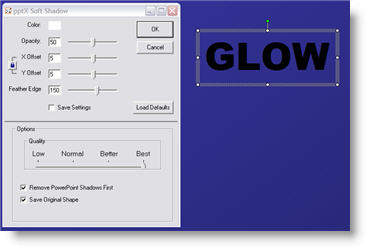
(1) Select text, autoshape or image. Here are my setting for adding a white drop-shadow.

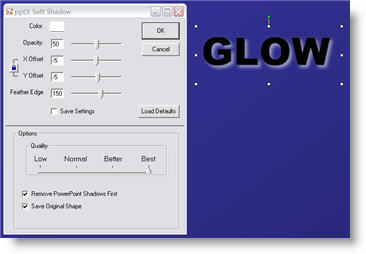
(2) Select the object again and apply a second softshadow. Note the negative (-5 and -5) X and Y positions, so the 2nd softshadow is positioned in the upper left. Here are my settings for this second softshadow.

(3) The result is a photoshop quality glow.

– Troy @ TLC

By |2016-11-17T14:47:06-08:00November 7th, 2006|Software/Add-Ins, Tutorial|

PowerPoint Timers

Countdown timers can be created fairly easy in PowerPoint. There are lots of needs for timers and I recently had a client call me from there event (that was already underway) asking for a countdown timer to run for the breaks.

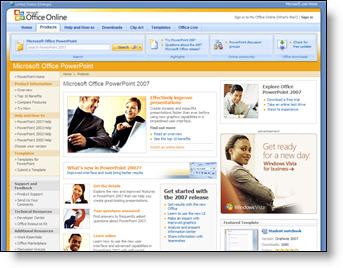
Microsoft has some good resources available on its website. I simply emailed a link to the Microsoft Online where they have a few dozen ready-made countdown timers. My client found one they liked, added their logo to the master slide and was ready to go in less than 15 minutes.

To check out the countdown timer presentations Microsoft has available (for free), click here.

– Troy @ TLC

By |2016-11-17T14:37:15-08:00November 3rd, 2006|Software/Add-Ins|

Hands-On PowerPoint Training

There is a big difference between hearing a PowerPoint skill explained – having it demonstrated – and being able to do it hands-on.

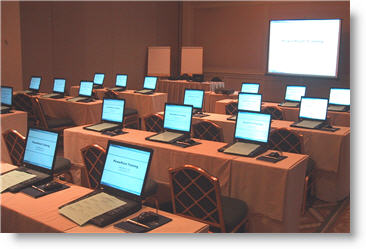
Here is a photo of a recent hands-on training session that I developed the training course materials for (of course setting up the rental computer settings made for a very early morning before attendees arrived).

– Troy @ TLC

By |2016-11-17T14:36:47-08:00November 1st, 2006|Resource/Misc, Software/Add-Ins|

Fix Links Pro Fixes A Hidden Problem

Sometimes you don’t want to give away to much information. And when an Excel chart or movie is inserted you are giving away information about your network/file structure.

As example, right click on a movie that is inserted into PowerPoint and choose EDIT.

The movie information includes the path where it came from.

To eliminate this information I use the Fix Links Pro add-in (website is here).

(1) Open Fix Links Pro and choose REPAIR

(2) It generates a report about all multimedia and embedded files in the presentation. The key is where the report says “now path-free”.

(3) Now right click the movie, choose EDIT and see that the path information has been removed

– Troy @ TLC

By |2016-11-17T14:32:26-08:00October 25th, 2006|Software/Add-Ins|

Great “PhotoShop” Shadows Inside PowerPoint

Often you have a nice, well designed slide such as this title slide. It does not really need any images or animation, but it would be nice to give it a bit of depth.

Adding a soft, PhotoShop, drop shadow to the title text helps the slide differentiate itself from the “standard” PowerPoint content and add some depth and appeal.

This effect was created in less than 4 seconds using PPTXtreme‘s SoftShadow add-in. I selected the text box and clicked on the QuickShadow button.

Looking closer you can see the smooth feathered black shadow that was applied to each letter. Something that helps the text float above the background artwork.

– Troy @ TLC

By |2016-11-17T14:12:17-08:00August 18th, 2006|Software/Add-Ins, Tutorial|

Set Home Page in Internet Explorer FAST

Thanks to Brad Hagen, owner of Video Resources, for showing me this nifty shortcut! On a recent project I was responsible for setting up an event’s internet cafe. Set up a wireless network, configure the dozen computers and set up with custom wallpaper, set the browser homepage, etc.

Here is how to set the browser homepage in three easy steps:

(1) Browse to URL you want to be the home page
Set TLCCreative.com as your homepage!

(2) Click-and-drag the webpage icon in the address bar

and drag on top of the “Home” icon

(3) Click “Yes” to the dialog. Done!

-Troy @ TLC

By |2016-11-17T14:09:01-08:00August 2nd, 2006|Software/Add-Ins, Tutorial|

Download Office 2007 today (or pay)

In an interesting move, Microsoft will begin charging a $1.50 to download Beta 2 of Office 2007.

“We are thrilled with the incredible excitement around the upcoming 2007 Microsoft Office system as evident by more than 3 million people using the beta 2 since its release two months ago. Having exceeded our beta 2 participation goals by 500%, we have had to make the business decision to implement a cost recovery measure for future downloads of beta 2 beginning 2 August, 2006.” (source: The Register.com)

By |2016-11-17T14:08:40-08:00August 1st, 2006|Software/Add-Ins|

New Ribbon UI Movie

Microsoft’s Jensen Harris recently posted this movie showing how the new Ribbon can be minimized and still used. While not a big fan when I first viewed the ribbon in the pre-beta, there has been A LOT of good work going on at Microsoft and my expectations are looking better! Check this 38 second movie here (or high-bandwidth version here).

-Troy @ TLC

By |2016-11-17T14:08:12-08:00July 28th, 2006|Software/Add-Ins, Tutorial|

NXPowerlite 2.3 Released


The NXPowerLite guys over in the UK have been hard at work. There is a new update this excellent (and recommended) PowerPoint compression application. For me the install went smooth and in expirimenting with the new features I am even more impressed.
– Batch processing is great. Select 2,3,50 presentations and it will optimize them all in one step!
– The explanation for .jpg compression has been improved and it should eliminate a lot of questions.
– But the feature I like most is that you can keep the original file date/time.

Download the latest from the NXPowerlite website here (a full function trial is offered as well).

-Troy @ TLC

By |2016-11-17T14:06:18-08:00July 16th, 2006|Software/Add-Ins|
Go to Top