
Working in Ireland
Céad Míle Fáilte – “One hundred thousand welcomes” – from Dublin, Ireland where I have been working and enjoying the Irish “summer” (which is windy and 60f/15c). It has been a great show with a super widescreen background presentation and 16×9 presentations over it (PIP). Fantastic local AV crew and the Dublin Convention Centre is a great venue.
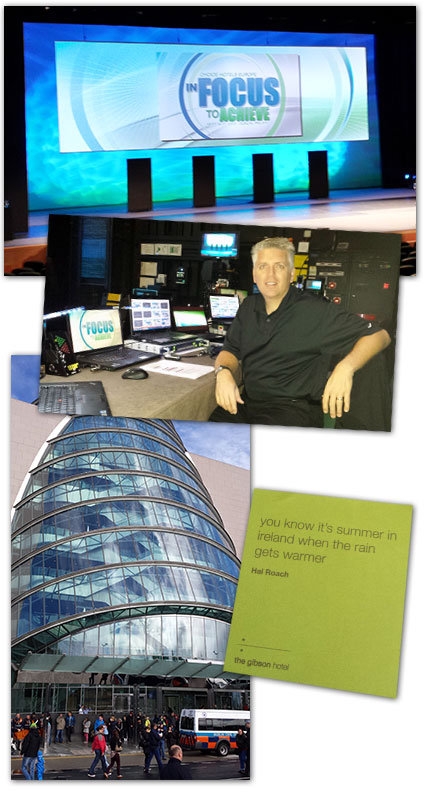
– Troy @ TLC
Will PowerPoint Play This Video?
Video in PowerPoint has been growing fast over the past 4 years. The number of people experiencing video issues has surprisingly not grown a tremendous amount too. In just the past few years, the number of variables that need to align for a video to successfully play in PowerPoint have also grown.
With so many video related questions filling my in box and seen on the forums, we have created a reference chart that provides quick answers on if a video should play with the computer setup. It also makes it easy to identify the key attributes for your computer setup that should be included in any troubleshooting request.
So what are the variables? For a video to play on a slide is a combination of the Operating System, installed CoDecs, version of PowerPoint, and video format used. Cross referencing each of these variables is tedious, confusing and difficult to find all in one place.
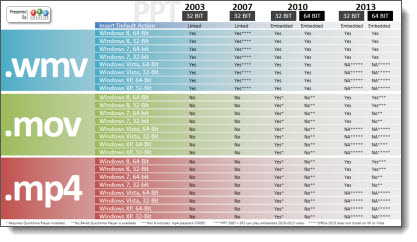
To remedy a lot headaches and wasted time, I am very happy to finally provide a download link to the “PPT-OS-and Video Format reference chart” (and the designers here at TLC Creative Services that have been gathering and testing each of the variables over the past 2 months are very happy too!).
Download the PDF here.
Side note: Attendees to my webinar on “Video in Powerpoint” at yesterday’s Outstanding Presentations Workshop were the first to see and be able to download this, and I walked through all of the information in the reference chart – just a benefit of attendance!
– Troy @ TLC
PowerPoint and Video Webcast Tomorrow!
Tuesday, September 10, 2013 starts the “4th annual Outstanding Presentations Workshop“
I am very excited to be the lead off presenter with about a topic that I deal with daily – video in PowerPoint. Hope to have you join the event.

From Ellen:
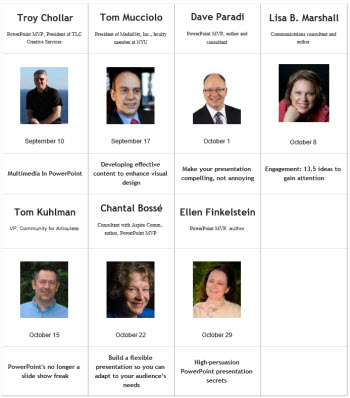
This year, we have a superb group of well-known speakers — some that you asked for last year. Here they are with their presentation topic:
– Troy Chollar, PowerPoint MVP, President of TLC Creative Services, “Multimedia in PowerPoint”
– Tom Mucciolo, President of MediaNet, Inc., faculty member at NYU, “Developing effective content to enhance visual design”
– Dave Paradi, PowerPoint MVP, author and consultant, “Make your presentation compelling, not annoying”
– Lisa B. Marshall, Communications consultant and author, “Engagement: 13.5 ideas to gain attention”
– Tom Kuhlman, VP, Community for Articulate, “PowerPoint’s no longer a slide show freak”
– Chantal Bossé, Consultant with Aspire Comm., author, PowerPoint MVP, “Build a flexible presentation so you can adapt to your audience’s needs”
– Ellen Finkelstein, PowerPoint MVP, author, “High-persuasion PowerPoint presentation secrets”
The audience is from all around the world. This is the best deal in presentation training around; 7 live seminars by industry experts for $7. Details and registration here.
PowerPoint is my Creative Suite
“PowerPoint is my Creative Suite” is my first session I am busy preparing for the Presentation Summit that is this October in Fort Lauderdale, Florida.

I have been pulling real projects from the archives to use as examples. It is going to be a great session with lots of examples and, I will be in the Help Center over the 3 day event to talk about projects and PowerPoint design options.
Hope to see you there! Here is The Presentation Summit info page.
– Troy @ TLC
The Annoying PowerPoint Survey – 2013
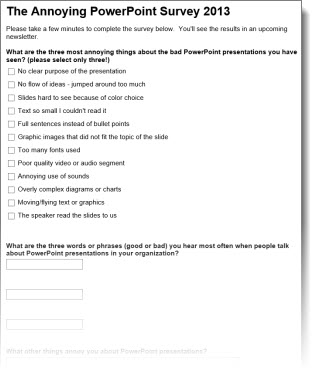
Microsoft PowerPoint MVP Dave Paradi puts together the very informative and insightful (sometimes comical) “Annoying PowerPoint” survey.
The survey is live and everyone is invite to participate! I definitely recommend 3 minutes of time to anonymously add your PowerPoint opinion so we can all learn from the results (He is releasing the results at this years Presentation Summit in October). Access the survey here.
– Troy @ TLC
Outstanding Presentations Workshops – Starting Next Week
Microsoft PowerPoint MVP, Ellen Finkelstein, has organized the Outstanding Presentations Workshops again and they begin next week. These online webcasts are beyond a good value (all 7 workshops for $7!). The presenters cover a wide range of presentation topics, and the webcasts can be viewed any time (by paid attendees) after if you cannot make the live broadcast time.
Next Tuesday, Sept. 10th is the first of the workshops and I am very happy to be the presenter – “Multimedia in PowerPoint.” Join me for an hour of video in PowerPoint tips and tricks!
Info and details here.
– Troy @ TLC
Do I have MSI or CTR Installed?
The previous post defined the two Microsoft install methods. But determining if your install of PowerPoint 2013 is from an MSI (full standalone installer) or CTR (streaming download installer) is not easy to determine. Microsoft has not given its end users any useful information in determining this. Here is one method that will tell you.
Open PowerPoint 2013.
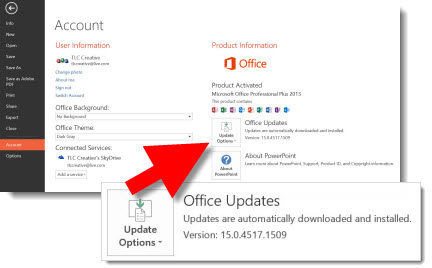
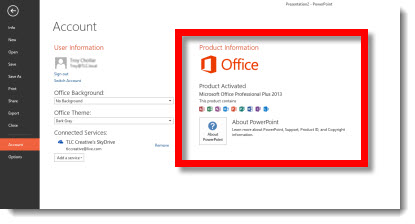
Go to FILE >> ACCOUNT.
In the far right pane under PRODUCT INFORMATION.
If the computer has a CTR install, there will be an UPDATES option.
If the computer has an MSI install, the UPDATES option is not available.
At this point, that is the only easy to access information piece within the application that I have found (thanks Glenna!) that indicates which version is being run. And lets not get into which Service Packs and Updates are installed! Office 2013 has taken away all of the familiar information to help troubleshoot issues…
For more info on CTR and MSI, the PPTFAQ has this page with a great overview and links to more details.
– Troy @ TLC