
The New View of ‘Arrange All’ Presentations!
PPT 2010 now displays each presentation in its own instance of the application. What does this mean?
Here is a real world example (eg. my current project), where I have 2 screens and a separate presentation for each. In designing I need to view the presentations side-by-side. To do this it is the same as before: VIEW >> ARRANGE ALL. This is a screen capture of one monitor.
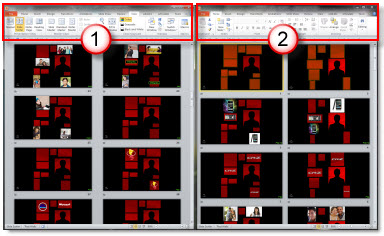
But the big difference is each presentation is contained in its very own application. Each has its own ribbon!
This is just one example of the new feature – and I am using it every day.
– Troy @ TLC
Email Through Cell Phone Can Be Bad
Don’t get me wrong, I live by my cell phone and definitely do more email than talking. I actually do almost as much texting as talking. But the small keyboard and onscreen touch keyboards combined with intuitive word completion (where the phone guesses at your words) is creating a bad communication experience.

As example – this is a recent email received (not a text message, but email) that was typed on a mobile phone:
“Is there something I’m supposed to so or the presenter?”
Translation (after a phone call to figure out the original message) = “Got your email and just want to confirm there is nothing I need to do at this time while we wait for the presenter to review the presentation proof.”
– Troy @ TLC
Toggle Normal Edit view and Slide Sorter View
In the lower right corner are the shortcut buttons to change the view (normal, edit, slide show – and reading in PPT 2010), plus the zoom tools.

In my sample I am in the Slide Sorter view:
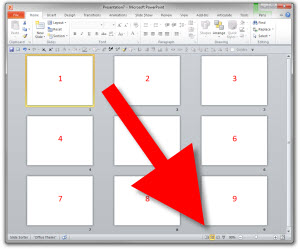
If I want to edit an individual slide, I select the slide and click the far left button for Normal/Edit view.
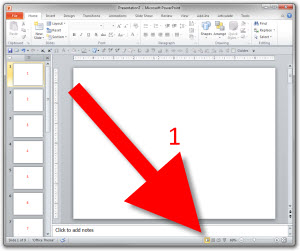
But the Slide Sorter button is also a toggle. When in Slide Sorter view, click the slide sorter button again and you change to the Normal view. Click it again and you go back to Slide Sorter.
This works in PPT 2007 and 2010. Not really a time saving shortcut as the buttons are literally next to each other – but it is a little known feature.
– Troy @ TLC
PPTXtreme Add-ins and Windows 7 with PPT 2010
I am a huge fan of the PPTXtreme PowerPoint add-ins. They make much of my development time up to 5X more efficient and in some cases make the impractical, practical.
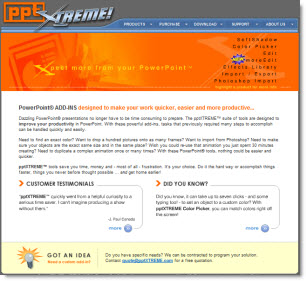
With PPT 2007 a few of the add-ins lost functionality. Namely ‘Color Picker’ and ‘Photoshop Import’ (which is one of those HUGE time saver add-ins for me).
Now with my new computers running Windows 7 and PPT 2010 I have the sad reality that none of the PPTXtreme add-ins function… I did some experimenting to try and find a solution like I did with Vista (where I installed outside the ‘Programs’ folder and then manually added permissions). The bad news is nothing, for me, got these add-ins functioning.
The good news is, it is not entirely PPT 2010 that is the conflict. Here is PPT 2010 opening and a selection of the PPTXtreme Add-ins loading – and working.
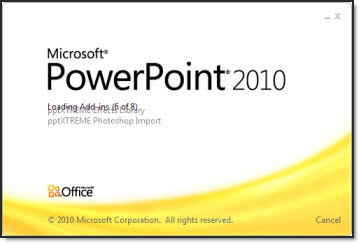
In this case it is PPT 2010 installed on a Windows XP Pro OS. My install tricks for Vista have no effect in Windows 7, so the sad reality is Windows 7 + PPT 2010 leaves PPTXtreme unavailable.
I have talked with the PPTXtreme developer and fingers crossed that there may be a round of development going into the add-ins as soon as this summer to update compatability (which would hopefully mean a fall time release).
Stay tuned for a hopeful update later this year.
– Troy @ TLC
Backstage Setup and The Beach Boys
Just a few quick photos of my backstage office for a recent show and yes, the real Beach Boys were the entertainment (lots of fun when you know the lyrics to virtually every song!).

– Troy @ TLC
PowerPoint 2010 Viewer
The new PPT viewer was released last week and I have spent some time testing presentations with it.
First, this is not a light weight, quick download – but a full application at 60MB! It also needs to be truly installed vs. the previous versions that could be run directly from a CDROM or USB drive.
Aside from those two factors there is nothing but praise for the viewer at this point! It handles ALL animations, transitions, trigger events, media, etc. From what I have tested, it runs everything that the full application runs – yeah!
I do not have a KB article or other official document to verify this, but I was told the PPT 2010 viewer is basically the full PowerPoint application when it comes to viewing a slide show (hence the large install file). This allows the viewer to play everything the full application does AND it does all the backend stuff like hardware acceleration (not available in any previous viewer).
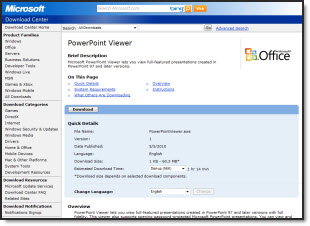
Get it from Microsoft, free here.
– Troy @ TLC
Move Your Custom QAT To Any PPT 2010 Machine
In PPT 2007 the QAT (Quick Access Toolbar) was the only customization option for the ribbon. In PPT 2010 the ability to customize the ribbons has been added, but the QAT is still the best resource for having always needed tools always available.
Here is my QAT, which I detailed in this post.

PPT 2010 adds a new feature to the QAT setup. Here is the QAT dialog in the Options area.
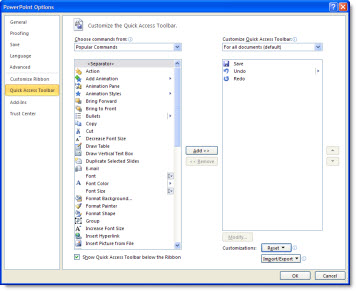
In the lower right is a new Import/Export option.
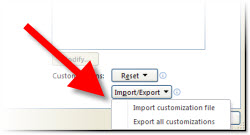
If you have customized your QAT, use the Export option to save a data file with all of your customization options. This can be used to setup your QAT on another computer or if something happens to your current computer you can quickly get your familiar work enviroment back.
If you have a QAT data file, click ‘Import Customization File’ and go find the data file.
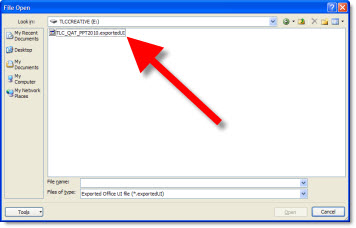
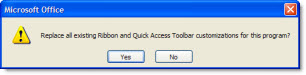
You will see a warning dialog that existing toolbar setup will be overwritten – say ‘Yes’ to install the new QAT.
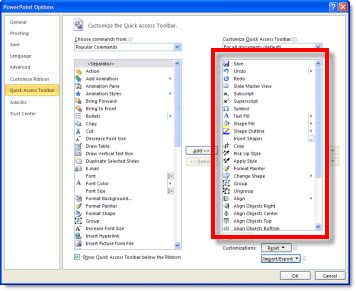
Now the QAT column will show all of the tools/buttons added (compare to first dialog image above that showed default 4 tools).
Last, if you would like to setup your QAT with the tools I have, my QAT toolbar data file can be downloaded here (850K).
– Troy @ TLC